Changing the schema
This page needs a recent browser (with SharedArrayBuffer support). Please update Chrome, Edge, Firefox or Safari to the latest version. · 이 페이지는 최신 브라우저(SharedArrayBuffer 지원)가 필요합니다. Chrome, Edge, Firefox 또는 Safari를 최신 버전으로 업데이트해 주세요.
English
Changing a table's structure
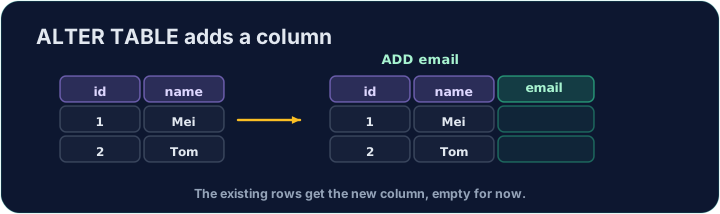
A table's design is not fixed. ALTER TABLE … ADD adds a new column to an existing table:
Existing rows get NULL in the new column until you fill them in.
한국어
테이블 구조 변경
테이블 설계는 고정되어 있지 않습니다. ALTER TABLE … ADD은 기존 테이블에 새로운 열을 추가합니다:
ALTER TABLE product ADD weight DECIMAL(5, 2);
기존 행은 채우기 전까지 새 열에 NULL을 가집니다.
English
Removing a table
DROP TABLE deletes a whole table — its structure and all its rows:
This cannot be undone, so use it with care. Dropping a table that other tables reference can break referential integrity.
한국어
테이블 삭제
DROP TABLE는 전체 테이블을 삭제합니다 — structure and 모든 행:
DROP TABLE product;
이 과정은 되돌릴 수 없으므로 주의해서 사용하십시오. 다른 테이블이 참조하는 테이블을 삭제하면 referential integrity가 깨질 수 있습니다.
English
Common mistakes
ALTER TABLEadds or changes a column.- Existing rows get NULL in a new column unless you set a default.
한국어
흔한 실수
ALTER TABLE은 열을 추가하거나 변경합니다.- 기본값을 설정하지 않은 경우 새 열에 existing rows는 NULL을 가집니다.
Add a new column weight of type DECIMAL(5, 2) to the product table using ALTER TABLE.
Click Run to see the output here. · 출력을 보려면 '실행'을 클릭하세요.
Delete the entire product table with DROP TABLE. (Afterwards only customer and orders remain.)
Click Run to see the output here. · 출력을 보려면 '실행'을 클릭하세요.