Counting and averaging · 계산 및 평균 구하기
Summarising with aggregate functions
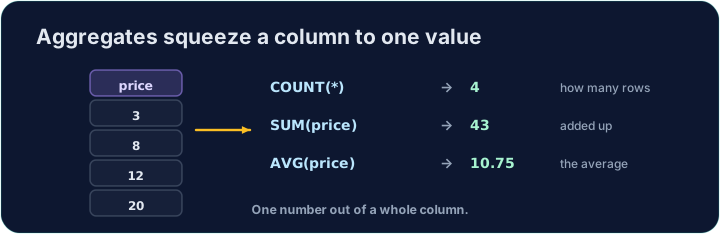
Sometimes you do not want the rows themselves, but a summary of them. Aggregate functions turn many rows into a single value:
COUNT(*)— how many rowsSUM(col)— the totalAVG(col)— the averageMIN(col)/MAX(col)— the smallest / largest
집계 함수로 요약하기
有时候行本身并不是我们想要的,而是它们的摘要。집계 함수는 여러 행을 단일 값으로 변환합니다:
COUNT(*)— 행의 개수SUM(col)— 합계AVG(col)— 평균MIN(col)/MAX(col)— 최소 / 최대
SELECT COUNT(*) FROM student;
Naming and rounding the result
Give the result a clear heading with AS. Averages often have long decimals, so wrap them in ROUND(value, 2) to keep 2 decimal places:
You can combine several aggregates in one query.
결과 명명 및 반올림
AS을 사용하여 결과에 명확한 제목을 붙이세요. 평균은 소수점이 긴 경우가 많으므로 2자리 소수점으로 유지하려면 ROUND(value, 2)으로 감싸세요:
SELECT COUNT(*) AS n, ROUND(AVG(score), 2) AS avg_score
FROM student;
하나의 쿼리에 여러 집계 함수를 결합할 수 있습니다.
Common mistakes
COUNT(*)counts rows;AVG(col)averages a column.- Round an average with
ROUND(x, 2).
흔한 실수
COUNT(*)은 행을 세고;AVG(col)은 열의 평균을 계산합니다.ROUND(x, 2)를 사용하여 평균을 반올림합니다.
In one query, show how many students there are as n, and their average score (to 2 decimal places) as avg_score. · 한 개의 쿼리로 n에 해당하는 학생 수와 그들의 평균 점수(소수점 2자리)를 avg_score로 표시하십시오.
Click Run to see the output here. · 출력을 보려면 '실행'을 클릭하세요.
Show the lowest score as lowest, the highest as highest, and the total of all scores as total. · 최저점을 lowest, 최상점을 highest, 모든 점수의 합계를 total로 표시하십시오.
Click Run to see the output here. · 출력을 보려면 '실행'을 클릭하세요.