Citations and bibliography · 인용 및 참고 문헌
This page needs a recent browser (with SharedArrayBuffer support). Please update Chrome, Edge, Firefox or Safari to the latest version. · 이 페이지는 최신 브라우저(SharedArrayBuffer 지원)가 필요합니다. Chrome, Edge, Firefox 또는 Safari를 최신 버전으로 업데이트해 주세요.
English
Citing your sources
- Academic writing must say where facts came from. LaTeX makes this tidy.
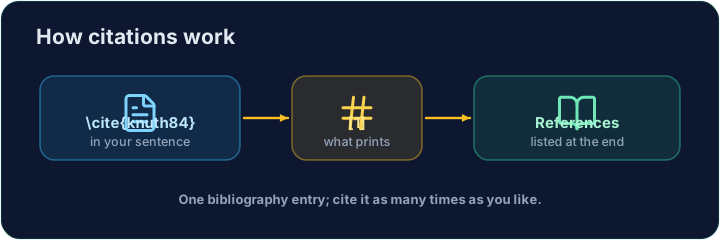
- You keep a list of sources, each with a key, and cite the key in your text.
한국어
출처 인용
- 학문적 글쓰기는 사실의 출처를 명시해야 합니다. LaTeX는 이를 깔끔하게 처리합니다.
- 출처 목록을 유지하고, 각 항목마다 키를 부여하며 본문에서 해당 키를 인용합니다.
English
The bibliography
- List your sources in a
thebibliographyenvironment, each as a\bibitem:
- The
{9}just says "numbers are one digit wide".lamportis the key you choose.
한국어
참고 문헌
- 출처를
thebibliography환경에 나열하고, 각 항목을\bibitem로 작성하세요:
\begin{thebibliography}{9}
  \bibitem{lamport} Leslie Lamport. \emph{LaTeX}. 1986.
\end{thebibliography}
{9}는 "번호는 한 자리 폭"임을 의미할 뿐입니다.lamport는 당신이 선택한 키입니다.
English
Citing in the text
- Anywhere in the document, write
\cite{lamport}:
- LaTeX prints
[1]and keeps the numbers in order. Add a source and everything renumbers.
한국어
본문 내 인용
- 문서 어디에서나
\cite{lamport}를 작성하세요:
LaTeX is powerful~\cite{lamport}.
- LaTeX은
[1]를 출력하고 숫자의 순서를 유지합니다. 출처를 추가하면 모든 번호가 재부호화됩니다.
English
Common mistakes
\cite{key}needs that key defined in your bibliography.- Compile twice, or the citations show as
?.
한국어
흔한 실수
\cite{key}는在你的bibliography에서 해당 키가 정의되어 있어야 합니다.- 두 번 컴파일해야 하며, 그렇지 않으면 인용 표시가
?로 나타납니다.
Cite the book in the sentence with \cite{lamport}, and add a matching \bibitem{lamport} entry inside the bibliography. The same key links the two. · 문장 속에서 책에 \cite{lamport}로 인용하고, 참고 문헌 안에 동일한 \bibitem{lamport} 항목을 추가하십시오. 같은 키가 두 부분을 연결합니다.
Click Run to compile and preview the PDF. · PDF를 컴파일하고 미리보기하려면 '실행'을 클릭하세요.
Add a second source. Give the second book a \bibitem{knuth} entry, then cite it in the sentence with \cite{knuth}. Watch LaTeX number them in citation order. · 두 번째 출처를 추가하십시오. 두 번째 책에 \bibitem{knuth} 항목을 부여한 뒤, 문장에서 \cite{knuth}로 인용하십시오. LaTeX가 인용 순서에 따라 번호를 매기는 것을 확인하십시오.
Click Run to compile and preview the PDF. · PDF를 컴파일하고 미리보기하려면 '실행'을 클릭하세요.