Skip to content
Subjects
  • 1 Getting started
    1.1

    Your first program

    Python runs your code one line at a time. Each line is a statement 语句. A program 程序 is just a list of statements that run from top to bottom.

    The print() function shows text on the screen. This is called output 输出. Text inside quotes is a string 字符串.

    print("Hello, world!")
    print("I am learning Python")
    
    • Each print() starts a new line.
    • Quotes can be "double" or 'single' — both make a string.
    • A program does nothing until you run it.

    print() can show several items at once. Separate them with commas; Python puts one space between them. A calculation without quotes is worked out first.

    print("Total:", 3 + 4)
    print("3 + 4")
    print("Ada", "Bo", "Cy")
    print("Ada", "Bo", sep="-")
    print("no new line", end=" ")
    print("after it")
    # Total: 7
    # 3 + 4
    # Ada Bo Cy
    # Ada-Bo
    # no new line after it
    
    • sep= changes what goes between the items; end= changes what comes after the last one (normally a new line).
    Source code runs through the interpreter to produce output
    Source code runs through the interpreter to produce output
    Vocabulary
    English
    statement/ˈsteɪtmənt/
    program/ˈprəʊɡræm/
    output/ˈaʊtpʊt/
    string/strɪŋ/
    1.2

    Comments & code style

    A comment 注释 starts with #. Python ignores everything after the # on that line. Comments explain your code to people; they do not change what the code does.

    # This line is a note for humans
    print("Hi")        # you can also comment at the end of a line
    

    Good style makes code easy to read:

    • Use clear names that say what a value means.
    • Put one statement on each line.
    • Do not add spaces at the start of a normal line. In Python, spacing at the start (indentation 缩进) has a special meaning, so a wrong space gives an error 错误.
    Vocabulary
    English
    comment/ˈkɒment/
    indentation/ˌɪndenˈteɪʃn/
    error/ˈerə/
    1.3

    Input, process, output

    Many programs follow a simple plan: input 输入 → process → output. You get some data, do something with it, then show a result.

    The input() function reads text that the user types. It always gives back a string.

    name = input("What is your name? ")
    print("Hello, " + name)
    

    Worked example: age next year. Each part of the plan is one or two lines.

    age_text = input("How old are you? ")    # input: the user types, for example, 15
    age = int(age_text)                       # process: turn the text into a number
    next_year = age + 1                       # process: calculate
    print("Next year you will be", next_year) # output
    

    If you leave out int(...), age_text + 1 stops with TypeError: can only concatenate str (not "int") to str: Python cannot add a number to text. You can also write the first two lines as one: age = int(input("How old are you? ")).

    • input() waits for the user to type and press Enter.
    • Store the typed text in a variable 变量 so you can use it later.
    • Because input() returns a string, change it with int(...) first if you need a number.

    Practice

    Write each program on paper first, then open the model answer, compare, and press Run. Run waits for you to type: type a value and press Enter.

    1. A rectangle. Ask for a width and a height, then print the area. For 4 and 6 it prints Area: 24.

    Model answer
    width = int(input("Width? "))      # input
    height = int(input("Height? "))
    area = width * height              # process
    print("Area:", area)               # output
    

    Each number is turned into an int as it is read, so the maths works.

    2. Cinema tickets. A ticket costs 7.50. Ask how many tickets, then print the total. For 3 tickets it prints Total: 22.5.

    Model answer
    price = 7.50
    tickets = int(input("How many tickets? "))
    total = price * tickets
    print("Total:", total)
    

    The price is fixed, so it is written in the program; only the number of tickets is typed. A count of tickets is a whole number, so int(...) fits. Use float(...) for a typed value that can have a decimal point.

    3. Find the bug. This should add two numbers, but for 3 and 4 it prints 34. Fix it.

    a = input("First number? ")
    b = input("Second number? ")
    print(a + b)
    
    Model answer
    a = int(input("First number? "))
    b = int(input("Second number? "))
    print(a + b)                       # 7 for 3 and 4
    

    input() gives text, and + joins two pieces of text: "3" + "4" is "34". Turning each value into a number first makes + add.

    Common mistakes

    • Forgetting the quotes: print(Hello) looks for a variable named Hello and raises a NameError. Text needs quotes: print("Hello").
    • A stray space at the start of a line: Python reads indentation as structure, so it raises an IndentationError.
    • Assuming input() returns a number. It always returns a string, so wrap it in int(...) before doing any maths.
    Vocabulary
    English
    input/ˈɪnpʊt/
    variable/ˈveərɪəbl/
  • 2 Variables, types & operators
    2.1

    Variables & assignment

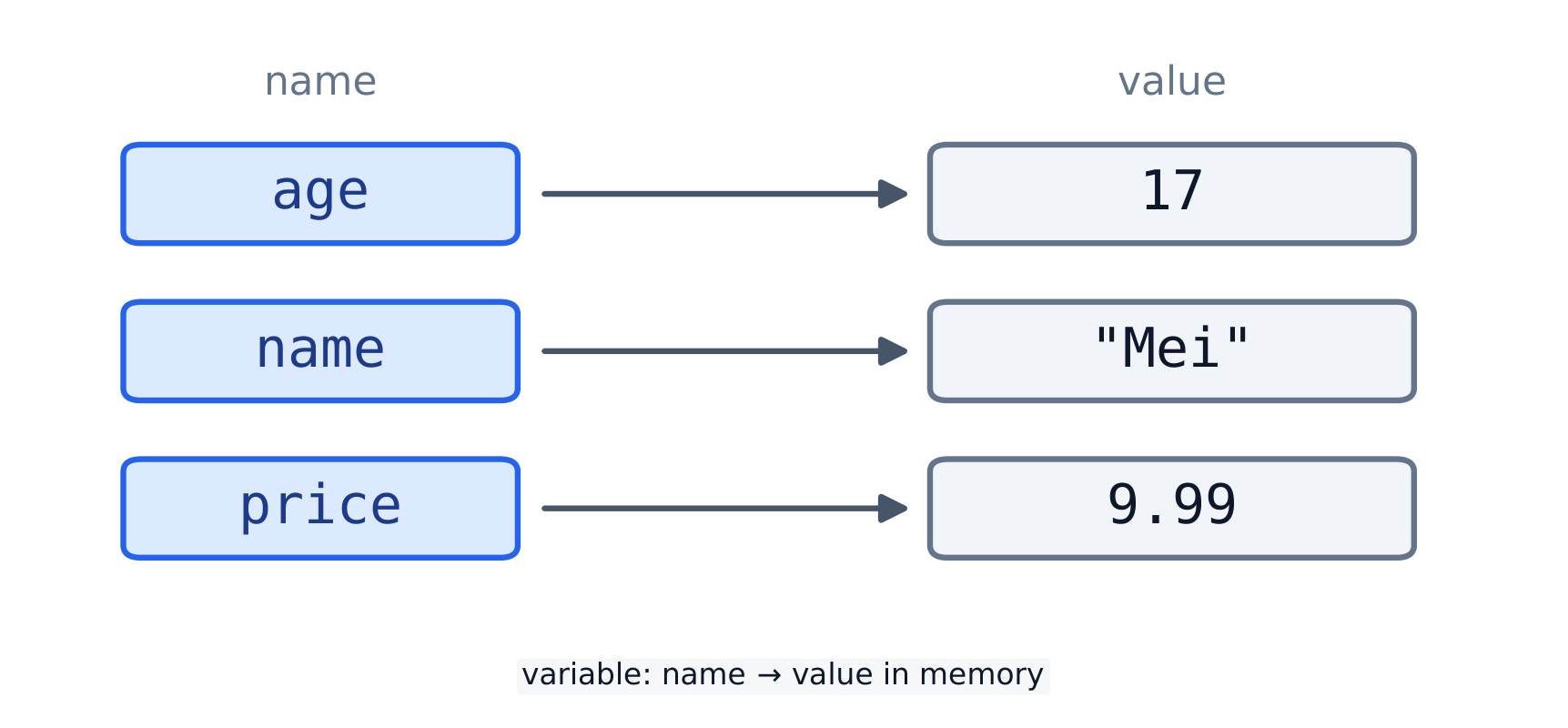
    A variable 变量 is a name for a value 值. You make one with =, which is called assignment 赋值. The name goes on the left; the value goes on the right.

    age = 17
    name = "Mei"
    price = 9.99
    print(age, name, price)
    

    Now age holds 17. Use the name anywhere you need the value, and change it later:

    age = 17
    age = age + 1   # age is now 18
    print(age)
    
    A variable is a name attached to a stored value
    Each variable name points to a value in memory
    • The = sign does not mean "equal". It means "store the right side under the left name".
    • To test if two values are equal, use == (see below).

    Swapping two variables. Python can swap in one line; in most other languages you need a third, temporary variable:

    a = 3
    b = 8
    a, b = b, a
    print(a, b)
    # 8 3
    
    Vocabulary
    English
    variable/ˈveərɪəbl/
    value/ˈvæljuː/
    assignment/əˈsaɪnmənt/
    2.2

    Numbers: int & float

    Python has two main number types. An integer 整数 (int) is a whole number like 17. A float 浮点数 (float) has a decimal point like 9.99.

    These operators 运算符 work on numbers:

    Operator Meaning Example Result
    + add 3 + 2 5
    - subtract 3 - 2 1
    * multiply 3 * 2 6
    / divide (always float) 7 / 2 3.5
    // integer divide 7 // 2 3
    % remainder (modulo) 7 % 2 1
    ** power 2 ** 3 8
    • / always gives a float, so 4 / 2 is 2.0.
    • // and % go together: 17 // 5 is 3, and 17 % 5 is 2.

    Worked example: minutes to hours. // gives the whole hours and % gives the minutes left over. The same idea splits a number into digits (n % 10 is the last digit) and tests for even numbers (n % 2 == 0).

    total = 135
    hours = total // 60
    minutes = total % 60
    print(hours, "h", minutes, "min")
    print(4729 % 10, 4729 // 10)
    # 2 h 15 min
    # 9 472
    

    Floats are not exact. A computer stores most decimals approximately, so tiny errors appear. Round results before you show them, and do not test floats with ==:

    print(0.1 + 0.2)
    print(round(0.1 + 0.2, 2))
    print(round(7 / 3, 2))
    print(type(7 / 3), type(7 // 3))
    # 0.30000000000000004
    # 0.3
    # 2.33
    # <class 'float'> <class 'int'>
    

    type(x) tells you what kind of value x holds: useful when a program does something strange.

    Vocabulary
    English
    integer/ˈɪntɪdʒə/
    float/fləʊt/
    operator/ˈɒpəreɪtə/
    2.3

    Expressions & type conversion

    An expression 表达式 is anything that has a value, like 3 + 4 * 2. Python uses normal maths order (* and / before + and -); add brackets to make the order clear.

    input() gives a string, so convert it before doing maths. Changing a value from one type to another is type conversion 类型转换:

    age = int("17")        # text "17" -> number 17
    price = float("9.99")  # text -> 9.99
    label = str(17)        # number -> text "17"
    print(age, price, label)
    
    • int("abc") fails, so only convert text that looks like a number.
    • Mixing types fails too: "age: " + 17 is an error; write "age: " + str(17).
    Vocabulary
    English
    expression/ekˈspreʃn/
    type conversion/taɪp kənˈvɜːʃn/
    2.4

    Booleans & comparison

    A Boolean 布尔值 is one of just two values: True or False. A comparison 比较 gives back a Boolean.

    Operator Meaning
    == equal to
    != not equal to
    < > less than / greater than
    <= >= less / greater than or equal to
    print(7 > 2)        # True
    print(3 == 3.0)     # True
    age = 20
    print(age >= 18)    # True
    

    Join comparisons with and, or, not:

    age = 20
    print(age >= 13 and age <= 19)   # False  (True only for ages 13 to 19)
    
    Number line with the band 13 to 19 shaded; age 20 sits outside it, so True and False gives False
    With and, both tests must pass; at age 20 the second one fails.

    Practice

    Write each answer on paper first, then open the model answer, compare, and press Run.

    1. Predict the results. What do these print? 7 / 2, 7 // 2, "7" + "2" and int("7") + 2.

    Model answer
    print(7 / 2)          # 3.5
    print(7 // 2)         # 3
    print("7" + "2")      # 72
    print(int("7") + 2)   # 9
    

    / always gives a float; // keeps only the whole part. In quotes, 7 and 2 are text, so + joins them. int("7") turns the text into a number first, so + adds.

    2. Swap two values. a = 5 and b = 8. Swap them so that a is 8 and b is 5.

    Model answer
    a = 5
    b = 8
    temp = a      # keep a copy of a
    a = b
    b = temp
    print(a, b)   # 8 5
    

    Writing a = b first would lose the 5, so it is kept in temp. Python also allows a, b = b, a in one line, but exam pseudocode uses the temp method.

    3. How many buses? 130 students go on a trip, and a bus holds 40. Print how many buses are needed.

    Model answer
    students = 130
    seats = 40
    buses = students // seats
    if students % seats > 0:      # some students still have no seat
        buses = buses + 1
    print(buses)                  # 4
    

    130 // 40 is 3, but three buses leave 10 students behind (130 % 40 is 10). When there is a remainder, one more bus is needed.

    Common mistakes

    • / always gives a float, even 4 / 2 is 2.0. Use // when you want a whole number.
    • Using = where you mean ==: = assigns a value, == tests whether two values are equal.
    • Joining a string and a number: "age: " + 5 raises a TypeError. Convert first with str(5).
    • Floats are not exact, so 0.1 + 0.2 is not exactly 0.3 — avoid == on float results.
    Vocabulary
    English
    Boolean/ˈbuːlɪən/
    comparison/kəmˈpærɪsn/
  • 3 Strings
    3.1

    Indexing

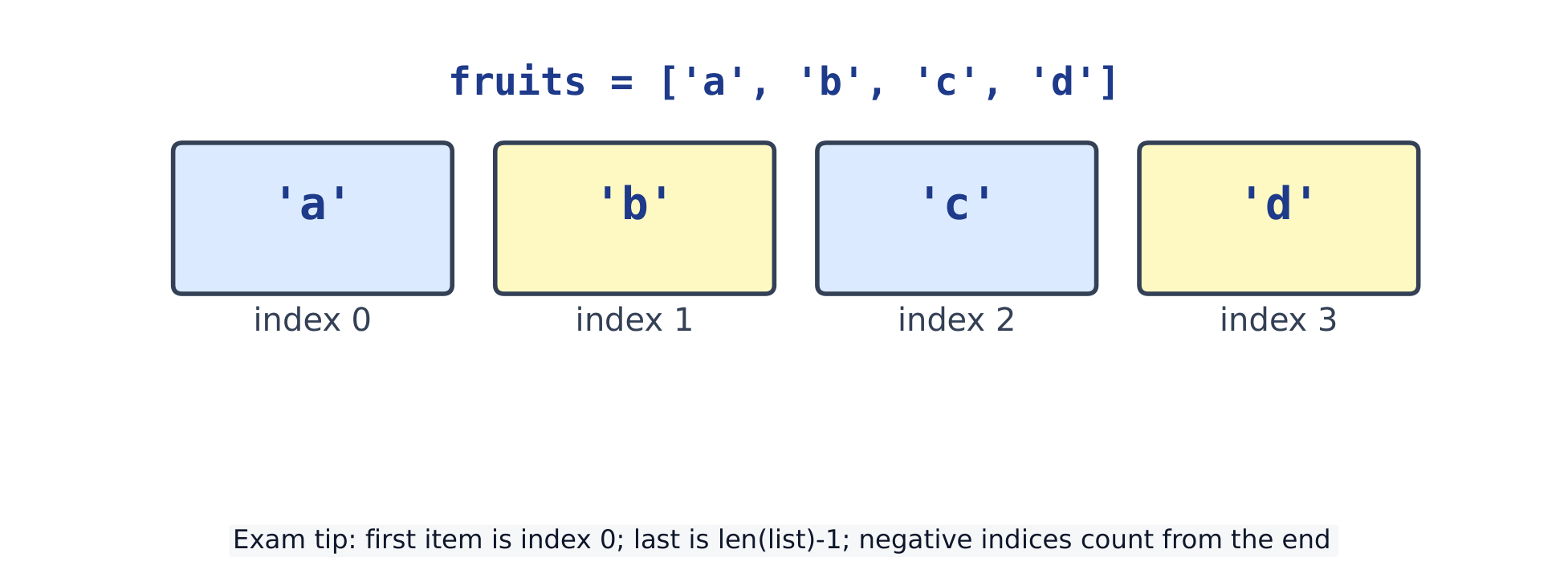
    A string 字符串 is text inside quotes. Each character 字符 has a position, called its index 索引. The first index is 0, not 1.

    Read one character with square brackets:

    word = "Python"
    print(word[0])    # P  (the first character)
    print(word[2])    # t
    print(len(word))  # 6  (how many characters)
    
    • Counting starts at 0, so the last index is len(word) - 1.
    • A negative index counts back from the end: word[-1] is the last character.
    word = "Python"
    print(word[-1])   # n
    print(word[-2])   # o
    
    • An index that is too large gives an error 错误 (an IndexError).
    s[start:stop] is a half-open window of characters
    s[start:stop] is a half-open window of characters
    Vocabulary
    English
    string/strɪŋ/
    character/ˈkærɪktə/
    index/ˈɪndeks/
    error/ˈerə/
    3.2

    Slicing

    A slice 切片 takes a part of a string. Write word[start:end]. The slice keeps start but stops before end.

    word = "Python"
    print(word[0:3])   # Pyt   (positions 0, 1, 2)
    print(word[2:5])   # tho
    
    • Leave out start to begin at 0; leave out end to go to the end.
    word = "Python"
    print(word[:3])    # Pyt
    print(word[3:])    # hon
    
    • A third number is the step 步长. word[::-1] reverses 反转 the string.
    print("Python"[::-1])   # nohtyP
    
    Vocabulary
    English
    slice/slaɪs/
    step/step/
    reverse/rɪˈvɜːs/
    3.3

    String methods & length

    A method 方法 is a function that belongs to a value. You call it with a dot:

    name = "mei chen"
    print(name.upper())     # MEI CHEN
    print(name.title())     # Mei Chen
    print(len(name))        # 8
    

    Strings are immutable 不可变: a method returns a new string and never changes the original 原始 one.

    name = "mei"
    print(name.upper())     # MEI  (the returned value)
    print(name)             # mei  (the original is unchanged)
    

    Common methods (each returns a new value):

    Method Meaning Example Result
    .upper() / .lower() change case "Hi".lower() hi
    .strip() remove edge spaces " hi ".strip() hi
    .replace(a, b) swap text "cat".replace("c", "b") bat
    .split(sep) break into a list "a,b".split(",") ['a', 'b']

    More methods for finding and checking text:

    text = "banana split"
    print("nan" in text)              # True   (is it inside?)
    print(text.count("a"))            # 3      (how many times)
    print(text.find("split"))         # 7      (first index, or -1)
    print(text.startswith("ban"))     # True
    print("2025".isdigit())           # True   (only digits?)
    print("12a".isdigit())            # False
    words = text.split()              # split at spaces
    print(words)                      # ['banana', 'split']
    print("-".join(words))            # banana-split
    
    • isdigit() lets you check typed input before int(...) turns it into a number, so a typing mistake does not crash the program.
    • split() breaks a string into a list; "-".join(list) does the opposite and puts - between the parts.
    • To compare without caring about capitals, change both sides first: answer.lower() == "yes".

    Walking through a string. A for loop visits each character in turn. Because strings cannot change, build a new string as you go:

    word = "Programming"
    vowels = 0
    no_vowels = ""
    for ch in word:
        if ch.lower() in "aeiou":
            vowels = vowels + 1
        else:
            no_vowels = no_vowels + ch
    print(vowels, no_vowels)
    # 3 Prgrmmng
    

    Join strings with +. This is called concatenation 拼接:

    first = "Mei"
    last = "Chen"
    print(first + " " + last)   # Mei Chen
    

    + joins only strings. To join a number, turn it into a string with str(...), or use an f-string (next):

    age = 17
    print("Age: " + str(age))   # Age: 17
    

    "Age: " + age stops with TypeError: can only concatenate str (not "int") to str.

    Vocabulary
    English
    method/ˈmeθəd/
    immutable/ɪˈmjuːtəbl/
    original/əˈrɪdʒɪnl/
    concatenation/kənˌkætəˈneɪʃn/
    3.4

    f-strings

    An f-string 格式化字符串 builds text from values. Put f before the quote, then write {...} around a value.

    name = "Mei"
    age = 17
    print(f"{name} is {age} years old")   # Mei is 17 years old
    
    • Any expression 表达式 can go inside the braces.
    • {value:.2f} rounds to 2 decimal places 小数位.
    price = 9.5
    print(f"Two cost {price * 2}")        # Two cost 19.0
    print(f"Pi is about {3.14159:.2f}")   # Pi is about 3.14
    

    Practice

    Write each answer on paper first, then open the model answer, compare, and press Run.

    1. A username. Make a username from the first three letters of a first name and the last two digits of a birth year, all in small letters. "Mei" and 2009 give mei09.

    Model answer
    first = "Mei"
    year = 2009
    username = first[:3].lower() + str(year)[-2:]
    print(username)       # mei09
    

    first[:3] is a slice of the first three letters. A number has no letters to slice, so str(year) turns 2009 into the text "2009" first; [-2:] then takes the last two.

    2. Count the vowels. Print how many vowels (a, e, i, o, u) are in "Programming is fun".

    Model answer
    text = "Programming is fun"
    count = 0
    for letter in text.lower():
        if letter in "aeiou":
            count = count + 1
    print(count)          # 5
    

    A for loop over a string visits each character. .lower() makes a capital vowel count too, and in "aeiou" asks "is this letter one of these?".

    3. A receipt line. item = "Pen", price = 1.5, qty = 3. Print 3 x Pen = 4.50.

    Model answer
    item = "Pen"
    price = 1.5
    qty = 3
    print(f"{qty} x {item} = {price * qty:.2f}")   # 3 x Pen = 4.50
    

    The sum goes inside the braces, and :.2f shows it with two decimal places, as money is written. Without it the line would end = 4.5.

    Common mistakes

    • Strings cannot be changed in place: s[0] = "x" raises an error. Build a new string instead.
    • Indexing starts at 0; the last character is s[-1], and s[len(s)] is out of range.
    • A slice s[a:b] includes a but stops before b.
    • String methods return a NEW string: s.upper() does nothing unless you store the result.
    • "5" + "3" is "53" (joined text), not 8. Turn input into numbers with int(...) before adding.
    • "Yes" == "yes" is False: capitals matter. Compare .lower() versions.
    Vocabulary
    English
    f-string/ef strɪŋ/
    expression/ekˈspreʃn/
    decimal places/ˈdesɪml ˈpleɪsɪz/
  • 4 Selection
    4.1

    if / elif / else

    A program chooses what to do with if. It runs an indented 缩进 block only when a condition 条件 is true. The if line ends with a colon 冒号.

    score = 72
    if score >= 60:
        print("pass")
    print("done")
    # pass
    # done
    

    The last print is not indented, so it is not part of the if. It runs every time.

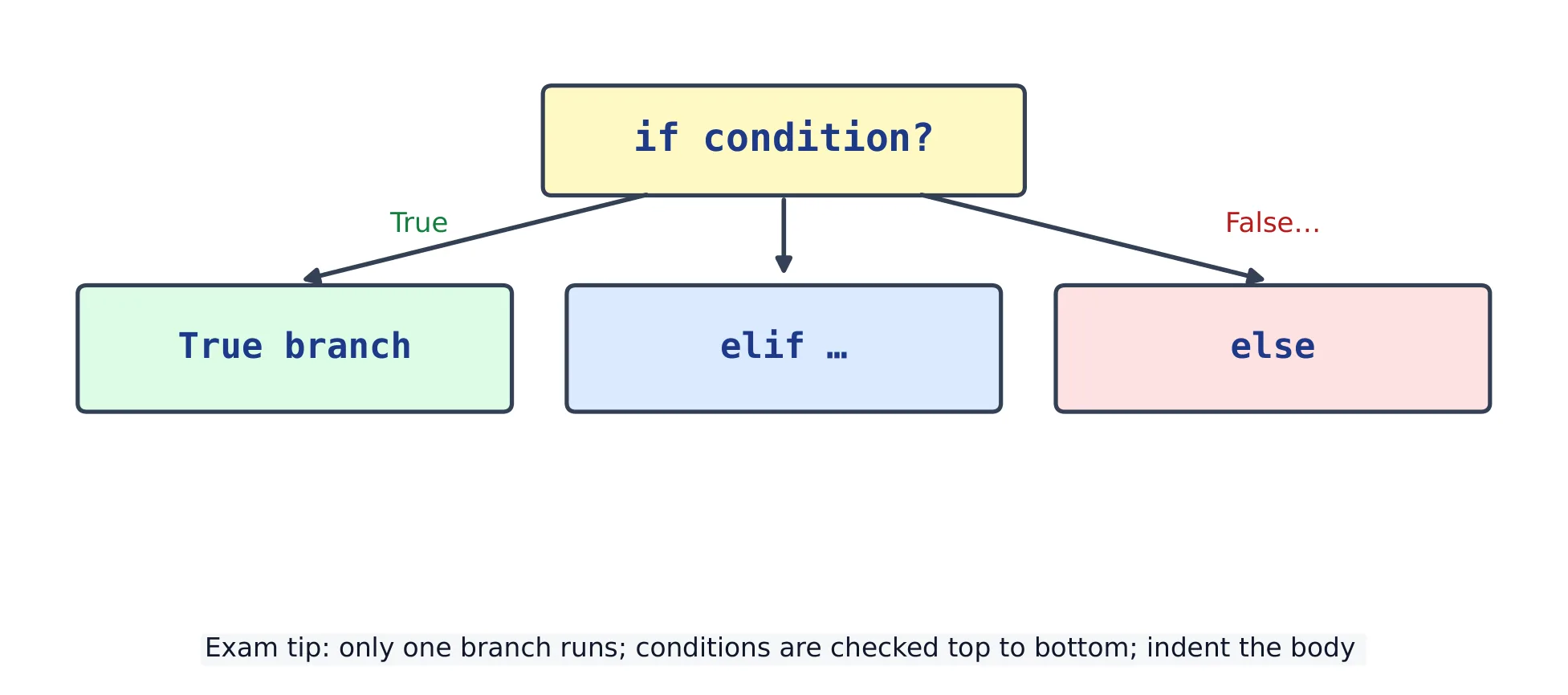
    Add elif (else-if) for more cases and else for "anything else". Python checks the conditions from the top. It runs the first true branch 分支 only, then skips the rest.

    score = 72
    if score >= 80:
        print("A")
    elif score >= 60:
        print("B")
    else:
        print("fail")
    # B
    
    • Compare values with == (equal to), != (not equal to), <, >, <=, >=.
    • A comparison 比较 gives a Boolean 布尔值: either True or False.
    if / elif / else: only one branch runs
    if / elif / else: only one branch runs

    The order of the branches matters. Put the strictest test first. Here the order is wrong: 95 is also >= 60, so the first branch catches it and the "A" branch can never run.

    score = 95
    if score >= 60:          # wrong order: 95 stops here
        print("B")
    elif score >= 80:
        print("A")
    # B
    

    Input is text. input() always gives a string 字符串. Turn it into a number with int() before you compare it with a number. A string compared with == to a number is never equal.

    answer = "18"            # what input() would give
    print(answer == 18)
    age = int(answer)
    if age >= 18:
        print("adult")
    # False
    # adult
    

    Worked example: a ticket price. Children under 12 pay 5, people aged 65 or more pay 6, everyone else pays 10.

    for age in [8, 30, 70]:
        if age < 12:
            price = 5
        elif age >= 65:
            price = 6
        else:
            price = 10
        print(age, price)
    # 8 5
    # 30 10
    # 70 6
    

    Test one value from each branch, and the values on each boundary 边界 (11, 12, 64, 65). Most selection bugs sit on a boundary: < where you meant <=.

    Vocabulary
    English
    condition/kənˈdɪʃn/
    colon/ˈkəʊlən/
    branch/bræntʃ/
    comparison/kəmˈpærɪsn/
    Boolean/ˈbuːlɪən/
    string/strɪŋ/
    boundary/ˈbaʊndəri/
    4.2

    Combining conditions

    Join conditions with and, or, not. and needs both sides true; or needs at least one side true; not turns True into False and False into True.

    a b a and b a or b not a
    True True True True False
    True False False True False
    False True False True True
    False False False False True
    age = 16
    has_ticket = True
    if age >= 18 and has_ticket:
        print("entry allowed")
    else:
        print("entry refused")
    # entry refused
    
    • A range check can be written as one chain: 0 <= mark <= 100 means 0 <= mark and mark <= 100.
    • in tests membership 成员: letter in "aeiou" is True when letter is a vowel.
    • Use brackets to make the order clear: (a or b) and c. Without brackets, and is worked out before or.
    mark = 105
    if 0 <= mark <= 100:
        print("valid")
    else:
        print("not a valid mark")
    letter = "e"
    if letter in "aeiou":
        print(letter, "is a vowel")
    # not a valid mark
    # e is a vowel
    

    A trap: or needs a full comparison on each side. colour == "red" or "blue" does not mean "red or blue". Python reads it as (colour == "red") or "blue", and a non-empty string such as "blue" counts as true, so the test is always true.

    colour = "green"
    if colour == "red" or "blue":                 # wrong: always true
        print("wrong test says: warm or cool")
    if colour == "red" or colour == "blue":       # right
        print("right test says: red or blue")
    if colour in ("red", "blue"):                 # also right, and shorter
        print("in-test says: red or blue")
    # wrong test says: warm or cool
    

    Nested if. One if can sit inside another. The inner test only runs when the outer one is true. Often and says the same thing with less indentation.

    logged_in = True
    is_teacher = False
    if logged_in:
        if is_teacher:
            print("teacher page")
        else:
            print("student page")
    else:
        print("please log in")
    # student page
    

    Practice

    Write each answer on paper first, then open the model answer, compare, and press Run. Each answer tests several values, so you can see every branch run.

    1. Ticket prices. Under 12 pays 5, 65 and over pays 6, everyone else pays 10. Print the price for ages 8, 30 and 70.

    Model answer
    for age in [8, 30, 70]:
        if age < 12:
            price = 5
        elif age >= 65:
            price = 6
        else:
            price = 10
        print(age, price)
    # 8 5
    # 30 10
    # 70 6
    

    Only the first true branch runs. else catches everyone the two tests did not.

    2. A weekend. day holds a day's name. Print weekend for Saturday or Sunday, otherwise school day.

    Model answer
    for day in ["Monday", "Saturday", "Sunday"]:
        if day == "Saturday" or day == "Sunday":
            print(day, "weekend")
        else:
            print(day, "school day")
    # Monday school day
    # Saturday weekend
    # Sunday weekend
    

    Each side of or is a full comparison. day == "Saturday" or "Sunday" would be true for every day (see the trap above). day in ("Saturday", "Sunday") also works.

    3. Find the bug. This should print A for 85, but it prints C. Fix it.

    mark = 85
    if mark >= 40:
        print("C")
    elif mark >= 60:
        print("B")
    elif mark >= 80:
        print("A")
    
    Model answer
    for mark in [85, 65, 45, 20]:
        if mark >= 80:
            print(mark, "A")
        elif mark >= 60:
            print(mark, "B")
        elif mark >= 40:
            print(mark, "C")
        else:
            print(mark, "fail")
    # 85 A
    # 65 B
    # 45 C
    # 20 fail
    

    85 is also >= 40, so the first test caught it and the others never ran. Test the highest boundary first. The new else also gives a mark below 40 an answer.

    Common mistakes

    • Write elif, not else if.
    • Every if / elif / else line ends with a colon :, and its body must be indented by the same amount (4 spaces).
    • if x = 5: is an error: use == to compare. One = stores a value.
    • else takes no condition; only if and elif do.
    • Comparing input() text with a number: convert with int() or float() first.
    • x == 1 or 2 is always true. Write x == 1 or x == 2, or x in (1, 2).
    • Branches in the wrong order: test >= 80 before >= 60.
    Vocabulary
    English
    indentation/ˌɪndenˈteɪʃn/
    membership/ˈmembəʃɪp/
  • 5 Iteration
    5.1

    for loops and range

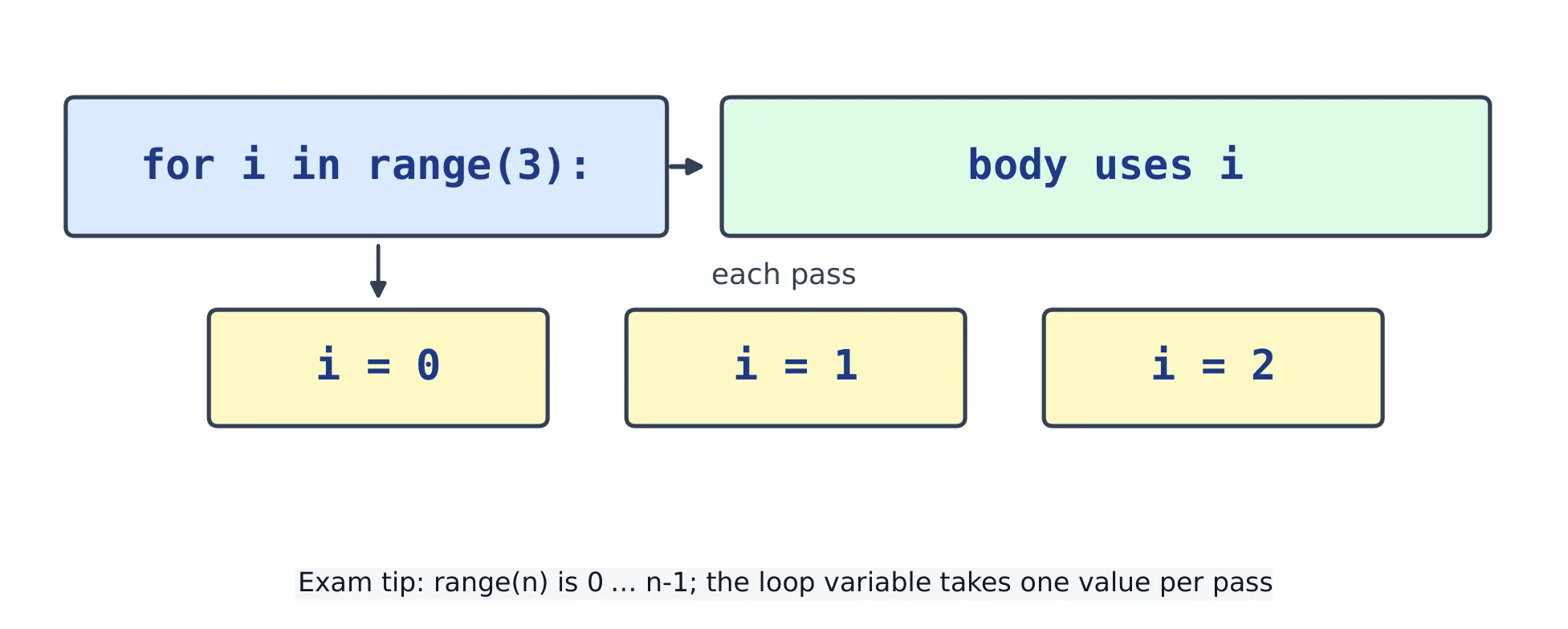
    A loop 循环 repeats code. A for loop repeats once for each item in a sequence 序列. range(n) gives the numbers 0 up to n - 1.

    for i in range(5):
        print(i)
    # 0, then 1, 2, 3, 4 (each on its own line)
    
    • range(a, b) goes from a up to (but not including) b.
    • range(a, b, step) adds a step 步长 each time.
    for n in range(2, 11, 2):
        print(n)        # 2 4 6 8 10
    
    for i in range(n): body runs with i = 0 … n-1
    for i in range(n): body runs with i = 0 … n-1

    Loop over the items, or over the positions. A for loop can walk straight through a list or a string. Use range(len(...)) only when you need the position 位置 too; enumerate gives both at once.

    fruits = ["apple", "pear", "plum"]
    for fruit in fruits:                 # the items
        print(fruit, end=" ")
    print()
    for i in range(len(fruits)):         # the positions
        print(i, fruits[i], end="; ")
    print()
    for i, fruit in enumerate(fruits):   # both
        print(i, fruit, end="; ")
    print()
    # apple pear plum 
    # 0 apple; 1 pear; 2 plum; 
    # 0 apple; 1 pear; 2 plum; 
    

    print(..., end=" ") ends with a space instead of a new line, so the next print continues on the same line.

    Vocabulary
    English
    loop/luːp/
    sequence/ˈsiːkwəns/
    step/step/
    position/pəˈzɪʃn/
    5.2

    The accumulator pattern

    To build a result across a loop, start a variable before the loop, then update 更新 it each turn. This is the accumulator 累加器 pattern.

    total = 0
    for n in range(1, 6):
        total = total + n
    print(total)        # 15
    
    • The same idea counts how many items match a test.
    count = 0
    for letter in "banana":
        if letter == "a":
            count = count + 1
    print(count)        # 3
    

    Largest and smallest. Start from the first item, not from 0: if every value were negative, a start of 0 would be wrong.

    temps = [-4, -9, -1, -6]
    lowest = temps[0]
    highest = temps[0]
    for t in temps:
        if t < lowest:
            lowest = t
        if t > highest:
            highest = t
    print(lowest, highest)
    # -9 -1
    

    Tracing a loop. Write one row for each pass, with every variable. For the total loop above:

    pass n total after the pass
    1 1 1
    2 2 3
    3 3 6
    4 4 10
    5 5 15
    Vocabulary
    English
    update/ˈʌpdeɪt/
    accumulator/əˈkjuːmjʊleɪtə/
    5.3

    while loops

    A while loop repeats as long as a condition stays true. Change something inside, or it never stops — an infinite loop 无限循环.

    n = 1
    while n <= 3:
        print(n)
        n = n + 1
    # 1
    # 2
    # 3
    
    • break leaves the loop straight away.
    total = 0
    while True:
        total = total + 10
        if total >= 30:
            break
    print(total)        # 30
    

    for or while? Use for when you know how many times to repeat, or you go through every item. Use while when the loop stops because of something that happens inside it.

    A sentinel 哨兵值 ends the data. In a real program the values come from input(), and a special value such as 0 means "stop". Here a list stands in for what the user types:

    typed = ["12", "7", "30", "0"]       # what the user types, one per line
    total = 0
    i = 0
    value = int(typed[i])                 # with input(): value = int(input())
    while value != 0:
        total = total + value
        i = i + 1
        value = int(typed[i])
    print("total", total)
    # total 49
    

    Read the first value before the loop and the next one at the end of the body. Then the sentinel is never added to the total.

    • continue skips the rest of this pass and goes to the next one.
    for n in range(1, 8):
        if n % 3 == 0:
            continue                       # skip 3 and 6
        print(n, end=" ")
    print()
    # 1 2 4 5 7 
    

    Practice

    Write each answer on paper first, then open the model answer, compare, and press Run.

    1. Countdown. Print 10, 9, 8 … 1 on one line, then Lift off!.

    Model answer
    for n in range(10, 0, -1):
        print(n, end=" ")
    print()
    print("Lift off!")
    # 10 9 8 7 6 5 4 3 2 1 
    # Lift off!
    

    The third number in range is the step, here -1. The stop, 0, is never reached, so the last number is 1. range(10, 1, -1) would stop at 2.

    2. Sum of squares. Print 1² + 2² + … + 10².

    Model answer
    total = 0
    for n in range(1, 11):
        total = total + n * n
    print(total)      # 385
    

    The accumulator starts at 0 before the loop, grows inside it, and is printed after it. range(1, 11) stops before 11, so 10 is the last number.

    3. Doubling. Start at 1 and keep doubling. Print how many doublings it takes to pass 1000, and the number reached.

    Model answer
    value = 1
    steps = 0
    while value <= 1000:
        value = value * 2
        steps = steps + 1
    print(steps, value)   # 10 1024
    

    A while loop fits: you do not know the number of steps before you start. The body changes value, so the condition becomes false and the loop ends.

    Vocabulary
    English
    infinite loop/ˈɪnfɪnət luːp/
    sentinel
    5.4

    Nested loops

    A loop inside another loop is a nested loop 嵌套循环. The inner loop 内层循环 runs fully for each turn of the outer loop 外层循环.

    for row in range(3):
        line = ""
        for col in range(3):
            line = line + "*"
        print(line)
    # ***
    # ***
    # ***
    

    Common mistakes

    • range(n) goes from 0 to n - 1, not 1 to n — the classic off-by-one error.
    • Changing a list while looping over it skips items; loop over a copy if you must remove things.
    • Forgetting to change the loop variable in a while makes it run forever.
    • Indentation decides what is inside the loop; a wrongly-indented line runs only once, after the loop.
    Vocabulary
    English
    nested loop/ˈnestɪd luːp/
    inner loop/ˈɪnə luːp/
    outer loop/ˈaʊtə luːp/
  • 6 Lists & 2-D lists
    6.1

    Lists

    A list 列表 holds many values in order, inside []. Each item 元素 has an index (from 0).

    scores = [88, 71, 95]
    print(scores[0])      # 88
    print(len(scores))    # 3
    scores.append(60)     # add to the end
    print(scores)         # [88, 71, 95, 60]
    
    • Change an item by its index: scores[1] = 100.
    • A list can grow and shrink; a string cannot.

    The everyday list tools:

    Tool Does
    a.append(x) adds x at the end
    a.insert(i, x) inserts x at position i
    a.remove(x) removes the first x
    a.pop() / a.pop(i) removes and returns the last item / item i
    a.sort() sorts the list in place
    sorted(a) returns a NEW sorted list
    x in a is x in the list?
    len(a), sum(a), max(a), min(a) size and quick maths
    List indices start at 0
    List indices start at 0
    Vocabulary
    English
    list/lɪst/
    item/ˈaɪtəm/
    6.2

    Traversing a list

    To traverse 遍历 a list is to visit each item. A for loop does this with no index needed.

    scores = [88, 71, 95]
    total = 0
    for s in scores:
        total = total + s
    print(total)          # 254
    
    • Use enumerate when you also need the index.
    for i, name in enumerate(["a", "b"]):
        print(i, name)    # 0 a  /  1 b
    

    Patterns you will use again and again:

    marks = [62, 45, 78, 50, 39]
    
    # change every item: use the index; changing the loop variable changes nothing
    for i in range(len(marks)):
        marks[i] = marks[i] + 5
    print(marks)                          # [67, 50, 83, 55, 44]
    
    # build a new list of the items that pass a test
    passed = []
    for m in marks:
        if m >= 50:
            passed.append(m)
    print(passed)                         # [67, 50, 83, 55]
    
    # average, and where the best one is
    print(round(sum(marks) / len(marks), 1))   # 59.8
    print(marks.index(max(marks)))             # 2
    
    • for m in marks: m = m + 5 only changes the copy in m; the list stays the same. Use marks[i] = ... to change the list.

    sorted and sort can sort backwards, or by a key: a function that gives the value to sort by.

    names = ["Sam", "Ana", "Christopher", "Mei"]
    print(sorted(names))                  # ['Ana', 'Christopher', 'Mei', 'Sam']
    print(sorted(names, reverse=True))    # ['Sam', 'Mei', 'Christopher', 'Ana']
    print(sorted(names, key=len))         # ['Sam', 'Ana', 'Mei', 'Christopher']
    

    Practice

    Write each answer on paper first, then open the model answer, compare, and press Run.

    1. Long words. words = ["cat", "rabbit", "dog", "hamster", "fish"]. Print how many words have more than 4 letters.

    Model answer
    words = ["cat", "rabbit", "dog", "hamster", "fish"]
    count = 0
    for w in words:
        if len(w) > 4:
            count = count + 1
    print(count)          # 2
    

    Only rabbit and hamster count: fish has exactly 4 letters, and the test is > 4.

    2. The hottest day, without max. temps = [21, 25, 19, 28, 24] holds Monday to Friday. Print the highest temperature and the day it was, using a loop.

    Model answer
    temps = [21, 25, 19, 28, 24]
    days = ["Mon", "Tue", "Wed", "Thu", "Fri"]
    best = 0                        # the index of the hottest day so far
    for i in range(1, len(temps)):
        if temps[i] > temps[best]:
            best = i
    print(temps[best], "on", days[best])   # 28 on Thu
    

    Keep the index of the best item, not the value: from the index you can get both the temperature and the day. Start with the first item (index 0), never with a made-up value such as 0, which is wrong when every value is negative.

    3. No repeats. names = ["Mei", "Sam", "Mei", "Ana", "Sam"]. Make a new list with each name once, in the order they first appear.

    Model answer
    names = ["Mei", "Sam", "Mei", "Ana", "Sam"]
    unique = []
    for n in names:
        if n not in unique:
            unique.append(n)
    print(unique)         # ['Mei', 'Sam', 'Ana']
    

    not in checks the new list before adding. list(set(names)) also removes repeats, but a set does not keep the order, so the names can come out shuffled.

    Vocabulary
    English
    traverse/trəˈvɜːs/
    6.3

    2-D lists (grids)

    A 2-D list 二维列表 is a list of lists — a grid 网格 of rows and columns. Use two indexes: grid[row][col].

    grid = [[1, 2, 3],
            [4, 5, 6]]
    print(grid[0][2])     # 3
    print(grid[1][0])     # 4
    
    • A nested loop 嵌套循环 visits every cell.
    grid = [[1, 2], [3, 4]]
    for row in grid:
        for value in row:
            print(value, end=" ")
    print()               # 1 2 3 4
    
    Vocabulary
    English
    2-D list/tuː diː lɪst/
    grid/ɡrɪd/
    nested loop/ˈnestɪd luːp/
    6.4

    List comprehensions

    A list comprehension 列表推导式 builds a new list in one line: [expression for item in sequence].

    squares = [x * x for x in range(5)]
    print(squares)        # [0, 1, 4, 9, 16]
    
    • Add if to keep only some items.
    evens = [n for n in range(10) if n % 2 == 0]
    print(evens)          # [0, 2, 4, 6, 8]
    
    Vocabulary
    English
    list comprehension/lɪst ˌkɒmprɪˈhenʃn/
    6.5

    Tuples & sets

    A tuple 元组 is a fixed sequence in round brackets. It cannot be changed after it is made — use one for values that belong together, and unpack 解包 it into names.

    point = (3, 4)
    x, y = point            # unpacking
    print(x, y)             # 3 4
    

    A function that needs to hand back two results returns a tuple:

    def min_max(nums):
        return min(nums), max(nums)
    
    lo, hi = min_max([5, 2, 9])
    print(lo, hi)           # 2 9
    

    A set 集合 stores each value once, with no order. It is perfect for removing duplicates and for fast membership tests 成员测试.

    votes = ["red", "blue", "red", "green", "red"]
    colours = set(votes)
    print(len(colours))         # 3  (duplicates removed)
    print("blue" in colours)    # True
    
    Five votes red, blue, red, green, red collapse into a set holding red, blue and green, so its length is 3
    A set keeps each value once.

    Common mistakes

    • b = a shares one list. a.copy() or a[:] creates a new outer list, but nested mutable items remain shared (a shallow copy).
    • The last item is a[-1]; a[len(a)] is out of range.
    • append adds ONE item; use extend or + to join another list.
    • Building a grid with [[0]*3]*3 makes three copies of the same row. Build the rows in a loop instead.
    • A tuple with one item needs a comma: (5,), not (5).
    • A set has no order and no duplicates, so you cannot index it with s[0].
    • a = a.sort() sets a to None: sort() changes the list and returns nothing. Write a.sort() alone, or a = sorted(a).
    Vocabulary
    English
    tuple/ˈtuːpl/
    unpack/ʌnˈpæk/
    set/set/
    membership test/ˈmembəʃɪp test/
  • 7 Dictionaries
    7.1

    Dictionaries

    A dictionary 字典 (dict) stores key 键 → value 值 pairs. You look up a value by its key, not by a number index.

    student = {"name": "Mei", "score": 88}
    print(student["name"])     # Mei
    print(student["score"])    # 88
    

    Add and update

    Assign to a key to add it, or to change an existing one.

    student = {"name": "Mei"}
    student["score"] = 88      # add a new key
    student["score"] = 90      # update the value
    print(student)             # {'name': 'Mei', 'score': 90}
    

    Check and loop

    Use in to test for a key. Loop over the keys, or over .items() to get both key and value.

    student = {"name": "Mei", "score": 90}
    print("score" in student)  # True
    for key, value in student.items():
        print(key, "=", value)
    # name = Mei
    # score = 90
    
    • .get(key, default) returns a default 默认值 when the key is missing — no error.
    student = {"name": "Mei"}
    print(student.get("age", 0))   # 0
    

    The classic exam pattern — tally how often each value appears:

    word = "banana"
    counts = {}
    for letter in word:
        counts[letter] = counts.get(letter, 0) + 1
    print(counts)   # {'b': 1, 'a': 3, 'n': 2}
    
    • .get(letter, 0) supplies 0 the first time a key is seen, so there is no KeyError.

    Remove, count and list the parts

    • len(d) is the number of pairs.
    • del d[key] removes a pair; d.pop(key) removes it and gives back its value.
    • d.keys() and d.values() give the keys or the values on their own.
    stock = {"apple": 5, "pear": 0, "plum": 12}
    del stock["pear"]
    sold = stock.pop("apple")
    print(sold, len(stock))
    print(list(stock.keys()), sum(stock.values()))
    # 5 1
    # ['plum'] 12
    

    Find the key with the largest value

    Keep the best key so far, the same way you keep the largest number in a list.

    votes = {"red": 4, "blue": 9, "green": 7}
    best = None
    for colour, n in votes.items():
        if best is None or n > votes[best]:
            best = colour
    print(best, votes[best])
    # blue 9
    

    The short form max(votes, key=votes.get) gives the same key.

    A list of dictionaries: records

    One dictionary can describe one thing, such as a student. A list of them works like a table: each dictionary is a row, and each key is a column. This is Python's version of a record 记录 in pseudocode (TYPE … ENDTYPE).

    form = [
        {"name": "Ada", "mark": 91},
        {"name": "Bo", "mark": 80},
        {"name": "Cy", "mark": 47},
    ]
    total = 0
    for student in form:
        total = total + student["mark"]
        if student["mark"] < 50:
            print(student["name"], "needs help")
    print("average", total / len(form))
    # Cy needs help
    # average 72.66666666666667
    
    • form[1]["name"] is "Bo": the index picks the row, then the key picks the field.

    List or dictionary?

    Use a list when… Use a dictionary when…
    the order matters, and you find items by position you find items by a name or code
    marks[0] is the first mark marks["Ada"] is Ada's mark
    you add items to the end with .append() you add items with d[key] = value

    Practice

    Write each answer on paper first, then open the model answer, compare, and press Run.

    1. Room finder. rooms = {"Maths": "B12", "Art": "A03", "Music": "C01"}. Print the room for Art and for Drama; Drama is not in the dictionary, so print not found for it, without an error.

    Model answer
    rooms = {"Maths": "B12", "Art": "A03", "Music": "C01"}
    for subject in ["Art", "Drama"]:
        print(subject, rooms.get(subject, "not found"))
    # Art A03
    # Drama not found
    

    rooms["Drama"] would stop the program with a KeyError. .get(key, default) gives the default instead when the key is missing.

    2. Count the words. Count how many times each word appears in "the cat and the dog and the bird".

    Model answer
    text = "the cat and the dog and the bird"
    counts = {}
    for word in text.split():
        counts[word] = counts.get(word, 0) + 1
    for word, n in counts.items():
        print(word, n)
    # the 3
    # cat 1
    # and 2
    # dog 1
    # bird 1
    

    A word seen for the first time has no count yet, so counts.get(word, 0) starts it at 0. This counting pattern is one of the most useful in Python.

    3. The shopping bill. prices = {"pen": 1.5, "pad": 3, "ruler": 2}. Add up the bill for basket = ["pen", "pad", "pen", "ruler"].

    Model answer
    prices = {"pen": 1.5, "pad": 3, "ruler": 2}
    basket = ["pen", "pad", "pen", "ruler"]
    total = 0
    for item in basket:
        total = total + prices[item]
    print(total)          # 8.0
    

    The list holds what was bought, in order, with repeats; the dictionary looks up each item's price by name. The two pen prices make the total 1.5 + 3 + 1.5 + 2 = 8.0.

    Common mistakes

    • Reading a missing key with d[key] raises a KeyError; use d.get(key) or test if key in d first.
    • Assigning d[key] again overwrites the old value — keys are unique.
    • Keys must be immutable 不可变, such as a string or a number: a list cannot be a key.
    • A loop over a dictionary gives its keys. Use .items() when you also need the values.
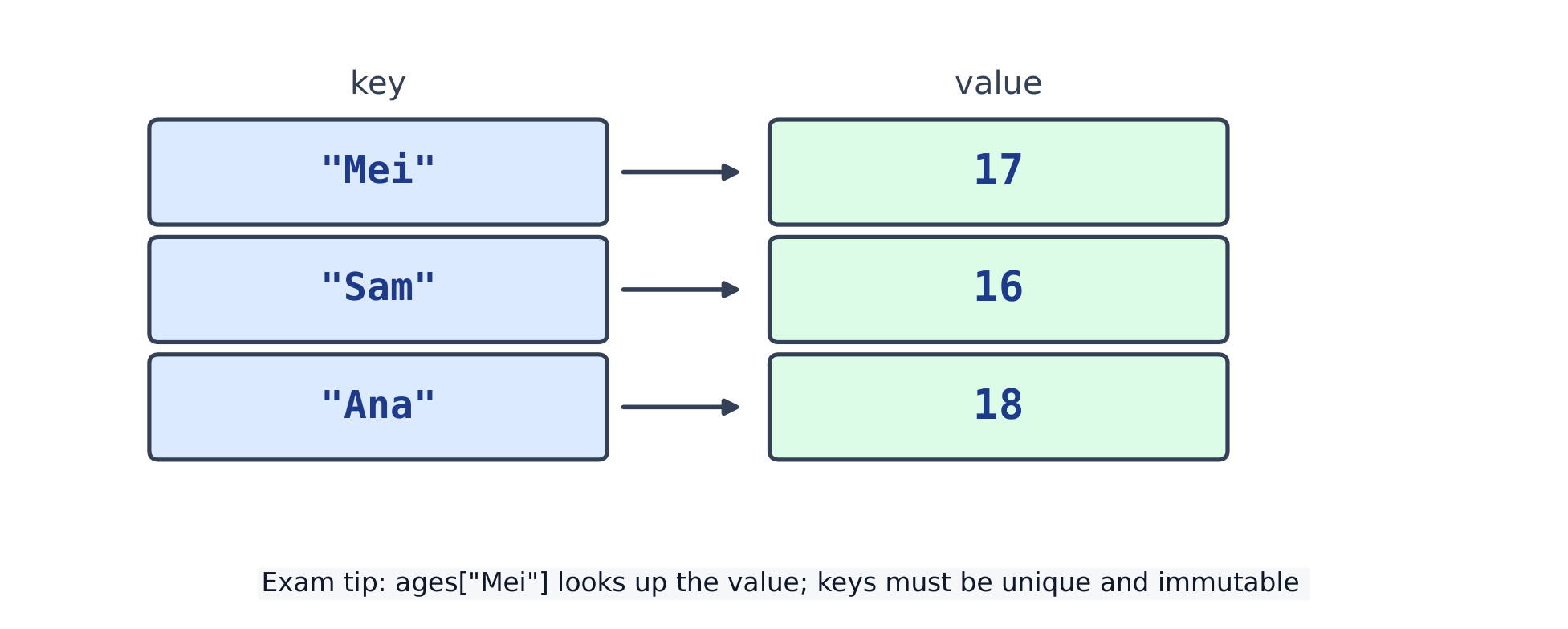
    A dictionary maps each key to one value
    A dictionary maps each key to one value
    Vocabulary
    English
    dictionary/ˈdɪkʃənəri/
    key/kiː/
    value/ˈvæljuː/
    default/dɪˈfɒlt/
    record/ˈrekɔːd/
    immutable/ɪˈmjuːtəbl/
  • 8 Functions & abstraction
    8.1

    Defining & calling functions

    A function 函数 is a named block of code you can reuse. Define 定义 it with def, then call 调用 it by name.

    def greet():
        print("Hello!")
    
    greet()        # Hello!
    greet()        # Hello!
    
    • The code inside runs only when you call the function.
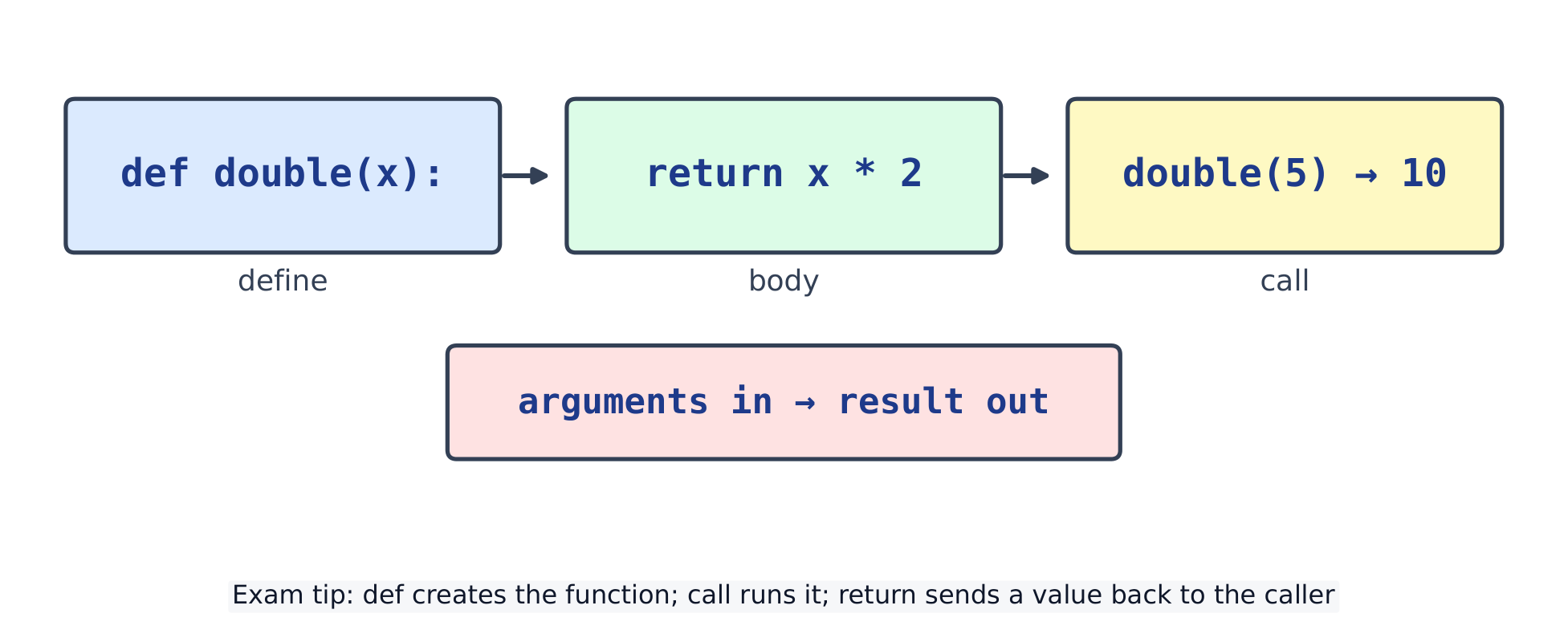
    def defines; call runs; return sends a value back
    def defines; call runs; return sends a value back
    Vocabulary
    English
    function/ˈfʌŋkʃn/
    define/dɪˈfaɪn/
    call/kɔːl/
    8.2

    Return values

    A function can return 返回 a value with return. The call then stands for that value.

    def square(n):
        return n * n
    
    print(square(5))          # 25
    print(square(3) + 1)      # 10
    
    • return ends the function at once. A function with no return gives None.

    Return or print? print only shows a value on the screen. return gives it to the code that called the function, which can store it, compare it or do maths with it. The difference shows when you use the result:

    def square_print(n):
        print(n * n)
    
    def square_return(n):
        return n * n
    
    a = square_print(4)      # shows 16, but a gets None
    b = square_return(4)     # shows nothing; b gets 16
    print(a, b)
    print(b + 1)
    # 16
    # None 16
    # 17
    

    a + 1 would crash with a TypeError, because a is None.

    What happens in a call. In print(square(3) + 1): 3 is copied into the parameter n; the body works out 3 * 3; return hands back 9; the call square(3) now stands for 9; 9 + 1 gives 10, and print shows it.

    A function can answer yes or no. A comparison is already True or False, so return it directly:

    def is_even(n):
        return n % 2 == 0
    
    for n in [4, 7, 0, -2]:
        print(n, is_even(n))
    # 4 True
    # 7 False
    # 0 True
    # -2 True
    

    Several return lines. return stops the function, so the first one reached wins. Make sure every path reaches one:

    def grade(score):
        if score >= 80:
            return "A"
        if score >= 60:
            return "B"
        return "fail"            # reached only when both tests were False
    
    print(grade(85), grade(65), grade(20))
    # A B fail
    

    Practice

    Write each function on paper first, then open the model answer, compare, and press Run.

    1. Two rooms. Write area(width, height), which returns the area of a rectangle. Use it to print the total floor area of a 3 × 4 room and a 5 × 2 room.

    Model answer
    def area(width, height):
        return width * height
    
    total = area(3, 4) + area(5, 2)
    print(total)              # 22
    

    Because area returns its answer, the two calls can be added together.

    2. Leap years. Write is_leap(year). A year is a leap year if it divides by 4, except years that divide by 100, which are leap years only if they also divide by 400.

    Model answer
    def is_leap(year):
        return (year % 4 == 0 and year % 100 != 0) or year % 400 == 0
    
    for y in [2024, 2023, 1900, 2000]:
        print(y, is_leap(y))
    # 2024 True
    # 2023 False
    # 1900 False
    # 2000 True
    

    The whole rule is one comparison, so return it directly. Test the special cases too: 1900 divides by 100 but not 400; 2000 divides by 400.

    3. Find the bug. This program crashes with TypeError: unsupported operand type(s) for +: 'NoneType' and 'NoneType'. Fix double.

    def double(n):
        print(n * 2)
    
    total = double(3) + double(4)
    
    Model answer
    def double(n):
        return n * 2
    
    total = double(3) + double(4)
    print(total)              # 14
    

    double printed its answer and returned nothing, so each call gave None, and None + None is the crash. Return the value; print only the final result.

    Vocabulary
    English
    return/rɪˈtɜːn/
    8.3

    Parameters, arguments & scope

    A parameter 形参 is the name in the def. An argument 实参 is the value you pass in.

    def power(base, exp):         # base, exp are parameters
        return base ** exp
    
    print(power(2, 3))            # 8  (2 and 3 are arguments)
    

    A variable made inside a function is local 局部 — it exists only there. That region is its scope 作用域.

    def f():
        x = 10            # local to f
        return x
    
    print(f())            # 10
    # print(x) here would be an error: x is not defined outside f
    

    A parameter can have a default value 默认值, used when the caller leaves it out:

    def greet(name, greeting="Hello"):
        return greeting + ", " + name
    
    print(greet("Mei"))              # Hello, Mei
    print(greet("Sam", "Welcome"))   # Welcome, Sam
    
    Vocabulary
    English
    parameter/pəˈræmɪtə/
    argument/ˈɑːɡjuːmənt/
    local/ˈləʊkl/
    scope/skəʊp/
    default value/dɪˈfɒlt ˈvæljuː/
    8.4

    Procedural abstraction

    Procedural abstraction 过程抽象 means hiding details behind a name. You use a function by its name and what it does, not by how it works.

    def area_of_rectangle(w, h):
        return w * h
    
    print(area_of_rectangle(4, 5))   # 20
    
    • A good function does one job, has a clear name, and avoids repeating code.
    Vocabulary
    English
    procedural abstraction/prəˈsiːdʒərəl əbˈstrækʃn/
    8.5

    Modules & imports

    A module 模块 is a file of ready-made functions. Bring one in with import 导入.

    import random
    random.seed(0)               # makes the result repeatable
    print(random.randint(1, 6))  # a dice roll
    
    import math
    print(math.sqrt(16))         # 4.0
    

    Common mistakes

    • A function returns None unless you write return. Printing is not the same as returning.
    • Never use a mutable default like def f(x=[]) — the same list is shared between all calls.
    • A variable made inside a function is local and cannot be seen outside it.
    • Run a function with f(); writing f on its own only names it.
    • Calling square(5) on a line by itself throws the answer away. Store it (result = square(5)) or print it.
    • Do not ask for input() inside a function that already gets the value as a parameter: the caller's value is lost.
    • Define the function above the line that calls it. Python reads from the top, and a call before the def gives a NameError.
    Vocabulary
    English
    module/ˈmɒdjuːl/
    import/ɪmˈpɔːt/
  • 9 Errors, exceptions & testing
    9.1

    Errors & debugging

    Code can fail in three ways. A syntax error 语法错误 breaks Python's rules, so it never runs. A runtime error 运行时错误 happens while running, like dividing by zero. A logic error 逻辑错误 runs but gives the wrong answer.

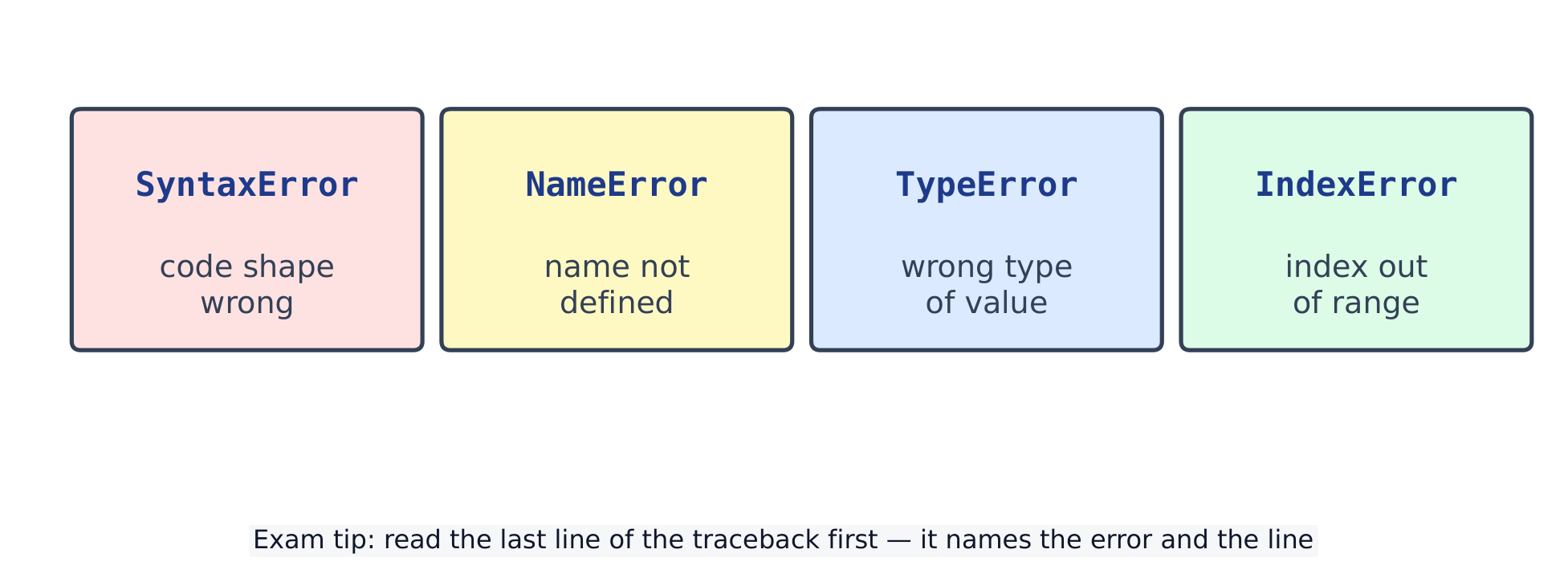
    Common Python errors: Syntax, Name, Type, Index
    Common Python errors: Syntax, Name, Type, Index
    # A runtime error, caught so this block still finishes:
    try:
        print(10 / 0)
    except ZeroDivisionError:
        print("cannot divide by zero")
    # cannot divide by zero
    
    • Python prints a traceback 回溯 showing where it failed. Read it bottom-up.

    Reading a traceback. Start at the last line: it names the error type and gives a short reason. The line above it shows the line number and the code that failed.

    Traceback (most recent call last):
      File "main.py", line 3, in <module>
        print("Total: " + total)
    TypeError: can only concatenate str (not "int") to str
    

    Here line 3 joins a string and a number with +. Fix it with str(total), a comma in print, or an f-string: print(f"Total: {total}").

    The errors beginners meet most

    Error What it usually means Example Fix
    SyntaxError the line breaks Python's grammar if x > 3 add the colon: if x > 3:
    IndentationError the spaces at the start of a line are wrong a loop body not indented indent the block by 4 spaces, all lines the same
    NameError a name was never created, or is misspelt print(totl) check the spelling; give the variable a value first
    TypeError the operation does not work on this type "Age: " + 15 convert: "Age: " + str(15)
    ValueError the type is right but the value is not int("ten") check the input before converting it
    IndexError the position is outside the list [1, 2, 3][3] the last index is len(list) - 1
    ZeroDivisionError division by zero total / count with count 0 test if count > 0 first
    KeyError the dictionary has no such key ages["Bo"] use in or .get()

    Finding a logic error with print. A logic error gives no message, only a wrong answer. Print the variables inside the loop and compare them with what you expect.

    marks = [60, 70, 80]
    total = 0
    for i in range(1, len(marks)):      # bug: starts at index 1
        total = total + marks[i]
        print("i =", i, "total =", total)
    print("average", total / len(marks))
    # i = 1 total = 70
    # i = 2 total = 150
    # average 50.0
    

    The trace shows that marks[0] (60) was never added: the loop should be range(len(marks)) or, simpler, for mark in marks:. Remove the debugging prints when the bug is fixed.

    Vocabulary
    English
    syntax error/ˈsɪntæks ˈerə/
    runtime error/ˈrʌntaɪm ˈerə/
    logic error/ˈlɒdʒɪk ˈerə/
    traceback/ˈtreɪsbæk/
    9.2

    try / except / raise

    Put risky code in try; if it fails, except catches the exception 异常 instead of a crash.

    def to_int(text):
        try:
            return int(text)
        except ValueError:
            return 0
    print(to_int("abc"))   # 0
    
    • Catch a specific type (ValueError, ZeroDivisionError, …).
    • raise makes your own error on purpose.
    def set_age(age):
        if age < 0:
            raise ValueError("age cannot be negative")
        return age
    
    try:
        set_age(-1)
    except ValueError as err:
        print("error:", err)
    # error: age cannot be negative
    
    Vocabulary
    English
    exception/ekˈsepʃn/
    9.3

    Testing & robustness

    A test 测试 checks that code gives the right answer. Try normal cases and edge cases 边界情形 — empty input, zero, very large values.

    def average(nums):
        if len(nums) == 0:        # edge case: empty list
            return 0
        return sum(nums) / len(nums)
    
    print(average([2, 4, 6]))     # 4.0
    print(average([]))            # 0
    
    • Robust 健壮 code handles 处理 strange input gracefully instead of crashing.

    Practice

    Write each answer on paper first, then open the model answer, compare, and press Run.

    1. Name the error. Which error does each line cause: int("12.5"), [3, 5][2] and "5" + 5?

    Model answer
    for code in ['int("12.5")', '[3, 5][2]', '"5" + 5']:
        try:
            eval(code)
        except Exception as err:
            print(code, "->", type(err).__name__)
    # int("12.5") -> ValueError
    # [3, 5][2] -> IndexError
    # "5" + 5 -> TypeError
    

    "12.5" is text, the right type for int(), but not a whole number: a ValueError. The list has positions 0 and 1 only: an IndexError. Text and a number cannot be added: a TypeError. (eval runs a piece of code given as text; it is used here only to try all three.)

    2. Skip the bad values. A user typed ["12", "abc", "7"]. Add up the numbers, skip anything that is not a whole number, and say which value was skipped.

    Model answer
    typed = ["12", "abc", "7"]
    total = 0
    for text in typed:
        try:
            total = total + int(text)
        except ValueError:
            print("skipped", text)
    print("total", total)
    # skipped abc
    # total 19
    

    Only the line that can fail goes inside try. Catch ValueError by name, so other bugs still show up instead of being hidden.

    3. Test the boundary. count_passes should count marks of 50 or more. It gives 1 for [50, 49, 75], but the answer is 2. Find the bug with a boundary test, then fix it.

    def count_passes(marks):
        count = 0
        for m in marks:
            if m > 50:
                count = count + 1
        return count
    
    Model answer
    def count_passes(marks):
        count = 0
        for m in marks:
            if m >= 50:
                count = count + 1
        return count
    
    print(count_passes([50, 49, 75]))   # 2
    print(count_passes([]))             # 0
    

    A mark of exactly 50 is the boundary, and > 50 leaves it out. This is a logic error: no message, only a wrong answer. Always test the boundary value and the values next to it (49 and 50), and the empty list too.

    Common mistakes

    • Do not use a bare except: — catch the specific error, e.g. except ValueError:.
    • A syntax error stops the whole program before it runs, so fix those first.
    • Test the edge cases (empty input, zero, the largest value), not just the easy one.
    Vocabulary
    English
    handle/ˈhændl/
    test/test/
    edge case/edʒ keɪs/
    robust/rəʊˈbʌst/
  • 10 Files
    10.1

    Reading & writing text files

    A text file 文本文件 stores text on disk. Open it with open(name, mode) where mode 模式 says read or write. Always use with, which closes the file for you.

    Writing

    Mode "w" writes a new file and erases any old one.

    with open("notes.txt", "w") as f:
        f.write("first line\n")
        f.write("second line\n")
    print("saved")            # saved
    

    Reading

    Mode "r" (the default) reads. .read() returns the whole file as one string.

    with open("notes.txt", "w") as f:
        f.write("hello\nworld\n")
    with open("notes.txt") as f:
        print(f.read().strip())
    # hello
    # world
    

    Line by line

    Loop over the file to get one line at a time. .strip() removes 去除 the newline 换行符 at the end.

    with open("data.txt", "w") as f:
        f.write("Mei,88\nSam,71\n")
    with open("data.txt") as f:
        for line in f:
            name, score = line.strip().split(",")
            print(name, "scored", score)
    # Mei scored 88
    # Sam scored 71
    

    Appending

    Mode "a" appends 追加 — it adds to the end without erasing.

    with open("log.txt", "w") as f:
        f.write("line 1\n")
    with open("log.txt", "a") as f:
        f.write("line 2\n")
    with open("log.txt") as f:
        print(f.read().strip())
    # line 1
    # line 2
    

    Worked example: totals from a file

    Everything read from a file is a string. Turn numbers into int or float before you do maths with them. Skip blank lines, which are common at the end of a file.

    with open("marks.txt", "w") as f:
        f.write("Mei,88\nSam,71\nAna,95\n\n")
    
    total = 0
    count = 0
    best_name = ""
    best = -1
    with open("marks.txt") as f:
        for line in f:
            line = line.strip()
            if line == "":
                continue                     # skip a blank line
            name, mark = line.split(",")
            mark = int(mark)                 # "88" -> 88
            total = total + mark
            count = count + 1
            if mark > best:
                best = mark
                best_name = name
    
    with open("report.txt", "w") as f:
        f.write(f"average {total / count:.1f}\n")
        f.write(f"top {best_name} {best}\n")
    with open("report.txt") as f:
        print(f.read().strip())
    # average 84.7
    # top Ana 95
    
    • f.write takes one string and adds no new line: put \n at the end yourself, and turn numbers into text (here with an f-string).

    Read, change, write back

    To sort or edit a file, read all of it into a list first, close it, then open it again with "w" and write the new version:

    with open("names.txt", "w") as f:
        f.write("Sam\nAna\nMei\n")
    
    with open("names.txt") as f:
        names = [line.strip() for line in f if line.strip()]
    names.sort()
    
    with open("names.txt", "w") as f:     # opened again only after reading
        for name in names:
            f.write(name + "\n")
    print(names)                          # ['Ana', 'Mei', 'Sam']
    
    • Opening with "w" before reading would erase the names before you could read them.
    • if line.strip() leaves out blank lines.

    When the file is missing

    Opening a file that does not exist for reading stops the program with FileNotFoundError. Catch it and give a clear message:

    try:
        with open("no_such_file.txt") as f:
            print(f.read())
    except FileNotFoundError:
        print("Cannot find no_such_file.txt - check the name and the folder.")
    # Cannot find no_such_file.txt - check the name and the folder.
    
    Mode Meaning
    "r" read (default)
    "w" write (erases first)
    "a" append (add to the end)

    Common mistakes

    • Always close a file, or use with open(...) as f: which closes it for you.
    • read() gives the whole file as one string, and each line still ends with \n.
    • Opening with "w" erases the file first; use "a" to add to the end.
    • int(line) on a line read from a file: int("88\n") works, but a blank line gives ValueError. Strip it and skip blanks.
    • f.write(95) gives TypeError: write text, such as f.write(str(95) + "\n").
    • A relative name such as "marks.txt" is looked for in the folder the program runs from, not always the folder of the .py file.
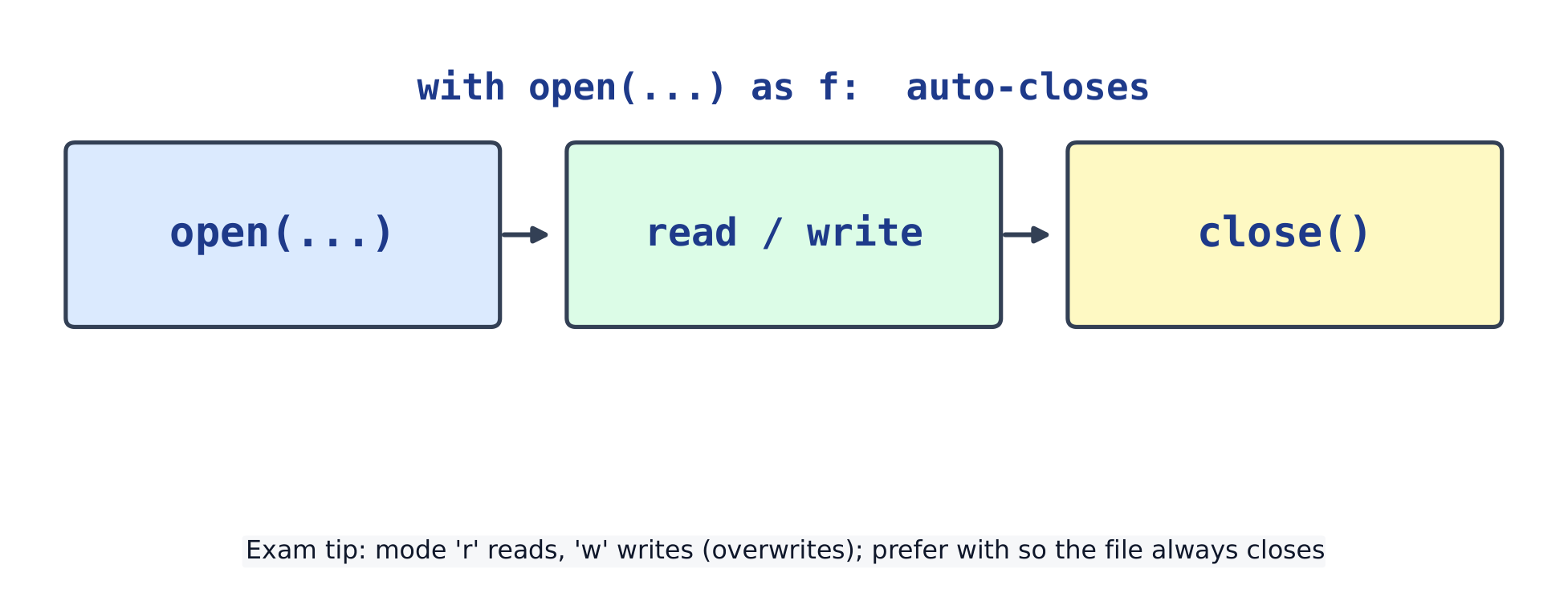
    open → read/write → close (with auto-closes)
    open → read/write → close (with auto-closes)
    Vocabulary
    English
    text file/tekst faɪl/
    mode/məʊd/
    remove/rɪˈmuːv/
    newline/ˈnjuːlaɪn/
    append/əˈpend/
  • 11 Algorithm design
    11.1

    Algorithms & decomposition

    An algorithm 算法 is a clear list of steps that solves a problem. Decomposition 分解 means breaking a big problem into smaller parts you can solve one at a time.

    # Algorithm: find the largest number in a list
    def largest(nums):
        best = nums[0]
        for n in nums:
            if n > best:
                best = n
        return best
    
    print(largest([3, 9, 2, 7]))   # 9
    
    • Abstraction 抽象 means ignoring detail: you use largest(...) without re-reading how it works.

    Decomposition in practice. Task: read marks, then report the average and how many passed (50 or more). Split it into three small jobs, one function each, and a short main part that joins them:

    def average(marks):
        return sum(marks) / len(marks)
    
    def count_passes(marks, pass_mark):
        count = 0
        for m in marks:
            if m >= pass_mark:
                count = count + 1
        return count
    
    def report(marks):
        print(f"average {average(marks):.1f}")
        print(f"passed {count_passes(marks, 50)} of {len(marks)}")
    
    report([62, 45, 78, 50, 39])
    # average 54.8
    # passed 3 of 5
    

    Each function can be written and tested on its own before you join them.

    Searching and sorting algorithms (linear and binary search, bubble and insertion sort) are in topic 13.

    Vocabulary
    English
    algorithm/ˈælɡərɪθəm/
    decomposition/ˌdiːkɒmpəˈzɪʃn/
    abstraction/əbˈstrækʃn/
    11.2

    Pseudocode & flowcharts

    Pseudocode 伪代码 is plain, structured English for an algorithm, written before the real code. It is not run.

    SET best TO first number
    FOR Each number n
        IF n > best
          THEN
            SET best TO n
    OUTPUT best
    

    This plan is the largest function above: SET best TO first number becomes best = nums[0], and the FOR and IF lines become Python's for and if.

    A flowchart 流程图 draws the same plan: a box for each step, a diamond for each decision 判断, and arrows for the order.

    Shape Meaning
    rounded box Start or Stop
    parallelogram input or output
    rectangle a process, such as best = n
    diamond a decision: one arrow for Yes, one for No

    Dry run with a trace table. Before you trust a plan, run it by hand. A trace table 追踪表 has one column per variable and one row per step. For largest([3, 9, 2, 7]), best starts at 3:

    n best after this step
    3 3 (not bigger)
    9 9 (9 > 3, so it changes)
    2 9 (not bigger)
    7 9 (not bigger)

    The last row gives the answer, 9. A trace table also finds mistakes: if best started at 0, the table for [-4, -2] would end with 0, a number that is not in the list.

    Vocabulary
    English
    pseudocode/ˈsuːdəʊkəʊd/
    flowchart/ˈfləʊtʃɑːt/
    decision/dɪˈsɪʒn/
    trace table/treɪs ˈteɪbl/
    11.3

    Recursion & the call stack

    Recursion 递归 is when a function calls itself. It needs a base case 基准情形 (a simple input that returns at once) and a recursive case 递归情形 (it calls itself on a smaller input).

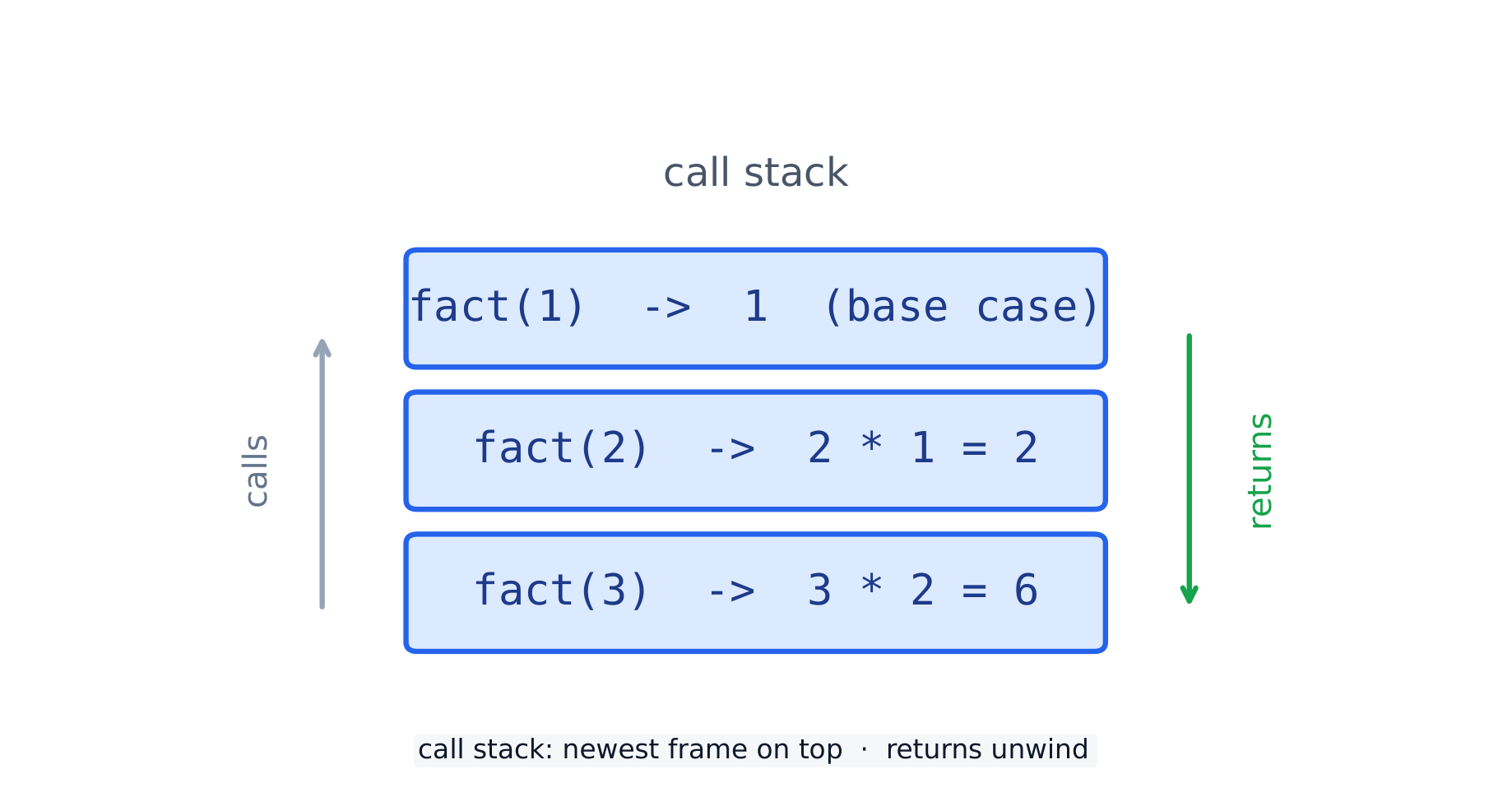
    The call stack for factorial(3): each call waits, then returns in reverse order
    The call stack for factorial(3): each call waits, then returns in reverse order
    def fact(n):
        if n <= 1:
            return 1               # base case: stop here
        return n * fact(n - 1)     # recursive case: a smaller problem
    
    print(fact(5))
    # 120
    

    How fact(3) runs: fact(3) waits for fact(2), which waits for fact(1). fact(1) returns 1 (the base case). Then fact(2) returns 2 * 1 = 2, and fact(3) returns 3 * 2 = 6. The calls go down to the base case, then the answers come back up in reverse order.

    The same shape works on lists: the sum of a list is its first item plus the sum of the rest.

    def total(items):
        if items == []:
            return 0                          # base case: an empty list
        return items[0] + total(items[1:])
    
    print(total([4, 7, 1]))
    # 12
    
    • Each paused call sits on the call stack 调用栈 until the call above it returns.

    Common mistakes

    • Recursion needs a base case, or it calls itself until Python stops it with RecursionError: maximum recursion depth exceeded. Check that every call moves closer to the base case, for example n - 1.
    • Pseudocode is for planning — it need not run, but every step must be unambiguous.
    • Break a big problem into small named steps before you write any code.
    Vocabulary
    English
    recursion/rɪˈkɜːʃn/
    base case/beɪs keɪs/
    recursive case/rɪˈkɜːsɪv keɪs/
    call stack/kɔːl stæk/
  • 12 Data structures
    12.1

    Abstract Data Types (ADTs)

    An abstract data type 抽象数据类型 (ADT) describes some data plus the operations on it, separate from how it is built. You use it through its operations, not through its inner storage.

    # A stack ADT, built on a list
    s = []
    s.append(1)        # add
    s.append(2)
    print(s.pop())     # 2  (remove the most recent)
    
    Vocabulary
    English
    abstract data type/ˈæbstrækt ˈdeɪtə taɪp/
    12.2

    Stacks

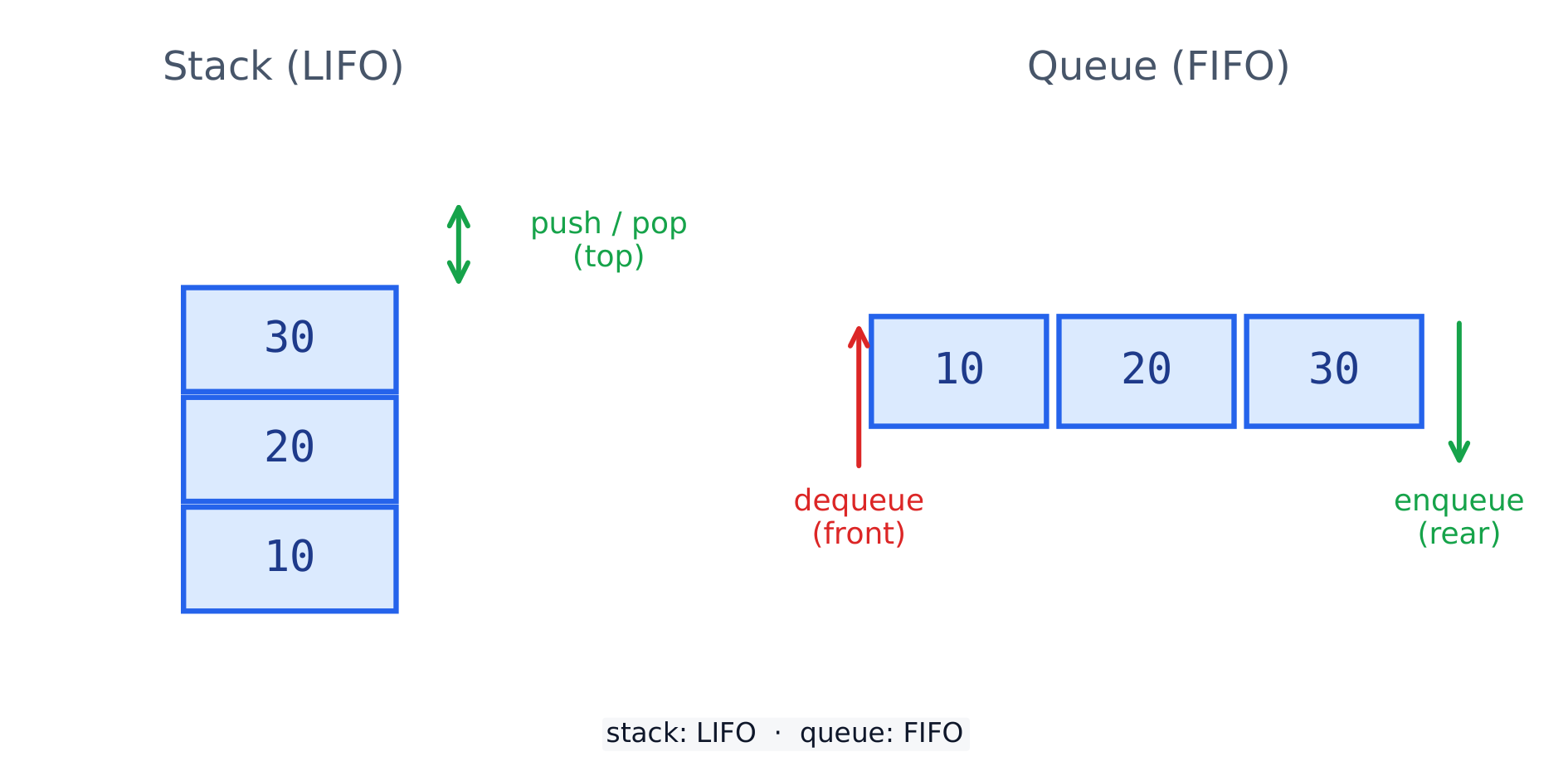
    A stack 栈 is last-in, first-out (LIFO 后进先出). You push 压入 onto the top and pop 弹出 from the top.

    A stack removes from the top (LIFO); a queue removes from the front (FIFO)
    A stack removes from the top (LIFO); a queue removes from the front (FIFO)
    stack = []
    stack.append("a")
    stack.append("b")
    print(stack[-1])     # b  (peek: look at the top without removing it)
    print(stack.pop())   # b
    print(stack.pop())   # a
    print(len(stack) == 0)   # True: empty, so another pop would raise IndexError
    

    A stack checks that brackets match: push each opening bracket; at a closing bracket, the top of the stack must be its partner.

    def balanced(text):
        pairs = {")": "(", "]": "[", "}": "{"}
        stack = []
        for ch in text:
            if ch in "([{":
                stack.append(ch)
            elif ch in ")]}":
                if len(stack) == 0 or stack.pop() != pairs[ch]:
                    return False
        return len(stack) == 0          # nothing left open
    
    print(balanced("(a[1] + b) * {c}"))   # True
    print(balanced("(a[1)]"))             # False
    print(balanced("((x)"))               # False
    

    Undo in an editor, the back button in a browser and the call stack of a running program work the same way: the most recent item comes off first.

    Vocabulary
    English
    stack/stæk/
    LIFO/ˈlaɪfəʊ/
    push/pʊʃ/
    pop/pɒp/
    12.3

    Queues

    A queue 队列 is first-in, first-out (FIFO 先进先出). You enqueue 入队 at the back and dequeue 出队 from the front.

    queue = []
    queue.append("a")     # enqueue
    queue.append("b")
    print(queue.pop(0))   # a  (dequeue the front)
    print(queue.pop(0))   # b
    

    pop(0) moves every other item one place along, so it is slow for a long list. collections.deque removes from the front in one step:

    from collections import deque
    
    jobs = deque()
    jobs.append("report.pdf")    # enqueue
    jobs.append("photo.png")
    jobs.append("notes.txt")
    while jobs:                  # an empty deque counts as False
        print("printing", jobs.popleft())
    # printing report.pdf
    # printing photo.png
    # printing notes.txt
    
    Vocabulary
    English
    queue/kjuː/
    FIFO/ˈfaɪfəʊ/
    enqueue/enˈkjuː/
    dequeue/diːˈkjuː/
    12.4

    Linked lists

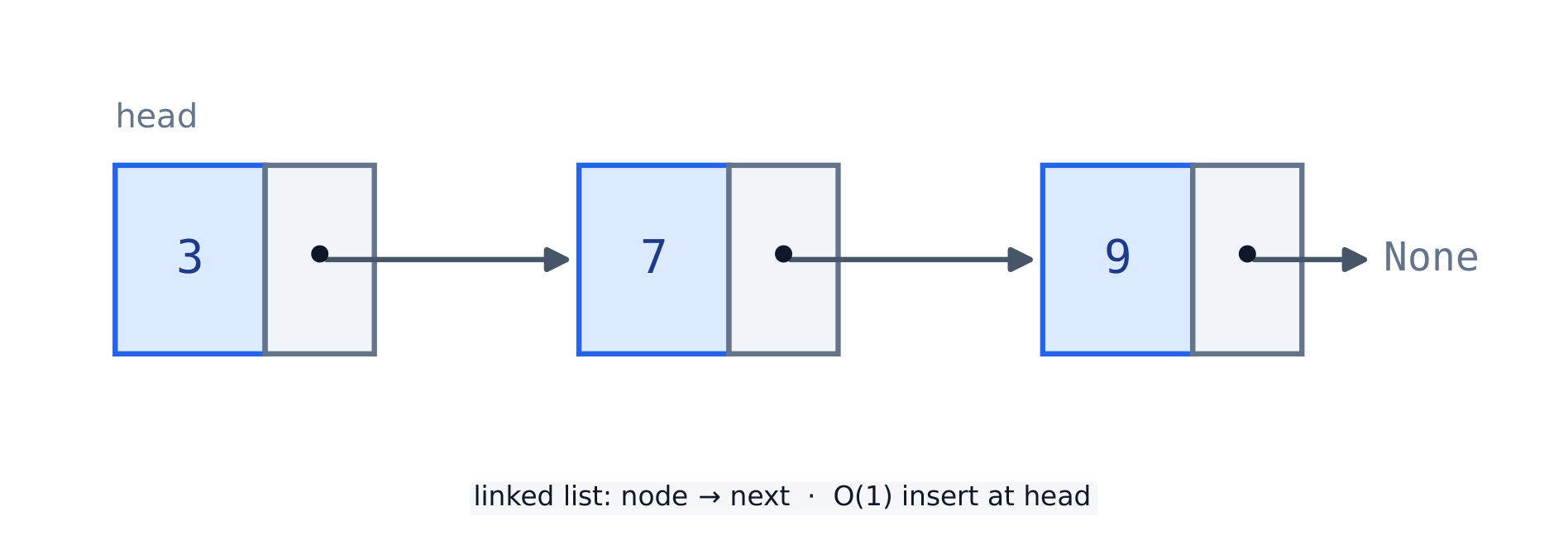
    A linked list 链表 is a chain of nodes 节点. Each node holds data and a pointer 指针 to the next node; the last points to None.

    A linked list: each node holds data and a pointer to the next node, ending at None
    A linked list: each node holds data and a pointer to the next node, ending at None
    n3 = {"data": 3, "next": None}
    n2 = {"data": 2, "next": n3}
    n1 = {"data": 1, "next": n2}
    node = n1
    while node is not None:      # traverse to the end
        print(node["data"])
        node = node["next"]
    # 1
    # 2
    # 3
    

    Inserting or deleting only changes pointers; no other node moves:

    def show(head):
        values = []
        node = head
        while node is not None:
            values.append(node["data"])
            node = node["next"]
        print(values)
    
    c = {"data": "C", "next": None}
    a = {"data": "A", "next": c}
    head = a
    show(head)                          # ['A', 'C']
    
    b = {"data": "B", "next": c}        # insert B after A:
    a["next"] = b                       # 1. B points to C, 2. A points to B
    show(head)                          # ['A', 'B', 'C']
    
    head = {"data": "Z", "next": head}  # insert at the front: the new node becomes the head
    show(head)                          # ['Z', 'A', 'B', 'C']
    
    a["next"] = a["next"]["next"]       # delete B: A now skips over it
    show(head)                          # ['Z', 'A', 'C']
    

    Set the new node's pointer first. If a["next"] = b ran before b pointed to c, the rest of the list would be lost.

    Vocabulary
    English
    linked list/lɪŋkt lɪst/
    node/nəʊd/
    pointer/ˈpɔɪntə/
    12.5

    Hash tables

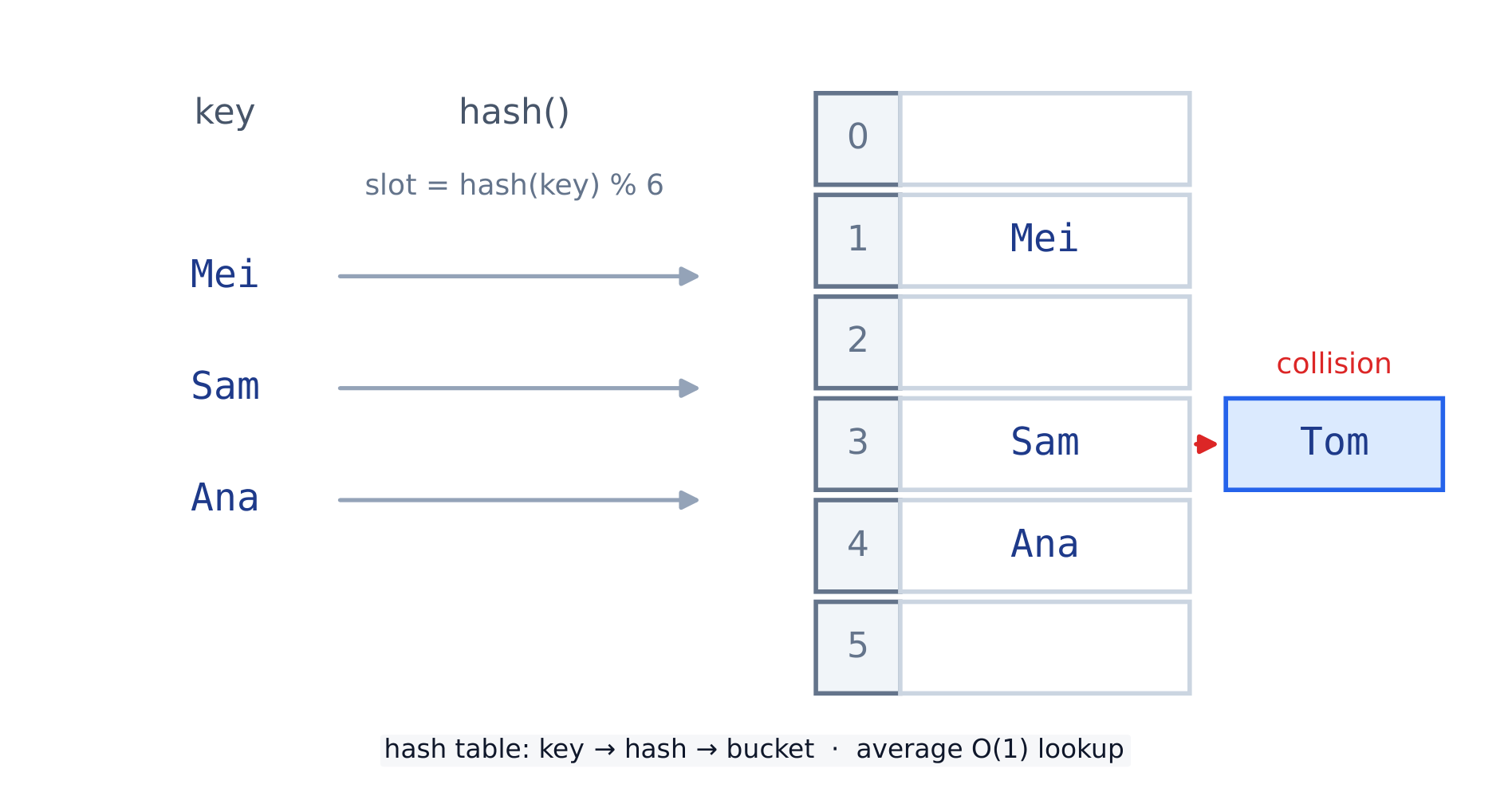
    A hash table 哈希表 maps a key to a slot with a hash function 哈希函数. Two keys can land in the same slot — a collision 冲突. Python's dict is a hash table, so lookup is fast.

    A hash function maps each key to a slot; two keys can collide in one slot
    A hash function maps each key to a slot; two keys can collide in one slot
    table = {}
    table["Mei"] = 88
    table["Sam"] = 71
    print(table["Mei"])   # 88  (fast lookup by key)
    

    A hand-built table shows what dict does inside. Here the hash function adds the character codes and takes the remainder by the table size. Each slot holds a list, so keys that collide share a slot (chaining):

    SIZE = 5
    slots = [[] for _ in range(SIZE)]
    
    def h(key):
        return sum(ord(ch) for ch in key) % SIZE
    
    def put(key, value):
        slots[h(key)].append((key, value))
    
    def get(key):
        for k, v in slots[h(key)]:        # search only one slot
            if k == key:
                return v
        return None
    
    for name, mark in [("Mei", 88), ("Sam", 71), ("Ali", 64), ("Ola", 90)]:
        put(name, mark)
        print(name, "-> slot", h(name))
    print(get("Ola"))     # 90
    print(slots[3])       # [('Mei', 88), ('Ali', 64)]: a collision
    
    Mei -> slot 3
    Sam -> slot 4
    Ali -> slot 3
    Ola -> slot 4
    

    get looks in one slot only, not the whole table, which is why lookup stays fast while collisions are few.

    Vocabulary
    English
    hash table/hæʃ ˈteɪbl/
    hash function/hæʃ ˈfʌŋkʃn/
    collision/kəˈlɪʒn/
    12.6

    Binary search trees

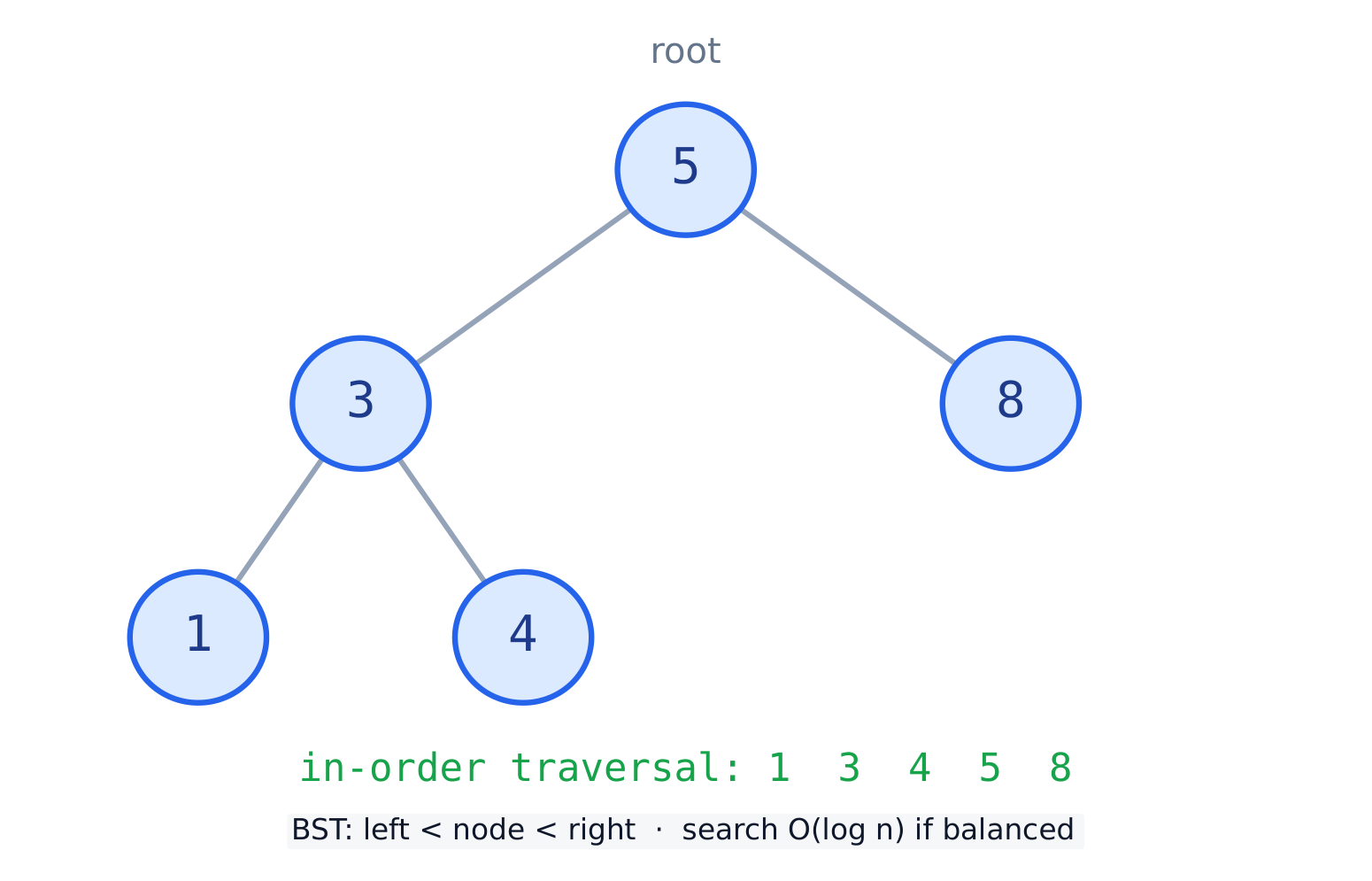
    A binary search tree 二叉搜索树 (BST) keeps order: every left child is smaller than its node, every right child is larger. Search stays fast.

    A binary search tree: smaller values go left, larger values go right
    A binary search tree: smaller values go left, larger values go right
    def insert(root, val):
        if root is None:
            return {"val": val, "left": None, "right": None}
        if val < root["val"]:
            root["left"] = insert(root["left"], val)
        else:
            root["right"] = insert(root["right"], val)
        return root
    
    def inorder(root):
        if root is None:
            return []
        return inorder(root["left"]) + [root["val"]] + inorder(root["right"])
    
    tree = None
    for v in [5, 3, 8, 1, 4]:
        tree = insert(tree, v)
    print(inorder(tree))   # [1, 3, 4, 5, 8]
    
    Vocabulary
    English
    binary search tree/ˈbaɪnəri sɜːtʃ triː/
    12.7

    Graphs

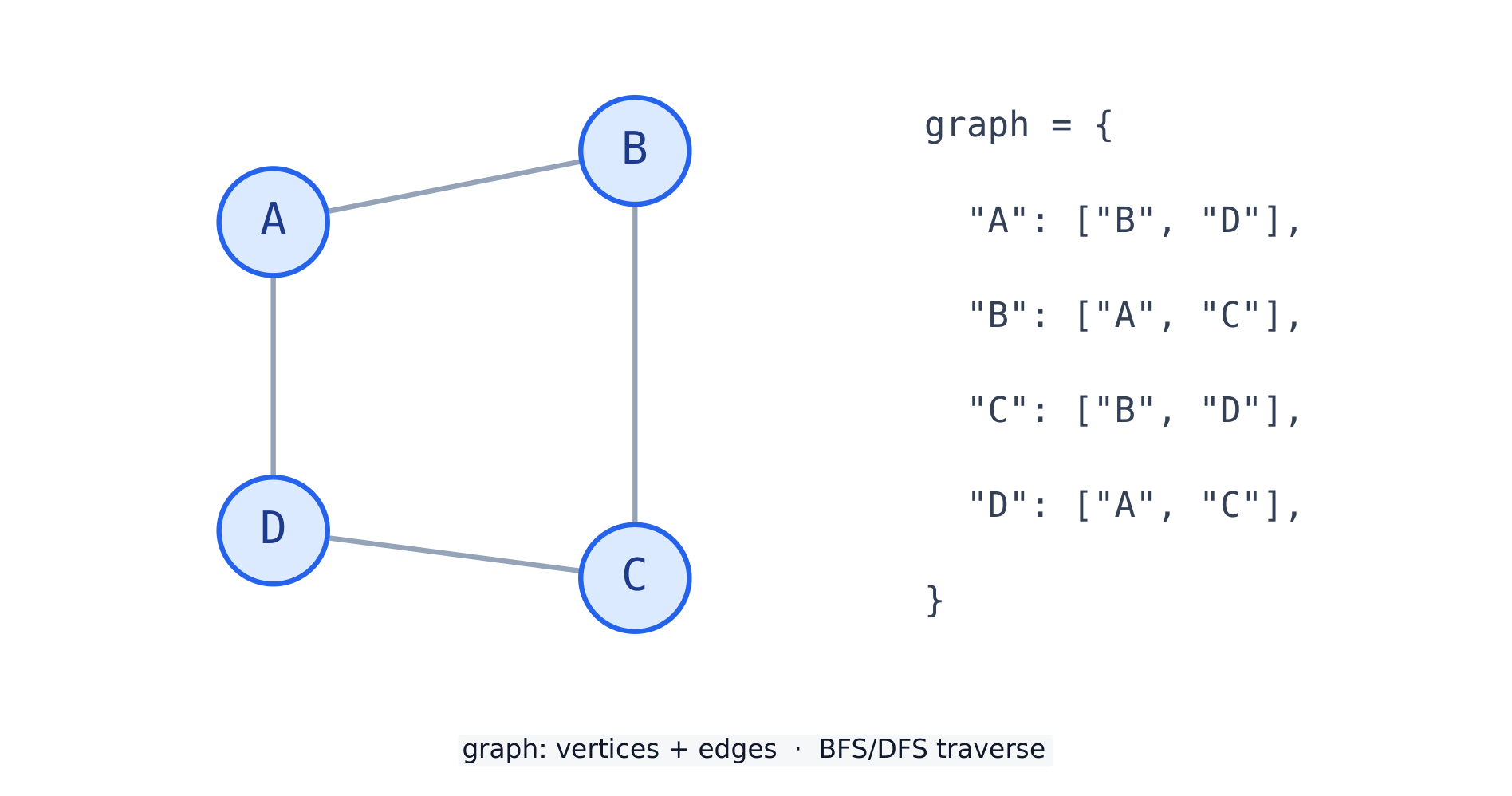
    A graph 图 is a set of vertices 顶点 joined by edges 边. An adjacency list 邻接表 — a dict of neighbour lists — is a common way to store one.

    A graph of vertices and edges, with its adjacency-list form
    A graph of vertices and edges, with its adjacency-list form
    graph = {"A": ["B", "D"], "B": ["A", "C"], "C": ["B", "D"], "D": ["A", "C"]}
    for vertex in graph:
        print(vertex, "->", graph[vertex])
    # A -> ['B', 'D']  (and so on for B, C, D)
    

    A breadth-first search 广度优先搜索 visits the start, then all its neighbours, then their neighbours. A queue keeps the order, and a set remembers what has been seen so no vertex is visited twice:

    from collections import deque
    
    def bfs(graph, start):
        seen = {start}
        order = []
        queue = deque([start])
        while queue:
            v = queue.popleft()
            order.append(v)
            for n in graph[v]:
                if n not in seen:
                    seen.add(n)
                    queue.append(n)
        return order
    
    graph = {"A": ["B", "D"], "B": ["A", "C"], "C": ["B", "D"], "D": ["A", "C"]}
    print(bfs(graph, "A"))   # ['A', 'B', 'D', 'C']
    

    A depth-first search uses a stack instead of the queue, so it follows one path as far as it can before going back.

    Common mistakes

    • A stack is last-in-first-out; a queue is first-in-first-out. Do not mix them up.
    • Check whether a structure is empty before you pop or dequeue from it.
    • In a linked list, losing the head pointer loses the whole list.
    • queue.pop() without the 0 removes the back item: that is a stack, not a queue.
    • A graph search without a seen set loops for ever when the graph has a cycle (A → B → A …).
    Vocabulary
    English
    graph/ɡræf/
    vertex/ˈvɜːteks/
    edge/edʒ/
    adjacency list/əˈdʒeɪsənsi lɪst/
    breadth-first search/bredθ fɜːst sɜːtʃ/
  • 13 Searching, sorting & efficiency
    13.1

    Linear & binary search

    A search 查找 finds where a value is. Linear search 线性查找 checks each item in turn, so it works on any list.

    def linear_search(items, target):
        for i in range(len(items)):
            if items[i] == target:
                return i
        return -1     # not found
    
    print(linear_search([4, 8, 2, 9], 2))   # 2
    

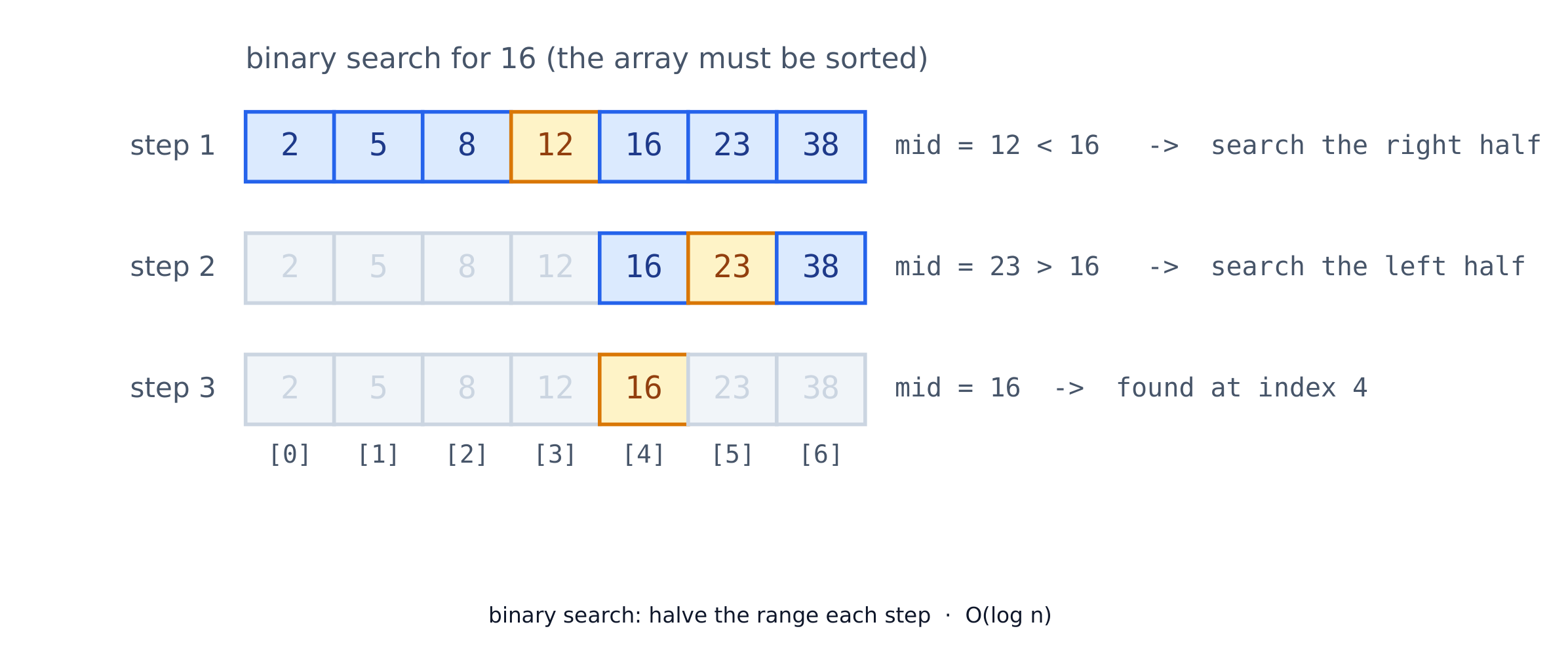
    Binary search 二分查找 is much faster but needs a sorted list. It halves the range each step.

    def binary_search(items, target):
        lo, hi = 0, len(items) - 1
        while lo <= hi:
            mid = (lo + hi) // 2
            if items[mid] == target:
                return mid
            elif items[mid] < target:
                lo = mid + 1
            else:
                hi = mid - 1
        return -1
    
    print(binary_search([1, 3, 5, 7, 9], 7))   # 3
    

    Trace for target 7 in [1, 3, 5, 7, 9]: lo = 0, hi = 4, mid = 2 (5, too small, so lo = 3); then mid = 3 (7, found). Each step throws away half the list: about 10 steps for 1,000 items and 20 for 1,000,000, where a linear search may need every item.

    Binary search halves the range each step — O(log n) on a sorted list
    Binary search halves the range each step — O(log n) on a sorted list
    Vocabulary
    English
    search/sɜːtʃ/
    linear search/ˈlɪnɪə sɜːtʃ/
    binary search/ˈbaɪnəri sɜːtʃ/
    13.2

    Sorting (bubble & insertion)

    To sort 排序 is to put items in order. Bubble sort 冒泡排序 repeatedly swaps 交换 neighbours that are in the wrong order.

    def bubble_sort(a):
        a = a[:]                          # work on a copy
        for i in range(len(a)):
            for j in range(len(a) - 1 - i):
                if a[j] > a[j + 1]:
                    a[j], a[j + 1] = a[j + 1], a[j]
        return a
    
    print(bubble_sort([5, 2, 4, 1]))      # [1, 2, 4, 5]
    

    Each pass 遍 carries the largest remaining item to the end. If a pass makes no swaps, the list is already sorted and the sort can stop early. Printing the list after each pass shows this, and it is how exam questions ask you to trace a sort:

    def bubble_sort_trace(items):
        n = len(items)
        for p in range(n - 1):
            swapped = False
            for i in range(n - 1 - p):              # the last p items are already in place
                if items[i] > items[i + 1]:
                    items[i], items[i + 1] = items[i + 1], items[i]
                    swapped = True
            print("after pass", p + 1, items)
            if not swapped:
                break
    
    bubble_sort_trace([5, 1, 4, 2])
    # after pass 1 [1, 4, 2, 5]
    # after pass 2 [1, 2, 4, 5]
    # after pass 3 [1, 2, 4, 5]
    

    Insertion sort 插入排序 builds a sorted part one item at a time, sliding each new item back into its place:

    def insertion_sort(a):
        a = a[:]                           # work on a copy
        for i in range(1, len(a)):
            key = a[i]
            j = i - 1
            while j >= 0 and a[j] > key:   # shift bigger values right
                a[j + 1] = a[j]
                j -= 1
            a[j + 1] = key                 # drop key into the gap
        return a
    
    print(insertion_sort([5, 2, 4, 1]))   # [1, 2, 4, 5]
    
    • In real code, use Python's built-in sorted():
    print(sorted([5, 2, 4, 1]))           # [1, 2, 4, 5]
    

    Practice

    Write each answer on paper first, then open the model answer, compare, and press Run.

    1. Which search looks at fewer items? Find 23 in [2, 5, 8, 12, 16, 23, 38, 56, 72, 91]. Write down the items a binary search looks at, and count how many a linear search looks at.

    Model answer
    items = [2, 5, 8, 12, 16, 23, 38, 56, 72, 91]
    target = 23
    lo, hi = 0, len(items) - 1
    looked = []
    while lo <= hi:
        mid = (lo + hi) // 2
        looked.append(items[mid])
        if items[mid] == target:
            break
        elif items[mid] < target:
            lo = mid + 1
        else:
            hi = mid - 1
    print("binary looks at", looked)              # [16, 56, 23]
    print("linear looks at", items.index(target) + 1, "items")   # 6
    

    Binary search: mid = 4 is 16, too small, so lo = 5; mid = 7 is 56, too big, so hi = 6; mid = 5 is 23, found. Three items against six, and the gap grows with the size of the list.

    2. Biggest first. Change bubble sort so that it sorts [3, 8, 1, 6] from largest to smallest.

    Model answer
    def bubble_sort_desc(a):
        a = a[:]
        n = len(a)
        for p in range(n - 1):
            for i in range(n - 1 - p):
                if a[i] < a[i + 1]:          # was >: now the smaller one moves right
                    a[i], a[i + 1] = a[i + 1], a[i]
        return a
    
    print(bubble_sort_desc([3, 8, 1, 6]))   # [8, 6, 3, 1]
    

    Only the comparison changes. With <, each pass carries the smallest value to the end.

    3. Stop early. Bubble sort often finishes before its last pass. Add a flag so it stops after a pass with no swaps, and print how many passes [1, 2, 4, 3] needs.

    Model answer
    def bubble_sort_early(a):
        a = a[:]
        passes = 0
        swapped = True
        while swapped:
            swapped = False
            passes = passes + 1
            for i in range(len(a) - 1):
                if a[i] > a[i + 1]:
                    a[i], a[i + 1] = a[i + 1], a[i]
                    swapped = True
        return a, passes
    
    print(bubble_sort_early([1, 2, 4, 3]))   # ([1, 2, 3, 4], 2)
    

    Pass 1 swaps 4 and 3; pass 2 makes no swap, which proves the list is sorted, so the loop ends. A full bubble sort would make 3 passes. Exam questions often ask for this flag.
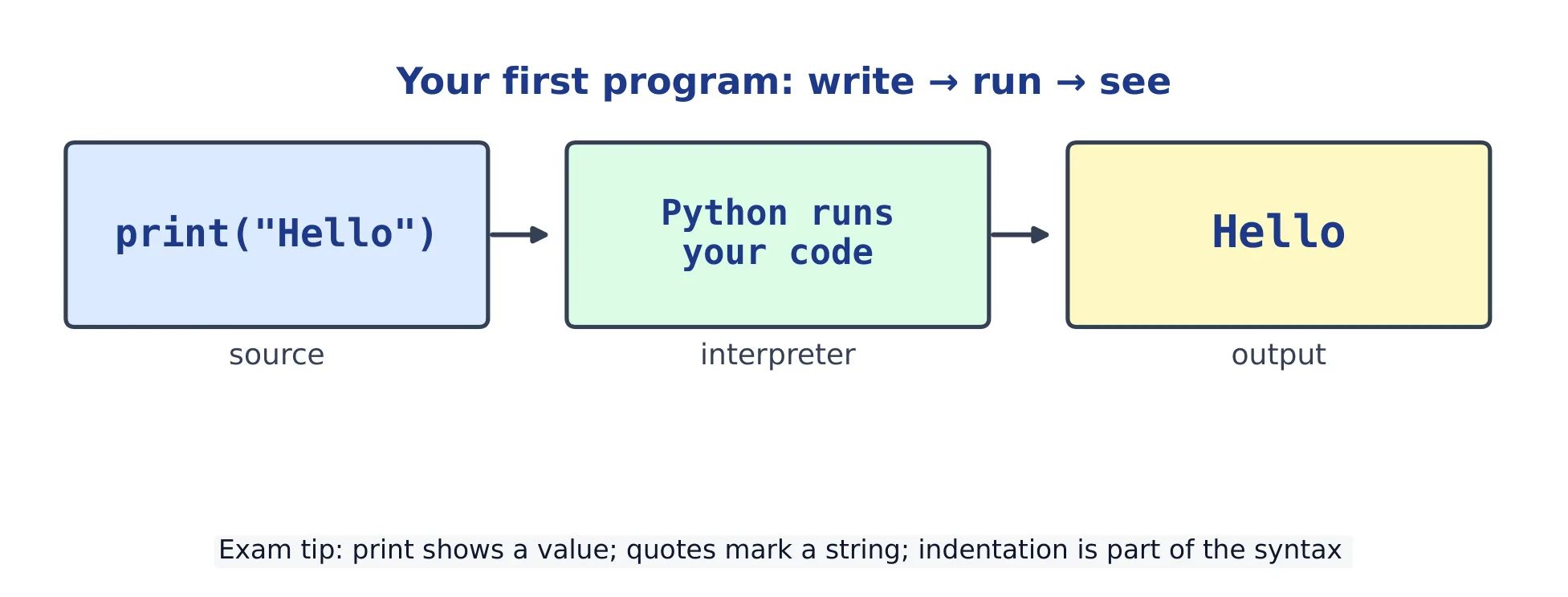
    Vocabulary
    English
    sort/sɔːt/
    bubble sort/ˈbʌbl sɔːt/
    swap/swɒp/
    insertion sort/ɪnˈsɜːʃn sɔːt/
    pass
    13.3

    Algorithmic efficiency

    Efficiency 效率 asks how the work grows as the input grows. We describe it with Big-O 大O记号.

    How the number of steps grows with input size for common complexities
    How the number of steps grows with input size for common complexities
    Big-O Name Example
    $O(1)$ constant look up a dict key
    $O(\log n)$ logarithmic binary search
    $O(n)$ linear linear search
    $O(n^2)$ quadratic bubble sort
    def steps(n):           # how many steps a linear scan takes
        count = 0
        for i in range(n):
            count = count + 1
        return count
    
    print(steps(100))       # 100  -> O(n)
    
    Vocabulary
    English
    efficiency/ɪˈfɪʃənsi/
    Big-O/bɪɡ əʊ/
    13.4

    Randomness & simulation

    The random module makes random numbers. Use a seed 种子 to make results repeatable. A simulation 模拟 runs many random trials to estimate an answer.

    import random
    random.seed(0)
    rolls = [random.randint(1, 6) for _ in range(1000)]
    print(rolls.count(6))   # about 1/6 of 1000
    

    Common mistakes

    • Binary search only works on a sorted list: on an unsorted one it gives wrong answers without any error.
    • Big-O tells you how the time GROWS, not the exact time; an O(n²) method beats O(n) only for tiny inputs.
    • Bubble sort is O(n²) — fine for learning, but slow on large lists.
    • In a bubble sort, range(n) for the inner loop makes items[i + 1] run off the end: stop at n - 1.
    Vocabulary
    English
    seed/siːd/
    simulation/ˌsɪmjʊˈleɪʃn/
  • 14 OOP & paradigms
    14.1

    Classes & objects

    A class 类 is a blueprint. An object 对象 is one thing built from it (an instance 实例). __init__ is the constructor 构造方法 that sets up each object; self is the object itself.

    class Dog:
        def __init__(self, name):
            self.name = name            # an attribute
        def speak(self):
            return self.name + " says woof"
    
    d = Dog("Rex")
    print(d.speak())     # Rex says woof
    
    • name is an attribute 属性 (data on the object); speak is a method 方法 (an action).

    Each object keeps its own attributes. A method changes the object it is called on, and no other:

    class Counter:
        def __init__(self):
            self.count = 0
        def click(self):
            self.count = self.count + 1
    
    a = Counter()
    b = Counter()
    a.click()
    a.click()
    b.click()
    print(a.count, b.count)   # 2 1
    

    a.click() is really Counter.click(a): Python passes the object in as self. That is why every method lists self first.

    Add __str__ to control what print(obj) shows:

    class Dog:
        def __init__(self, name):
            self.name = name
        def __str__(self):
            return f"Dog named {self.name}"
    
    print(Dog("Rex"))    # Dog named Rex
    
    A class is a blueprint; calling it creates an object
    A class is a blueprint; calling it creates an object

    Practice

    Write each class on paper first, then open the model answer, compare, and press Run.

    1. A rectangle. Write a class Rectangle with a width and a height, and a method area(). Make a 3 × 5 rectangle and print its area.

    Model answer
    class Rectangle:
        def __init__(self, width, height):
            self.width = width          # store the values on the object
            self.height = height
        def area(self):
            return self.width * self.height
    
    r = Rectangle(3, 5)
    print(r.area())      # 15
    

    __init__ stores the values with self., so area can read them later. Without self., width would be a local variable that is lost when __init__ ends.

    2. A bank account. Write Account with a balance that starts at 0, a method deposit(amount), and a method withdraw(amount) that refuses to take out more than the balance.

    Model answer
    class Account:
        def __init__(self):
            self.balance = 0
        def deposit(self, amount):
            self.balance = self.balance + amount
        def withdraw(self, amount):
            if amount > self.balance:
                print("not enough money")
            else:
                self.balance = self.balance - amount
    
    acc = Account()
    acc.deposit(50)
    acc.withdraw(80)     # not enough money
    acc.withdraw(20)
    print(acc.balance)   # 30
    

    The methods are the only code that changes balance, so the rule "never below zero" is kept in one place. This is the idea behind encapsulation (next section).

    3. Find the bug. This crashes with TypeError: Pet.speak() takes 0 positional arguments but 1 was given. Fix it.

    class Pet:
        def __init__(self, name):
            self.name = name
        def speak():
            return self.name + " says hello"
    
    print(Pet("Mo").speak())
    
    Model answer
    class Pet:
        def __init__(self, name):
            self.name = name
        def speak(self):
            return self.name + " says hello"
    
    print(Pet("Mo").speak())   # Mo says hello
    

    Pet("Mo").speak() passes the object in as the first argument, so every method needs self first, even one that is called with empty brackets.

    Vocabulary
    English
    class/klæs/
    object/ˈɒbdʒekt/
    instance/ˈɪnstəns/
    constructor/kənˈstrʌktə/
    attribute/ˈætrɪbjuːt/
    method/ˈmeθəd/
    14.2

    Inheritance, encapsulation & polymorphism

    Inheritance 继承 lets a subclass 子类 reuse a superclass 父类. Use super() to call the parent; override 重写 a method to change it.

    class Animal:
        def speak(self):
            return "some sound"
        def intro(self):
            return "I say " + self.speak()
    
    class Cat(Animal):
        def speak(self):                # override
            return "meow"
    
    print(Animal().intro())   # I say some sound
    print(Cat().intro())      # I say meow
    

    Cat did not write intro; it inherits it. But inside intro, self.speak() runs Cat's speak, because self is a Cat.

    A subclass that adds its own attributes calls the parent's __init__ with super(), so the parent still sets up its part:

    class Animal:
        def __init__(self, name):
            self.name = name
        def describe(self):
            return self.name + " is an animal"
    
    class Bird(Animal):
        def __init__(self, name, can_fly):
            super().__init__(name)        # Animal sets self.name
            self.can_fly = can_fly        # Bird adds its own attribute
        def describe(self):
            text = super().describe()     # reuse the parent's version
            if self.can_fly:
                return text + " that flies"
            return text + " that walks"
    
    k = Bird("Kiwi", False)
    print(k.describe())              # Kiwi is an animal that walks
    print(isinstance(k, Animal))     # True: a Bird is an Animal
    

    Without the super().__init__(name) line, self.name is never set, and describe fails with AttributeError.

    Encapsulation 封装 groups data with methods and exposes an intended interface. In Python, a leading underscore marks an intended non-public (often called private 私有) name by convention; it does not prevent outside code from accessing it. Double-leading-underscore name mangling helps avoid accidental subclass name clashes, not enforce security.

    class Account:
        def __init__(self):
            self._balance = 0           # non-public by convention
        def deposit(self, n):
            if n > 0:
                self._balance += n
        def withdraw(self, n):
            if 0 < n <= self._balance:
                self._balance -= n
                return True
            return False                # refused: the balance is unchanged
        def balance(self):
            return self._balance
    
    a = Account()
    a.deposit(50)
    print(a.withdraw(80))  # False
    print(a.withdraw(30))  # True
    print(a.balance())     # 20
    

    The methods are the interface: they check every change, so the balance can never go below zero. Outside code that writes a._balance = -100 breaks that promise, which is why the underscore says "do not touch".

    Polymorphism 多态 means one name, many behaviours — the right speak runs for each object.

    class Cat:
        def speak(self):
            return "meow"
    
    class Cow:
        def speak(self):
            return "moo"
    
    for animal in [Cat(), Cow()]:
        print(animal.speak())   # meow, then moo
    
    Vocabulary
    English
    inheritance/ɪnˈherɪtəns/
    subclass/ˈsʌbklæs/
    superclass/ˈsuːpəklæs/
    override/ˌəʊvəˈraɪd/
    encapsulation/ɪnˌkæpsjʊˈleɪʃn/
    private/ˈpraɪvət/
    polymorphism/ˈpɒlɪmɔːfɪzəm/
    14.3

    Programming paradigms

    A paradigm 范式 is a style of writing programs. Procedural 过程式 code is a sequence of steps and functions. Object-oriented 面向对象 code groups data and methods into objects. Declarative 声明式 code says what you want, not how (a list comprehension or SQL).

    def total(nums):           # procedural
        t = 0
        for n in nums:
            t += n
        return t
    print(total([1, 2, 3]))    # 6
    
    print(sum([1, 2, 3]))      # 6  (declarative: same result)
    

    Common mistakes

    Wrong What happens Right
    def click(): a.click() gives TypeError: Counter.click() takes 0 positional arguments but 1 was given def click(self):
    count = count + 1 inside a method UnboundLocalError: count is a new local name, not the object's attribute self.count = self.count + 1
    print(a.balance) prints <bound method ...>, not the number print(a.balance())
    def __int__(self, name): a spelling slip: Dog("Rex") gives TypeError: Dog() takes no arguments def __init__(self, name):
    d = Dog d is the class itself, not a new object d = Dog("Rex")
    • __init__ sets up a new object and runs automatically when you create one; you never call it by name (except through super()).
    • Two objects of the same class have separate attributes; changing one does not change the other.
    Vocabulary
    English
    paradigm/ˈpærədaɪm/
    procedural/prəˈsiːdʒərəl/
    object-oriented/ˈɒbdʒekt ˈɔːrɪəntɪd/
    declarative/dɪˈklærətɪv/
  • 15 Data representation
    15.1

    Bits & binary

    A bit 比特 is a single 0 or 1. Binary 二进制 is the base-2 number system: each place is worth twice the one to its right (1, 2, 4, 8, …). Denary 十进制 (base-10) is our normal numbers.

    Binary place values: 1101 means 8 + 4 + 1 = 13
    Binary place values: 1101 means 8 + 4 + 1 = 13
    print(bin(13))         # 0b1101
    print(int("1101", 2))  # 13
    

    Denary to binary by hand (the exam method): divide by 2 again and again, and write down each remainder. The remainders, read from the last to the first, are the binary number.

    def to_binary(n):
        if n == 0:
            return "0"
        bits = ""
        while n > 0:
            bits = str(n % 2) + bits      # the remainder is the next bit, from the right
            n = n // 2
        return bits
    
    print(to_binary(13))                  # 1101
    print(to_binary(200))                 # 11001000
    print(format(13, "08b"))              # 00001101  (padded to 8 bits)
    

    For 13: 13 ÷ 2 = 6 r 1, 6 ÷ 2 = 3 r 0, 3 ÷ 2 = 1 r 1, 1 ÷ 2 = 0 r 1. Reading the remainders upwards gives 1101.

    • 8 bits make a byte 字节. A fixed width can overflow 溢出 (wrap around) when the number is too big.
    x = 250
    x = (x + 10) % 256     # one byte wraps at 256
    print(x)               # 4
    

    Hexadecimal 十六进制 (base 16) is a compact way to read binary: one hex digit stands for exactly four bits. Python writes hex with 0x:

    print(hex(255))        # 0xff
    print(0xFF)            # 255
    print(int("ff", 16))   # 255
    

    Working out a file size

    Exam questions often ask how big a file is before compression. Multiply out the bits, then divide by 8 for bytes and by 1024 for KiB:

    # An image: width x height x colour depth (bits per pixel)
    width, height, depth = 800, 600, 24
    image_bits = width * height * depth
    print(image_bits // 8, "bytes")              # 1440000 bytes
    print(image_bits / 8 / 1024, "KiB")          # 1406.25 KiB
    
    # A sound: samples per second x bits per sample x seconds
    rate, sample_bits, seconds = 44100, 16, 10
    sound_bits = rate * sample_bits * seconds
    print(sound_bits // 8, "bytes")              # 882000 bytes
    
    • Colour depth 色深 is the number of bits for one pixel: 24 bits give 2**24, about 16.7 million colours.
    • A higher sample rate or more bits per sample gives better sound, and a bigger file.
    Vocabulary
    English
    bit/bɪt/
    binary/ˈbaɪnəri/
    denary/ˈdiːnəri/
    byte/baɪt/
    overflow/ˌəʊvəˈfləʊ/
    hexadecimal/ˌheksəˈdesɪml/
    colour depth/ˈkʌlə depθ/
    15.2

    Compression

    Compression 压缩 makes data smaller. Lossless 无损 compression keeps every bit, so you rebuild the original exactly. Lossy 有损 compression throws away detail — smaller but not exact — and is used for photos and music.

    Run-length encoding 游程编码 is a simple lossless method: store a run 游程 (a repeat) as a count plus the value.

    def rle(text):
        out = ""
        i = 0
        while i < len(text):
            run = 1
            while i + run < len(text) and text[i + run] == text[i]:
                run += 1
            out += str(run) + text[i]
            i += run
        return out
    
    print(rle("AAAABBBCCD"))   # 4A3B2C1D
    

    Lossless means the decoder gets back exactly the original text:

    def un_rle(code):
        out = ""
        count = ""
        for ch in code:
            if ch.isdigit():
                count += ch               # a count can have more than one digit
            else:
                out += ch * int(count)
                count = ""
        return out
    
    print(un_rle("4A3B2C1D"))             # AAAABBBCCD
    print(un_rle("12W1B"))                # WWWWWWWWWWWWB
    

    RLE only saves space when there are long runs: rle("ABCD") gives 1A1B1C1D, which is twice as long.

    Common mistakes

    • n bits store 2**n different values, from 0 up to 2**n - 1: 8 bits hold 256 values, 0 to 255.
    • Reading the division remainders top to bottom gives the binary number backwards.
    • bin(13) gives the string '0b1101'; the 0b only marks it as binary. Use format(13, "b") for the digits alone.
    • Lossy compression throws away detail and cannot be undone; lossless can be reversed exactly.
    • Forgetting to divide by 8. Width × height × colour depth gives bits, not bytes.
    Vocabulary
    English
    compression/kəmˈpreʃn/
    lossless/ˈlɒsləs/
    lossy/ˈlɒsi/
    run-length encoding/rʌn leŋθ enˈkəʊdɪŋ/
    run/rʌn/
  • 16 Computing concepts
    16.1

    What computing is & the design cycle

    Computing 计算 means solving problems with computers: input, process, output. Good software is built in a design cycle 设计循环 — plan, write, test, improve — repeated many times.

    • Break a problem down, build a small part, test it, then add more.
    • Programmers work in teams and reuse each other's code.

    Testing is part of the cycle. Choose test data 测试数据 before you run the code: a normal value, the values on each side of a boundary 边界, and an extreme value. Then compare what the program prints with what you expected.

    def grade(mark):
        if mark >= 50:
            return "pass"
        return "fail"
    
    for mark in [72, 50, 49, 0]:     # normal, boundary, just below, extreme
        print(mark, grade(mark))
    # 72 pass
    # 50 pass
    # 49 fail
    # 0 fail
    

    If 50 had printed fail, the test would show a > where the plan said "50 or more". Fix it, then run every test again.

    Vocabulary
    English
    computing/kəmˈpjuːtɪŋ/
    design cycle/dɪˈzaɪn ˈsaɪkl/
    test data/test ˈdeɪtə/
    boundary/ˈbaʊndəri/
    16.2

    The Internet

    The Internet 互联网 is a network 网络 of networks. Data is split into packets 数据包 that travel separately and are put back together at the other end. Shared rules called protocols 协议 (such as TCP/IP) make this work. If one path breaks, packets take another route — this is redundancy 冗余, which gives fault tolerance 容错.

    A map of the Internet: each line is a path between two networks
    A map of the Internet: each line is a path between two networks

    This program cuts a message into numbered packets of 4 characters, lets them arrive in the wrong order, and puts them back by their numbers, as TCP does:

    message = "HELLO WORLD"
    packets = []
    for i in range(0, len(message), 4):
        packets.append((len(packets) + 1, message[i:i + 4]))
    print(packets)
    
    arrived = [packets[2], packets[0], packets[1]]      # out of order
    print("".join(text for number, text in sorted(arrived)))
    # [(1, 'HELL'), (2, 'O WO'), (3, 'RLD')]
    # HELLO WORLD
    

    sorted orders the pairs by their first value, the packet number, so the text comes back in the right order.

    Layer Job
    HTTP request and send web pages
    TCP reliable delivery, in order
    IP addressing and routing
    Vocabulary
    English
    Internet/ˈɪntənet/
    network/ˈnetwɜːk/
    packet/ˈpækɪt/
    protocol/ˈprəʊtəkɒl/
    redundancy/rɪˈdʌndənsi/
    fault tolerance/fɒlt ˈtɒlərəns/
    16.3

    Parallel & distributed computing

    Sequential 顺序 code does one step at a time. Parallel 并行 computing does several steps at once on many cores 核心, which can give a speedup 加速. Distributed 分布式 computing spreads the work across many computers, such as a cloud.

    • Not everything can run in parallel: some steps must wait for an earlier result.

    Speedup is the old time divided by the new time. Here a job has 2 seconds that must run in order and 8 seconds that can be shared between workers:

    setup = 2          # must run in order
    splittable = 8     # can be shared
    for workers in [1, 2, 4, 8]:
        time = setup + splittable / workers
        speedup = round(10 / time, 2)
        print(workers, "workers:", time, "s, speedup", speedup)
    # 1 workers: 10.0 s, speedup 1.0
    # 2 workers: 6.0 s, speedup 1.67
    # 4 workers: 4.0 s, speedup 2.5
    # 8 workers: 3.0 s, speedup 3.33
    

    Doubling the workers never doubles the speed, because the 2 seconds of setup stay. Even with endless workers the time cannot drop below 2 seconds, so the speedup can never reach 5 (10 ÷ 2).

    Vocabulary
    English
    sequential/siːˈkwenʃl/
    parallel/ˈpærəlel/
    core/kɔː/
    speedup/ˈspiːdʌp/
    distributed/ˈdɪstrɪbjuːtɪd/
    16.4

    Impact of computing

    Computing brings both benefits and harms. The digital divide 数字鸿沟 means not everyone has equal access to it. Software can carry bias 偏见 from the data it learns from. Respect intellectual property 知识产权 (licences), and protect people's personal data 个人数据 and privacy 隐私.

    Bias can be measured. Compare how often a program is right for each group of people. A face-recognition test that is right for 95 of 100 people in group A but only 70 of 100 in group B has an accuracy gap of 0.25:

    correct_a, total_a = 95, 100
    correct_b, total_b = 70, 100
    print(correct_a / total_a, correct_b / total_b)
    print(round(correct_a / total_a - correct_b / total_b, 2))
    # 0.95 0.7
    # 0.25
    

    A large gap usually means the training data had too few examples from one group.

    Common mistakes

    • The Internet and the World Wide Web are not the same: the Web is one service that runs on top of the Internet.
    • More processor cores help only if the work can be split into parts that run at the same time.
    Vocabulary
    English
    digital divide/ˈdɪdʒɪtl dɪˈvaɪd/
    bias/ˈbaɪəs/
    intellectual property/ˌɪntəˈlektʃuːəl ˈprɒpəti/
    personal data/ˈpɜːsənl ˈdeɪtə/
    privacy/ˈprɪvəsi/
  • 17 Putting it together
    17.1

    End-to-end mini-projects

    A mini-project 小项目 combines earlier ideas: data in a list, a function with selection inside a loop, and printed output. This is also the shape of the AP Create Performance Task.

    Project: average mark

    def average(marks):
        if len(marks) == 0:
            return 0
        return round(sum(marks) / len(marks), 1)
    
    print(average([88, 71, 95, 60]))   # 78.5
    

    Project: count passes

    def count_passes(marks, pass_mark=60):
        passes = 0
        for m in marks:                 # iteration
            if m >= pass_mark:          # selection
                passes += 1
        return passes
    
    print(count_passes([88, 50, 95, 60]))   # 3
    

    Project: filter to a new list

    def merit(marks):
        return [m for m in marks if m >= 80]
    
    print(merit([88, 71, 95, 60]))     # [88, 95]
    

    A full project, step by step: a quiz report

    Task. A teacher types in quiz marks out of 20, one per line, and types -1 to finish. Marks outside 0 to 20 are rejected. The program prints how many marks were accepted, the average, the best mark and how many students passed (12 or more).

    Plan first. Write the plan before any code:

    Input Process Output
    marks typed one per line, -1 to stop check each mark is 0 to 20; keep the good ones in a list count, average, best, passes

    Step 1: read and check the input. Test this part on its own before going on.

    def read_marks():
        marks = []
        while True:
            mark = int(input("Mark (or -1 to stop): "))
            if mark == -1:
                break
            if 0 <= mark <= 20:
                marks.append(mark)
            else:
                print("Rejected:", mark)
        return marks
    
    print(read_marks())    # test it: type a few marks, then -1
    

    Step 2: one small function for each result. Each one is easy to test with a list you type in yourself.

    def average(marks):
        if len(marks) == 0:
            return 0
        return round(sum(marks) / len(marks), 1)
    
    def best(marks):
        top = marks[0]
        for m in marks:
            if m > top:
                top = m
        return top
    
    def count_passes(marks, pass_mark=12):
        passes = 0
        for m in marks:
            if m >= pass_mark:
                passes += 1
        return passes
    
    print(average([15, 9, 18]))       # 14.0
    print(best([15, 9, 18]))          # 18
    print(count_passes([15, 9, 18]))  # 2
    

    Step 3: join the pieces. Here is the whole program. The main part at the bottom only calls the functions and prints.

    def read_marks():
        marks = []
        while True:
            mark = int(input("Mark (or -1 to stop): "))
            if mark == -1:
                break
            if 0 <= mark <= 20:
                marks.append(mark)
            else:
                print("Rejected:", mark)
        return marks
    
    def average(marks):
        if len(marks) == 0:
            return 0
        return round(sum(marks) / len(marks), 1)
    
    def best(marks):
        top = marks[0]
        for m in marks:
            if m > top:
                top = m
        return top
    
    def count_passes(marks, pass_mark=12):
        passes = 0
        for m in marks:
            if m >= pass_mark:
                passes += 1
        return passes
    
    # main part
    marks = read_marks()
    if len(marks) == 0:
        print("No marks entered.")
    else:
        print("Accepted:", len(marks))
        print("Average:", average(marks))
        print("Best:", best(marks))
        print("Passed:", count_passes(marks))
    

    With the input 15, 25, 9, 18, -1 the program prints:

    Rejected: 25
    Accepted: 3
    Average: 14.0
    Best: 18
    Passed: 2
    

    Test more than one case. Try no marks at all (only -1), a mark of exactly 0, 12 and 20, and a mark of 21. The empty case is why the main part checks len(marks) == 0 before calling best.

    The AP Create Task wants a list, a parameterised procedure 过程 that uses selection 选择 and iteration 迭代, and some input/output. Each project above is exactly that shape — build small pieces, then join them.

    Common mistakes

    • Build in small steps and test each part before moving on — do not write it all at once.
    • Read the whole task first, then plan the input → process → output before you code.
    • best([]) fails with IndexError, because there is no marks[0]. Decide what an empty list should do before you write the function.
    • Keep input() and print() out of the calculating functions: then you can test them with a list, without typing.
    Mini-project: data → function → printed result
    Mini-project: data → function → printed result
    Vocabulary
    English
    mini-project/ˈmɪnɪ ˈprɒdʒekt/
    procedure/prəˈsiːdʒə/
    selection/sɪˈlekʃn/
    iteration/ˌɪtəˈreɪʃn/

Log in or create account

IGCSE, A-Level & AP