Bold, italic and emphasis · 太字、イタリック、強調表示
This page needs a recent browser (with SharedArrayBuffer support). Please update Chrome, Edge, Firefox or Safari to the latest version. · このページには最新のブラウザ(SharedArrayBuffer対応)が必要です。Chrome、Edge、Firefox、Safariを最新バージョンに更新してください。
English
Styling words
- To change how words look, you wrap them in a command:
\textbf= bold,\textit= italic,\texttt=code-like.
日本語
文字の装飾
- 文字の見え方を変えたい場合、コマンドで囲みます:
\textbf{bold} and \textit{italic} and \texttt{typewriter}
\textbf= 太字、\textit= イタリック、\texttt=code-like。
English
Emphasis the smart way
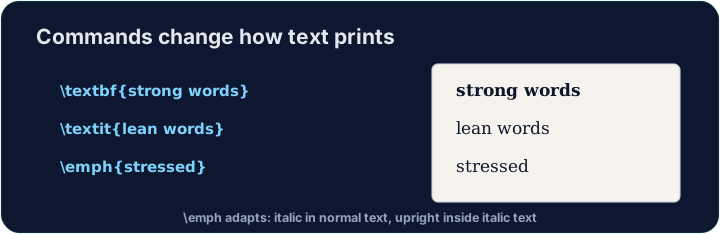
\emph{...}means "emphasise this" — usually italic, but it flips smartly inside italic text.- Prefer
\emphfor meaning, and\textitwhen you specifically want italic shapes.
日本語
賢い強調表示
\emph{...}は「これを強調」を意味 — 通常はイタリックですが、すでにイタリックのテキスト内では賢く切り替わります。- 意味の強調には
\emphを使い、特定の形状のイタリックが必要な場合に\textitを使います。
English
A note on quotes and dashes
- Type opening quotes with two backticks and closing with two apostrophes:
- A dash in a range is
--(en-dash, like 10--20); a pause in a sentence is---(em-dash). - These little touches are what make LaTeX documents look professional.
日本語
引用符とダッシュについて
- 開き括弧としてバックティック2つ、閉じ括弧としてアポストロフィ2つを使用します:
- 範囲のダッシュは
--(en-dash、例: 10--20);文内の一休みのダッシュは---(em-dash)。 - これらの細かい工夫が、LaTeX文書をプロフェッショナルに見せます。
English
Common mistakes
\textbf{...}is bold,\textit{...}italic,\emph{...}emphasis.- Every opening brace
{needs a matching}.
日本語
よくあるミス
\textbf{...}は太字、\textit{...}はイタリック、\emph{...}は強調です。- 開き波括弧
{には必ず対応する}が必要です。
Make the word important bold with \textbf{...}, and the word gently italic with \textit{...}. Then Run to see the styles. · \textbf{...}を使ってimportantという言葉を太字にし、\textit{...}を使ってgentlyという言葉をイタリックにしてください。その後、Runを実行してスタイルを確認してください。
Click Run to compile and preview the PDF. · コンパイルしてPDFをプレビューするには「実行」をクリックしてください。
Use the right tool for the job. Mark really with \emph{...} (emphasis that flips smartly), and show the file name report.tex in \texttt{...} (typewriter font). · タスクに適したツールを使用する。reallyに\emph{...}を適用して強調表示(スマートに切り替わる)し、ファイル名report.texを\texttt{...}でタイプライターフォントで表示する。
Click Run to compile and preview the PDF. · コンパイルしてPDFをプレビューするには「実行」をクリックしてください。