Tables · טבלאות
This page needs a recent browser (with SharedArrayBuffer support). Please update Chrome, Edge, Firefox or Safari to the latest version. · עמוד זה דורש דפדפן עדכני (תומך ב-SharedArrayBuffer). אנא עדכן את Chrome, Edge, Firefox או Safari לגרסה העדכנית ביותר.
English
Tables
- A table shows information in rows and columns.
- Start with
<table>. - Each row is a
<tr>(table row).
עברית
טבלאות
- טבלה מציגה מידע בשורות ועמודות.
- התחילו עם ⟨
<table>⟩. - כל שורה היא ⟨
<tr>⟩ (שורת טבלה).
English
Cells
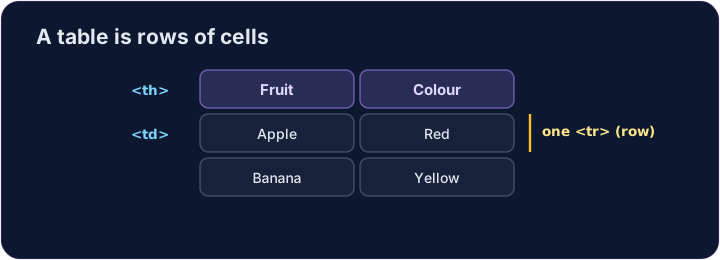
- Inside each row, each cell is a
<td>(table data). - For a heading cell, like a column title, use
<th>— it shows in bold. - Give every row the same number of cells.
עברית
תאים
- בתוך כל שורה, כל תא הוא ⟨
<td>⟩ (נתוני טבלה). - עבור תא כותרת, כמו כותרת עמודה, השתמשו ב-
<th>— הוא מוצג בעיבוי. - תנו לכל שורה את אותו מספר של תאים.
<table>
  <tr><th>Fruit</th><th>Colour</th></tr>
  <tr><td>Apple</td><td>Red</td></tr>
  <tr><td>Banana</td><td>Yellow</td></tr>
</table>
English
Common mistakes
- Cells (
<td>) go inside rows (<tr>). - Use
<th>for header cells.
עברית
טעויות נפוצות
- תאים (
<td>) נמצאים בתוך שורות (<tr>). - השתמשו ב-
<th>לתאי כותרת.
English
Now you try
- A table is rows (
<tr>) holding cells (<td>or<th>). - Build a small table, then add a header cell.
עברית
כעת תנסו בעצמכם
- טבלה היא שורות (
<tr>) המכילות תאים (<td>או ⟨<th>⟩). - בנו טבלה קטנה, ולאחר מכן הוסיפו תא כותרת.
Make a table with two rows. Each row is a <tr>, and put a <td> cell inside each row. · צור טבלה עם שתי שורות. כל שורה היא ⟨<tr>⟩, והכנס תא ⟨<td>⟩ בתוך כל שורה.
Add a header cell so the column has a title. Use <th> instead of <td> for it. · הוסף תא כותרת כדי שהעמודה תהיה בעלת כותרת. השתמש ב-<th> במקום <td> עבורו.