Connecting the app to the data
Introduit| English | Sens |
|---|---|
| parameterised query/ˌpærəˈmetəraɪzd ˈkwɪərɪ/ | requête paramétrée |
One quote mark in a login box, 1998
- In December 1998 the security researcher Jeff Forristal, writing as "rain.forest.puppy" in the hacker magazine Phrack, described how typing database code into a web form could make a server run it. The trick became known as SQL injection. It is still one of the most common web attacks.
- The fix is a parameterised query 参数化查询: the database receives the command and the user's data separately.
What is SQL injection?
Difficulté 1/5 · 100 pièces + un petit bonus lors de la première réussite aujourd'hui
Input treated as code.
How injection works
- Unsafe code builds a query by joining text:
"SELECT * FROM users WHERE name = '" + name + "'". - If someone types
' OR '1'='1as the name, the condition is always true and every user is returned.
The input ' OR '1'='1 makes the WHERE condition always true in the unsafe query.
Difficulté 1/5 · 100 pièces + un petit bonus lors de la première réussite aujourd'hui
Every row is returned.
Parameterised queries
- Safe code uses a placeholder:
SELECT * FROM users WHERE name = ?, then passesnameas a value. - The database treats the value only as data — a quote mark is just a character, never code.
Which query is safe?
Difficulté 1/5 · 100 pièces + un petit bonus lors de la première réussite aujourd'hui
A placeholder keeps data separate.
Return a small, permitted list
- After checking permission, select only the rows and columns needed: a student's own courses, with title and room — not every column of every student.
- Use
LIMITand paging for long lists.
One request, different server and browser states
A valid ID is not permission. Compare a confirmed empty list with a denied request, a failed lookup and a missing response; the interface must preserve these differences.
A course list should return every column of every student.
Difficulté 1/5 · 100 pièces + un petit bonus lors de la première réussite aujourd'hui
Only what is needed and permitted.
Worked example: one search, written safely
A search box looks up courses by title.
- Unsafe:
"SELECT * FROM courses WHERE title LIKE '%" + q + "%'". - Safe (Python):
cur.execute("SELECT course_id, title FROM courses WHERE title LIKE ? LIMIT 20", ("%" + q + "%",)). - Effect: whatever the user types is matched as text; only two columns and at most 20 rows return.
A search matches 57 courses and the query has LIMIT 20. How many rows return?
Difficulté 2/5 · 140 pièces + un petit bonus lors de la première réussite aujourd'hui
At most 20.
Three states in the interface
- While the request runs, show loading. If it returns no rows, show a clear empty message ("No courses match 'bio'").
- If it fails, show a failure message and a way to retry — never a blank page or raw error.
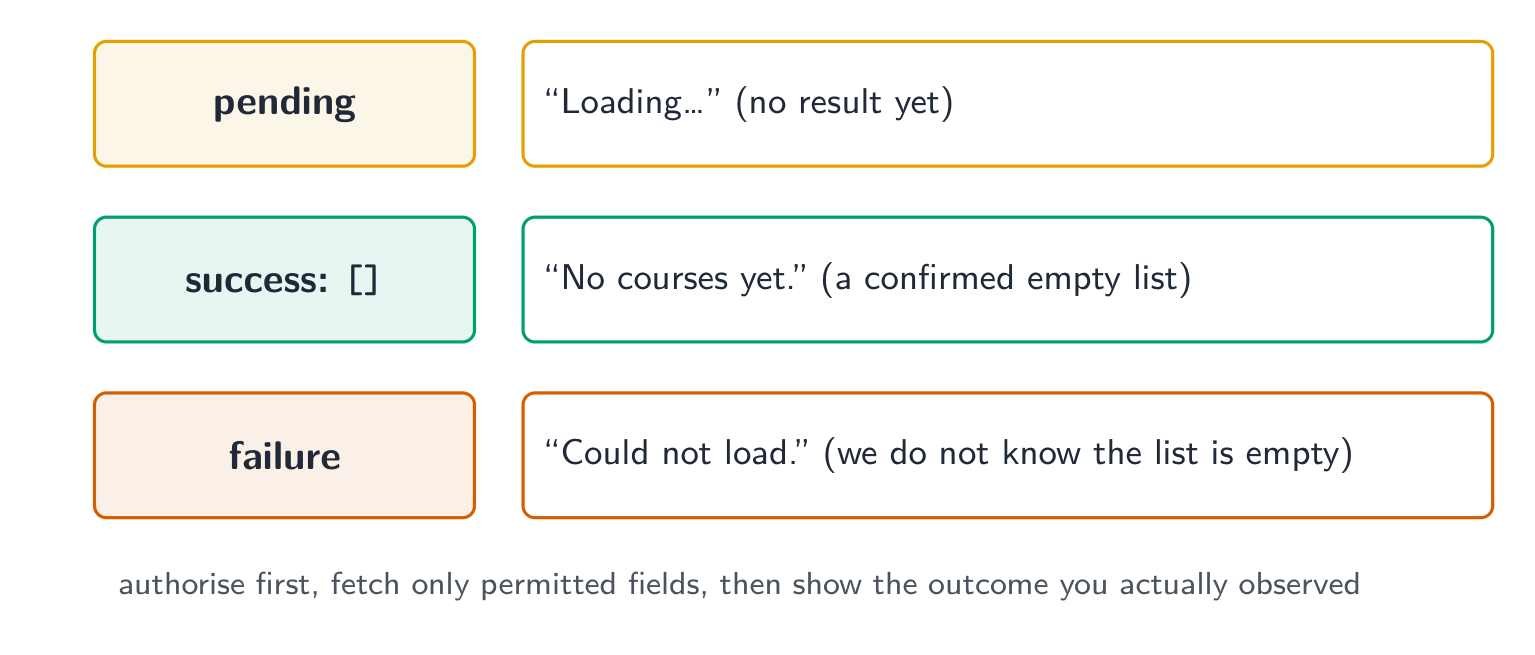
Match each situation to the state to show.
Difficulté 2/5 · 140 pièces + un petit bonus lors de la première réussite aujourd'hui
Three different messages.
Never build SQL by joining user text. Checking for "bad characters" misses cases; use placeholders every time.
Removing "bad characters" is as safe as a parameterised query.
Difficulté 1/5 · 100 pièces + un petit bonus lors de la première réussite aujourd'hui
Filters miss cases.
Pass user input to the database as parameters, never as part of the SQL text. Return only the permitted rows and columns, and show loading, empty and failure states clearly.
Explain to a classmate, in three or four sentences, why the unsafe search is dangerous and how the safe version fixes it.
Danger and fix.