Bold, italic and emphasis · Gras, italique et emphase
This page needs a recent browser (with SharedArrayBuffer support). Please update Chrome, Edge, Firefox or Safari to the latest version. · Cette page nécessite un navigateur récent (avec support SharedArrayBuffer). Veuillez mettre à jour Chrome, Edge, Firefox ou Safari vers la dernière version.
English
Styling words
- To change how words look, you wrap them in a command:
\textbf= bold,\textit= italic,\texttt=code-like.
Français
Mettre en forme le texte
- Pour changer l'apparence du texte, vous l'entourez d'une commande :
\textbf{bold} and \textit{italic} and \texttt{typewriter}
\textbf= gras,\textit= italique,\texttt=code-like.
English
Emphasis the smart way
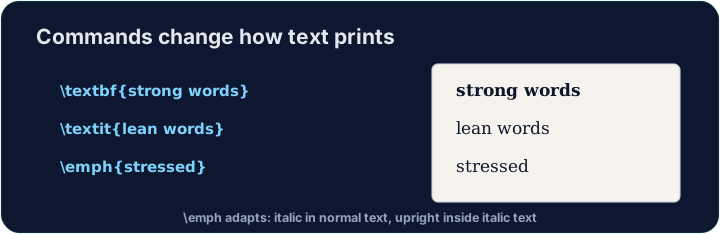
\emph{...}means "emphasise this" — usually italic, but it flips smartly inside italic text.- Prefer
\emphfor meaning, and\textitwhen you specifically want italic shapes.
Français
L'emphase intelligemment
\emph{...}signifie "emphasisez ceci" — généralement en italique, mais cela s'adapte intelligemment si le texte est déjà en italique.- Privilégiez
\emphpour le sens, et\textitlorsque vous voulez spécifiquement une police italique.
English
A note on quotes and dashes
- Type opening quotes with two backticks and closing with two apostrophes:
- A dash in a range is
--(en-dash, like 10--20); a pause in a sentence is---(em-dash). - These little touches are what make LaTeX documents look professional.
Français
Remarque sur les guillemets et les tirets
- Tapez les guillemets d'ouverture avec deux backticks et fermez-les avec deux apostrophes :
- Un tiret pour indiquer une plage est
--(tiret moyen, comme 10--20) ; une pause dans une phrase est---(tiret long). - Ces petites touches font que les documents LaTeX ont l'air professionnels.
English
Common mistakes
\textbf{...}is bold,\textit{...}italic,\emph{...}emphasis.- Every opening brace
{needs a matching}.
Français
Erreurs courantes
\textbf{...}est gras,\textit{...}italique,\emph{...}emphasis.- Chaque accolade ouvrante
{nécessite une accolade fermante correspondante}.
Make the word important bold with \textbf{...}, and the word gently italic with \textit{...}. Then Run to see the styles. · Rendez le mot important gras avec \textbf{...}, et le mot gently en italique avec \textit{...}. Puis Exécutez pour voir les styles.
Click Run to compile and preview the PDF. · Cliquez sur Exécuter pour compiler et prévisualiser le PDF.
Use the right tool for the job. Mark really with \emph{...} (emphasis that flips smartly), and show the file name report.tex in \texttt{...} (typewriter font). · Utilisez le bon outil pour la tâche. Marquez really avec \emph{...} (emphase intelligente), et affichez le nom de fichier report.tex en \texttt{...} (police machine à écrire).
Click Run to compile and preview the PDF. · Cliquez sur Exécuter pour compiler et prévisualiser le PDF.