Sélection : IF
Cette page nécessite un navigateur récent (avec support SharedArrayBuffer). Veuillez mettre à jour Chrome, Edge, Firefox ou Safari vers la dernière version.
English
IF makes a decision
- Selection chooses what to do, based on a test.
IFruns itsTHENblock only when the test isTRUE.- The block ends at
ENDIF.
English
DECLARE Age : INTEGER
Age ← 20
IF Age >= 18
  THEN
    OUTPUT "You may vote"
ENDIF
English
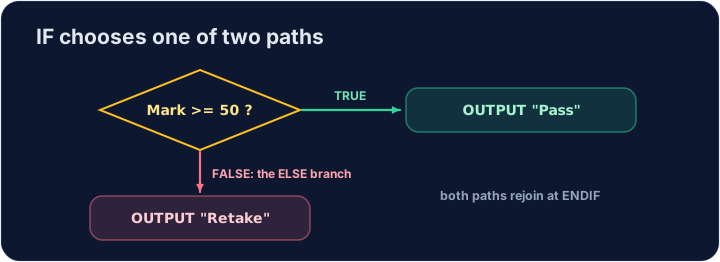
IF ... ELSE
ELSEgives the path to take when the test isFALSE.- Exactly one of the two blocks runs.
English
DECLARE Speed : INTEGER
Speed ← 64
IF Speed > 60
  THEN
    OUTPUT "Slow down"
  ELSE
    OUTPUT "OK"
ENDIF
Explorer
TRUE or FALSE — which block runs?
IF runs its THEN block when the test is TRUE; ELSE covers every other case.
English
Comparison operators
=equal to,<>not equal to.<><=>=compare sizes.
English
DECLARE Pupils : INTEGER
Pupils ← 23
IF MOD(Pupils, 4) = 0
  THEN
    OUTPUT "Teams of 4 work"
  ELSE
    OUTPUT MOD(Pupils, 4), " pupils left over"
ENDIF
English
Watch out
- In a test,
=means "is equal to". (The arrow←is for storing a value.) - Don't forget
THENafter the test andENDIFto close the block.
English
Common mistakes
- Write
IF ... THEN ... ELSE ... ENDIF— do not forgetENDIF. - Compare with
=in pseudocode conditions.
English
Now you try
- Read the input, then choose with
IF ... ELSE ... ENDIF. - Press Check answer to test it.
Difficulté 2/5 · 140 pièces + un petit bonus lors de la première réussite aujourd'hui
Read an INTEGER Number. If it is greater than 0, output positive, otherwise output not positive. For input 5, output positive.
Cliquez sur Exécuter pour voir le résultat ici.
Difficulté 2/5 · 140 pièces + un petit bonus lors de la première réussite aujourd'hui
Read an INTEGER Mark. Output Pass if it is 50 or more, otherwise Fail. For input 40, output Fail.
Cliquez sur Exécuter pour voir le résultat ici.
Difficulté 2/5 · 140 pièces + un petit bonus lors de la première réussite aujourd'hui
Read an INTEGER Number. Output even si MOD(Number, 2) = 0, otherwise odd. For input 8, output even.
Cliquez sur Exécuter pour voir le résultat ici.