Interactividad con JavaScript
Introducido| English | Significado |
|---|---|
| DOM/dɒm/ | DOM |
| event/ɪˈvent/ | evento |
| function/ˈfʌŋkʃn/ | función |
A menu opens, but its button still says it is closed
- A visible panel and its accessibility state can disagree. A reliable interaction updates both the content and the control that describes it.
- Browser JavaScript responds to user actions. Do not put private credentials in client code; visitors can inspect and change what runs on their machines.
Find the parsed elements
- The DOM 文档对象模型 represents the document as nodes as HTML is parsed. Code can query an existing node and change its properties.
- A script running before its target is parsed may get
null. A deferred external script runs after parsing; a script at the end of the body can also work for elements already above it.
¿Qué representa el DOM?
Dificultad 1/5 · 100 monedas + un pequeño bono en el primer intento de hoy
Los nodos están disponibles a medida que se analiza el documento; una consulta no puede encontrar un objetivo que aún no haya sido analizado.
Register the response once
- An event 事件 records an action such as a click or form submission.
addEventListenerregisters a function 函数 to run when that event is dispatched. - Find the button and panel, register the listener, then update state on each click. Do not call the function while registering it if you mean to pass it as a handler.
¿Qué método registra un controlador de eventos en un elemento?
Dificultad 1/5 · 100 monedas + un pequeño bono en el primer intento de hoy
addEventListener registra un callback para un evento como click.
Coloque los pasos para configurar esta interacción en orden.
Dificultad 3/5 · 200 monedas + un pequeño bono en el primer intento de hoy
El registro precede a la respuesta del evento; el controlador se ejecuta cuando el evento es despachado.
Keep a usable fallback
- Save this as an HTML file. The links are initially visible; the toggle button appears only after its handler is ready.
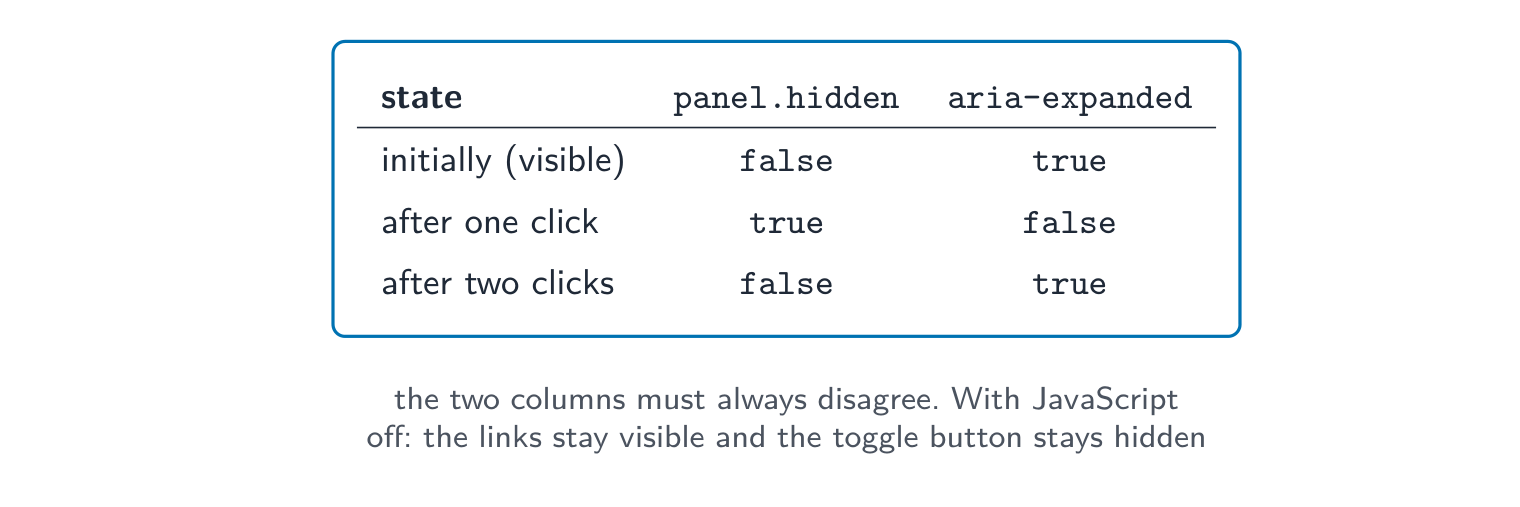
- Click the button twice. Check that the panel and
aria-expandedchange together. The native button also responds to keyboard activation.
<!doctype html>
<html lang="en">
<head><meta charset="utf-8"><title>Club menu</title></head>
<body>
  <button id="menu-button" type="button" hidden
          aria-controls="menu-panel" aria-expanded="true">Menu</button>
  <nav id="menu-panel" aria-label="Club">
    <a href="#meeting">Meeting details</a>
  </nav>
  <main id="meeting"><h1>Meet Thursday in room 12</h1></main>
  <script>
    const button = document.querySelector('#menu-button');
    const panel = document.querySelector('#menu-panel');
    button.addEventListener('click', () => {
      panel.hidden = !panel.hidden;
      button.setAttribute('aria-expanded', String(!panel.hidden));
    });
    button.hidden = false;
  </script>
</body>
</html>
Initially: links visible, expanded true. First click: links hidden, expanded false. Second click: links visible, expanded true. With JavaScript disabled, the original links remain visible.
En el ejemplo resuelto, JavaScript está desactivado. ¿Qué sucede con los enlaces de navegación originales?
Dificultad 1/5 · 100 monedas + un pequeño bono en el primer intento de hoy
Los enlaces comienzan visibles. El botón comienza oculto, por lo que un fallo en la mejora no elimina la navegación esencial.
Asocia cada estado del panel con el estado correcto del botón.
Dificultad 2/5 · 140 monedas + un pequeño bono en el primer intento de hoy
aria-expanded describe si la región controlada está expandida actualmente.
Separate helpful checks from trusted checks
- Browser validation can give quick feedback, but the server must validate submitted values and permissions independently. A caller can bypass or alter browser code.
- Use
textContentto insert plain text rather than interpreting it as HTML. Check missing elements and errors before adding more features.
A click handler alone does not make a custom element keyboard accessible. Use the appropriate native control and verify focus and activation. Also check that your CSS does not override the panel's hidden state.
Un servidor debe validar los valores enviados aunque el navegador ya los haya verificado.
Dificultad 1/5 · 100 monedas + un pequeño bono en el primer intento de hoy
Verdadero. Los llamadores pueden omitir o modificar el código del navegador, por lo que el servidor debe verificar los valores y permisos de forma independiente.
Trace two actions and a failure
- Record initial state and the state after two activations. Repeat using the keyboard, then check that essential navigation remains available without the script.
- Explain what runs in the browser and what still needs server checks. Test this local example without sending any real form data.
Parsed element → registered event handler → consistent state update. Preserve useful fallback content and keep trusted validation on the server.
El panel comienza visible. El interruptor se ejecuta dos veces. ¿Cuál es el estado final?
Dificultad 1/5 · 100 monedas + un pequeño bono en el primer intento de hoy
El primer clic lo oculta; el segundo lo restaura. Ambos estados deben permanecer consistentes.
¿Qué verificaciones corresponden a esta revisión de interacción local? Selecciona todas las que apliquen.
Dificultad 2/5 · 140 monedas + un pequeño bono en el primer intento de hoy
Prueba operación, estado y alternativa. El código del navegador no es un lugar seguro para credenciales privadas.