HTTPS, SSL/TLS and certificates · HTTPS, SSL/TLS y certificados
The padlock in your browser
- When you see HTTPS and a padlock, your connection to the website is encrypted.
- The "S" stands for Secure. It uses a protocol called TLS (the modern version of SSL).
El candado en tu navegador
- Cuando veas HTTPS y un candado, tu conexión al sitio web está encriptada.
- La "S" significa Segura. Utiliza un protocolo llamado TLS (la versión moderna de SSL).
How the secure connection is set up
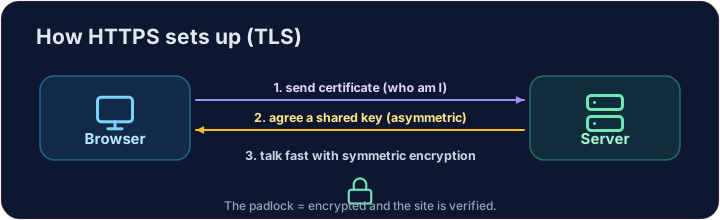
- TLS cleverly combines both kinds of encryption you have learned:
- It uses asymmetric encryption to safely agree on a shared secret key.
- Then it switches to fast symmetric encryption for the rest of the conversation.
- This "handshake" happens in a fraction of a second, before any page loads.
Cómo se establece la conexión segura
- TLS combina inteligentemente ambos tipos de encriptación que has aprendido:
- Utiliza encriptación asimétrica para acordar de forma segura una clave secreta compartida.
- Luego cambia a encriptación simétrica rápida para el resto de la conversación.
- Este "apretón de manos" ocurre en una fracción de segundo, antes de que cargue cualquier página.
How do you know the site is real?
- Encryption is useless if you are talking to an impostor. That is what digital certificates solve.
- A website's certificate is issued by a trusted Certificate Authority (CA) and signed with the CA's key.
- Your browser checks the signature. If it is valid, you know the site is who it claims to be.
¿Cómo sabes que el sitio es legítimo?
- La encriptación es inútil si te estás comunicando con un impostor. Es aquí donde entran los certificados digitales.
- El certificado de un sitio web es emitido por una Autoridad Certificadora (CA) de confianza y firmado con la clave de dicha CA.
- Tu navegador verifica la firma. Si es válida, sabes que el sitio es quien dice ser.
Putting it together
- Certificate → proves who the site is. TLS → keeps the conversation secret.
- That tiny padlock means: encrypted, and verified. No padlock on a login page? Walk away.
Covers: IGCSE 5.3 (SSL), A-Level 17.1 (SSL/TLS, digital certificates).
Juntando las piezas
- Certificado → demuestra quién es el sitio. TLS → mantiene la conversación en secreto.
- Ese pequeño candado significa: encriptado y verificado. ¿Sin candado en una página de inicio de sesión? Aléjate.
Cubre: IGCSE 5.3 (SSL), A-Level 17.1 (SSL/TLS, certificados digitales).
Now you try
- First put the four handshake steps in the right order — the exam loves this sequence.
- Then be the browser: look at a certificate's details and decide whether to trust it.
Ahora tú practica
- Primero ordena correctamente los cuatro pasos del apretón de manos — los exámenes adoran esta secuencia.
- Luego sé el navegador: revisa los detalles de un certificado y decide si confías en él.
Common mistakes
- HTTPS encrypts the traffic; the certificate proves the site's identity.
- A certificate warning is a real warning — do not click through it.
Errores comunes
- HTTPS encripta el tráfico; el certificado demuestra la identidad del sitio.
- Una advertencia de certificado es una advertencia real — no la ignores ni sigas adelante.
The TLS handshake · El handshake TLS
HTTPS sets up a secure channel before · antes any data is sent. · HTTPS establece un canal seguro antes de enviar cualquier dato.
Put the TLS handshake in order. Fill the list order with the four steps, first to last: hello, certificate, key exchange, secure data. · Ordena el handshake TLS. Rellena la lista order con los cuatro pasos, del primero al último: hello, certificate, key exchange, secure data.
Click Run to see the output here. · Haz clic en Ejecutar para ver la salida aquí.
Be the browser. Trust the certificate only if the name matches the site you asked for, the issuer is trusted, AND it has not expired (expires ≥ 2026). Print valid or invalid. · Sé el navegador. Confía en el certificado solo si el name coincide con el site que solicitaste, el emisor es confiable Y no ha expirado (expires ≥ 2026). Imprime valid o invalid.
Click Run to see the output here. · Haz clic en Ejecutar para ver la salida aquí.