Arreglos 2-D
Esta página necesita un navegador reciente (con soporte para SharedArrayBuffer). Por favor, actualiza Chrome, Edge, Firefox o Safari a la última versión.
English
Rows and columns
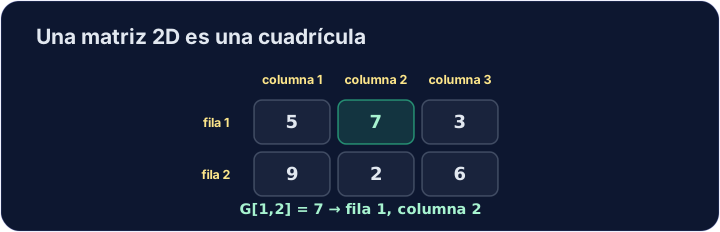
- A two-dimensional array is a grid. The declaration gives both bounds.
- Two indexes, separated by a comma, pick a cell: row, then column.
DECLARE Seats : ARRAY[1:3, 1:4] OF STRING
Seats[2, 3] ← "Mei"
Seats[3, 1] ← "Ola"
OUTPUT "Row 2, seat 3: ", Seats[2, 3]
OUTPUT "Row 3, seat 1: ", Seats[3, 1]
ARRAY[1:3, 1:4]is 3 rows by 4 columns: 12 cells. The row index always comes first.
English
One loop inside another
- The outer loop walks the rows. The inner loop walks the columns of that row.
NEXTnames the counter of the loop it closes.
English
DECLARE Sales : ARRAY[1:2, 1:3] OF INTEGER
DECLARE Shop, Day, ShopTotal : INTEGER
Sales[1, 1] ← 5
Sales[1, 2] ← 8
Sales[1, 3] ← 2
Sales[2, 1] ← 6
Sales[2, 2] ← 1
Sales[2, 3] ← 9
FOR Shop ← 1 TO 2
  ShopTotal ← 0
  FOR Day ← 1 TO 3
    ShopTotal ← ShopTotal + Sales[Shop, Day]
  NEXT Day
  OUTPUT "Shop ", Shop, ": ", ShopTotal
NEXT Shop
- Each row is one shop, each column one day. The inner loop adds up one row.
ShopTotal ← 0sits inside the outer loop, so each shop starts again from 0. For one total of the whole grid, set it to 0 once, before both loops.
English
Common mistakes
- Write
Grid[1, 2], with a comma. Both indexes start at the declared lower bound. - The inner
NEXTcomes before the outer one.
English
Now you try
- Read one cell of a 2-D array, then total every cell of a grid.
English
Independent transfer
The final task has no supplied algorithm. Plan its inputs, processing and outputs, then solve it before opening support. Check more than the sample case.
Dificultad 2/5 · 140 monedas + un pequeño bono en el primer intento de hoy
Declare Grid as ARRAY[1:2, 1:2] OF INTEGER. Store 7 in row 1, column 2, and output that cell.
Haz clic en Ejecutar para ver la salida aquí.
Dificultad 2/5 · 140 monedas + un pequeño bono en el primer intento de hoy
The grid is filled for you. Total all four cells and output the total (10).
Haz clic en Ejecutar para ver la salida aquí.
Dificultad 3/5 · 200 monedas + un pequeño bono en el primer intento de hoy
Read a 2 by 2 array row by row. Output the number of positive values in column 1, then column 2.
Haz clic en Ejecutar para ver la salida aquí.