Variables and DECLARE
Esta página necesita un navegador reciente (con soporte para SharedArrayBuffer). Por favor, actualiza Chrome, Edge, Firefox o Safari a la última versión.
English
A variable stores one value
- A variable has a name and holds one value you can change.
- The 2026 guide writes names in mixed case, starting with a letter:
NumberOfPlayersornumberOfPlayers. - These lessons use a capital first letter, the same shape as the guide's own examples.
English
DECLARE Lives : INTEGER
Lives ← 3
Lives ← Lives - 1
OUTPUT Lives
English
DECLARE, then the arrow
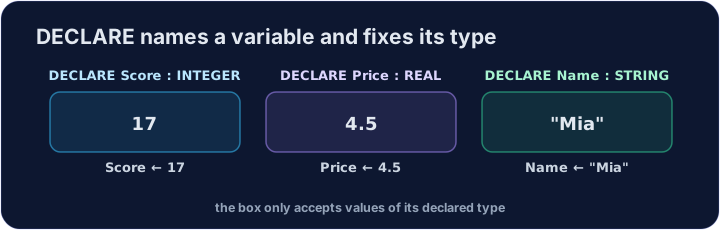
DECLARE Counter : INTEGERcreates the variable and names its type.- The assignment operator is
←. It stores the value on the right. =is not how you store a value.=means "is equal to" inside a test.
English
DECLARE Score : INTEGER
Score ← 40
Score ← Score + 2
OUTPUT Score
English
Watch out
- Declare a variable before you use it.
- An identifier starts with a letter. Digits may follow. The guide also allows
_. - Choose meaningful names such as
NumberOfPlayers; conventional indices such asIandJare allowed.
English
Common mistakes
Counter ← 1stores 1.Counter = 1is not an assignment.- One variable holds one value. Assigning again replaces it.
English
Now you try
- Declare an integer, store a value with
←, and output it.
English
Independent transfer
The final task has no supplied algorithm. Plan its inputs, processing and outputs, then solve it before opening support. Check more than the sample case.
Dificultad 1/5 · 100 monedas + un pequeño bono en el primer intento de hoy
Declare Total as an INTEGER, store 8, and output it.
Haz clic en Ejecutar para ver la salida aquí.
Dificultad 1/5 · 100 monedas + un pequeño bono en el primer intento de hoy
Declare Counter as an INTEGER. Start it at 0, add 1, and output it.
Haz clic en Ejecutar para ver la salida aquí.
Dificultad 3/5 · 200 monedas + un pequeño bono en el primer intento de hoy
Balance is an INTEGER supplied by the checker. Increase its stored value by 7, then output Balance. Write only the update and output statements.
Haz clic en Ejecutar para ver la salida aquí.