Linear search and bubble sort
This page needs a recent browser (with SharedArrayBuffer support). Please update Chrome, Edge, Firefox or Safari to the latest version.
Find one mark, then order the list
- Syllabus topic 10.2 asks for two algorithms on an array: a linear search and a bubble sort.
- A linear search looks at every cell. Remember the index when the value matches. If it never matches, the index stays 0.
- Searching does not move the values. Sorting does.
DECLARE A : ARRAY[1:4] OF INTEGER
DECLARE I, Pos : INTEGER
A[1] ← 4
A[2] ← 9
A[3] ← 1
A[4] ← 7
Pos ← 0
FOR I ← 1 TO 4
    IF A[I] = 9 THEN
        Pos ← I
    ENDIF
NEXT I
OUTPUT Pos
Bubble the largest to the end
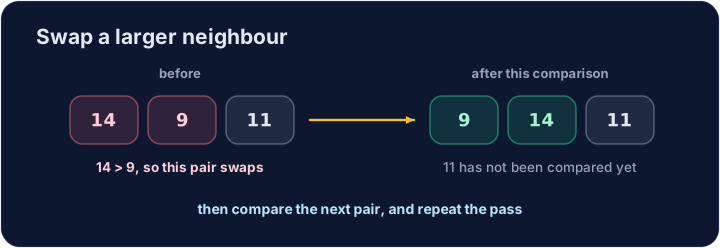
- Compare each pair of neighbours. When the left one is larger, swap them through a temporary variable.
- One comparison is not the whole sort. Repeat the pass until every pair has been handled.
- For four values, an outer loop of three passes and an inner loop across the pairs is enough.
DECLARE Score : ARRAY[1:4] OF INTEGER
DECLARE I, J, Temp : INTEGER
Score[1] ← 4
Score[2] ← 1
Score[3] ← 3
Score[4] ← 2
FOR I ← 1 TO 3
    FOR J ← 1 TO 3
        IF Score[J] > Score[J + 1] THEN
            Temp ← Score[J]
            Score[J] ← Score[J + 1]
            Score[J + 1] ← Temp
        ENDIF
    NEXT J
NEXT I
OUTPUT Score[1]
OUTPUT Score[2]
OUTPUT Score[3]
OUTPUT Score[4]
Common mistakes
- A swap needs three assignments. Copying the right cell over the left one loses the left value.
THENstays on theIFline in this guide. The innerNEXTnamesJ, the outer namesI.
Now you try
- First report where
9sits. Then sort four values into ascending order, one per line.
The array A holds 4, 9, 1, 7. Set Pos to the index of 9 (it is 2) and output Pos. If you never find it, Pos stays 0.
Click Run to see the output here.
The array Score holds 4, 1, 3, 2. Bubble-sort it into ascending order and output the four values, one per line.
Click Run to see the output here.