Add some style
This page needs a recent browser (with SharedArrayBuffer support). Please update Chrome, Edge, Firefox or Safari to the latest version. · تحتاج هذه الصفحة إلى متصفح حديث (يدعم SharedArrayBuffer). يرجى تحديث Chrome أو Edge أو Firefox أو Safari إلى أحدث إصدار.
English
Adding style
- HTML gives your page its content. CSS makes it look good.
- The easiest way to add CSS is a
<style>block near the top of your page. - Inside it, you write rules that change how things look.
العربية
إضافة تنسيق
- يمنحك HTML محتوى الصفحة. وCSS يجعلها تبدو جميلة.
- أسهل طريقة لإضافة CSS هي استخدام كتلة
<style>بالقرب من أعلى الصفحة. - بداخلها، تكتب قواعد تُغير كيفية ظهور الأشياء.
English
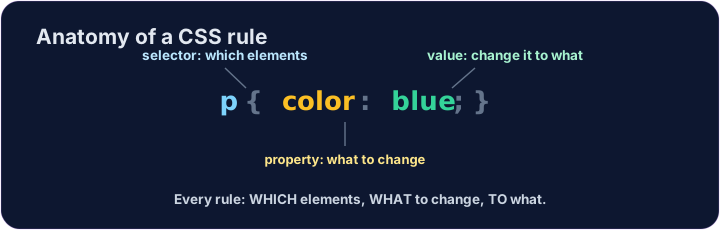
A CSS rule
- A rule has three parts:
p { color: blue; } pis the selector — which tags to change (here, every paragraph).coloris the property — what to change.blueis the value — what to change it to. (Together,color: blue;is one declaration.)
العربية
قاعدة CSS
- تتكون القاعدة من ثلاثة أجزاء:
p { color: blue; } pهو المحدد — أي الوسمات التي سيتم تغييرها (هنا، كل فقرة).colorهو الخاصية — ما يجب تغييره.blueهي القيمة — ما يجب تغييره إليه. (معًا،color: blue;تُشكل إعلانًا واحدًا.)
<style>
  p { color: blue; }
</style>
<p>Now I am blue.</p>
<p>So am I!</p>
English
Common mistakes
- Link the CSS file, or put rules inside a
<style>block. - Each CSS rule ends with a semicolon
;.
العربية
أخطاء شائعة
- اربط ملف CSS، أو ضع القواعد داخل كتلة
<style>. - تنتهي كل قاعدة CSS بنقطة المنقولة
;.
English
Now you try
- Write your rules inside the
<style>block. - Colour your paragraphs, then your heading.
العربية
الآن جرب بنفسك
- اكتب قواعدك داخل كتلة
<style>. - لون فقراتك، ثم العنوان الخاص بك.
Make every paragraph blue. Inside the <style> block, add the rule p { color: blue; }.
Now colour the heading too. Add a rule h1 { color: red; }.