Deleting rows · حذف الصفوف
Removing rows with DELETE
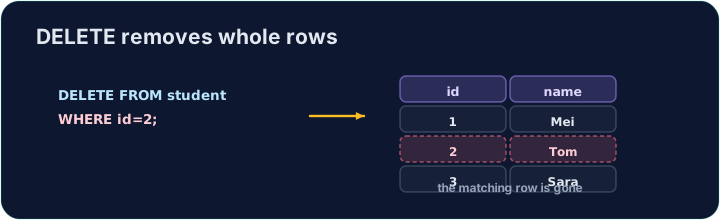
DELETE removes the rows that match a WHERE condition:
Only the matching rows are removed; the table and its other rows stay.
إزالة الصفوف عبر DELETE
DELETE يزيل الصفوف التي تطابق شرط WHERE:
DELETE FROM product WHERE code = 'P03';
يتم إزالة الصفوف المطابقة فقط؛ يبقى الجدول وصفوفه الأخرى.
The same warning
Like UPDATE, a DELETE with no WHERE hits every row:
Always check your WHERE before running a DELETE. The checker runs your DELETE, then reads the table back to confirm the right row is gone.
نفس التحذير
مثل UPDATE، فإن DELETE بدون WHERE يضرب كل صف:
DELETE FROM product; -- empties the whole table!
تحقق دائماً من WHERE قبل تشغيل DELETE. يقوم الفاح بتشغيل DELETE الخاص بك، ثم يقرأ الجدول مرة أخرى للتأكد من اختفاء الصف الصحيح.
Common mistakes
DELETEwithout aWHEREempties the table — always add theWHERE.- Test a risky delete first as a
SELECTwith the sameWHERE.
أخطاء شائعة
DELETEبدونWHEREيُفرغ الجدول — أضف دائماًWHERE.- اختبر عملية حذف خطرة أولاً كـ
SELECTمع نفسWHERE.
Delete the product with code 'P03' from the product table. (Afterwards only P01 and P02 remain.) · احذف المنتج ذو الرمز 'P03' من جدول product. (بعد ذلك يتبقى فقط P01 و P02.)
Click Run to see the output here. · اضغط تشغيل لرؤية المخرجات هنا.
Delete can use any condition. Remove every product that costs less than 2.00 with WHERE price < 2.00. Only the Pen (0.80) goes; check which rows remain. · يمكن للحذف استخدام أي شرط. أزل كل منتج سعره أقل من 2.00 باستخدام WHERE price < 2.00. سيذهب القلم فقط (0.80)؛ تحقق من الصفوف المتبقية.
Click Run to see the output here. · اضغط تشغيل لرؤية المخرجات هنا.