Inserting rows · إدراج الصفوف
Adding rows with INSERT
INSERT adds a new row to a table. List the columns, then a matching set of VALUES:
Text goes in single quotes; numbers do not. The values must line up with the columns, in the same order.
إضافة صفوف عبر INSERT
INSERT يضيف صفًا جديداً إلى جدول. اذكر الأعمود، ثم مجموعة مطابقة من VALUES:
INSERT INTO product (code, title, price, in_stock)
VALUES ('P04', 'Ruler', 1.20, 75);
النص بين علامات اقتباس مفردة؛ الأرقام بدونها. يجب أن تتوافق القيم مع الأعمود بنفس الترتيب.
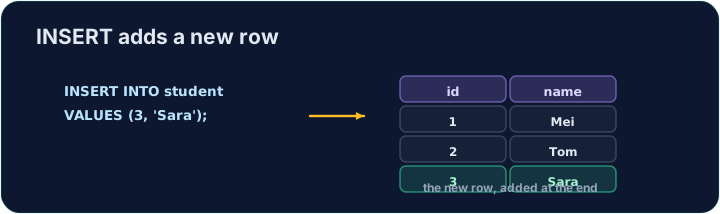
Seeing the effect
INSERT changes the data but returns no rows itself, so Run just reports how many rows changed. To see the new row, run a SELECT afterwards.
The checker does this for you: it runs your INSERT, then reads the table back to confirm your row is there.
رؤية التأثير
INSERT يغير البيانات ولا يعيد صفوفاً بحد ذاته، لذا Run يبلّغ فقط بعدد الصفوف المتغيرة. لرؤية الصف الجديد، قم بتشغيل SELECT afterwards.
يقوم الفاحص بذلك نيابة عنك: يشغل INSERT الخاص بك، ثم يقرأ الجدول مرة أخرى للتأكد من وجود صفك هناك.
Common mistakes
- The values must line up with the columns in order and type.
- Quote text values with single quotes.
أخطاء شائعة
- يجب أن تتوافق القيم مع الأعمود بالترتيب والنوع.
- ضع النص بين علامات اقتباس مفردة.
Add a new product to the product table: code 'P04', title 'Ruler', price 1.20, in_stock 75. · أضف منتجاً جديداً إلى جدول product: رمز 'P04'، عنوان 'Ruler'، سعر 1.20، متوفر في المخزون 75.
Click Run to see the output here. · اضغط تشغيل لرؤية المخرجات هنا.
Add a new customer to the customer table: id 5, name 'Eve', city 'York'. List the columns you are filling, then give the matching VALUES. · أضف عميلاً جديداً إلى جدول customer: id 5، name 'Eve'، city 'York'. اذكر الأعمدة التي تملؤها، ثم قدّم VALUES المقابلة.
Click Run to see the output here. · اضغط تشغيل لرؤية المخرجات هنا.