Counting and averaging · العد والمتوسط الحسابي
Summarising with aggregate functions
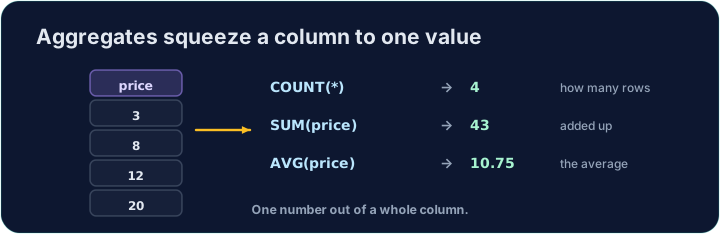
Sometimes you do not want the rows themselves, but a summary of them. Aggregate functions turn many rows into a single value:
COUNT(*)— how many rowsSUM(col)— the totalAVG(col)— the averageMIN(col)/MAX(col)— the smallest / largest
تلخيص مع الدوال المجمعة
أحيانًا لا تريد الصفوف نفسها، بل ملخصًا لها. الدوال المجمعة تحول العديد من الصفوف إلى قيمة واحدة:
COUNT(*)— عدد الصفوفSUM(col)— المجموع الكليAVG(col)— المتوسط الحسابيMIN(col)/MAX(col)— الأصغر / الأكبر
SELECT COUNT(*) FROM student;
Naming and rounding the result
Give the result a clear heading with AS. Averages often have long decimals, so wrap them in ROUND(value, 2) to keep 2 decimal places:
You can combine several aggregates in one query.
تسمية وتقريب النتيجة
منح النتيجة عنواناً واضحاً مع AS. الأverages غالباً ما تحتوي على فواصل عشرية طويلة، لذا غلفها في ROUND(value, 2) للحفاظ على 2 منازل عشرية:
SELECT COUNT(*) AS n, ROUND(AVG(score), 2) AS avg_score
FROM student;
يمكنك دمج عدة دوال مجمعة في استعلام واحد.
Common mistakes
COUNT(*)counts rows;AVG(col)averages a column.- Round an average with
ROUND(x, 2).
أخطاء شائعة
COUNT(*)يعد الصفوف؛AVG(col)يحسب متوسط عمود.- قم بتقريب المتوسط باستخدام
ROUND(x, 2).
In one query, show how many students there are as n, and their average score (to 2 decimal places) as avg_score. · في استعلام واحد، اعرض عدد الطلاب كـ n، ومتوسط درجاتهم (إلى 2 خانات عشرية) كـ avg_score.
Click Run to see the output here. · اضغط تشغيل لرؤية المخرجات هنا.
Show the lowest score as lowest, the highest as highest, and the total of all scores as total. · أظهر أقل درجة كـ lowest، وأعلى درجة كـ highest، والمجموع الكلي لجميع الدرجات كـ total.
Click Run to see the output here. · اضغط تشغيل لرؤية المخرجات هنا.