Programs and processes · البرامج والعمليات
This page needs a recent browser (with SharedArrayBuffer support). Please update Chrome, Edge, Firefox or Safari to the latest version. · تحتاج هذه الصفحة إلى متصفح حديث (يدعم SharedArrayBuffer). يرجى تحديث Chrome أو Edge أو Firefox أو Safari إلى أحدث إصدار.
English
What is a process?
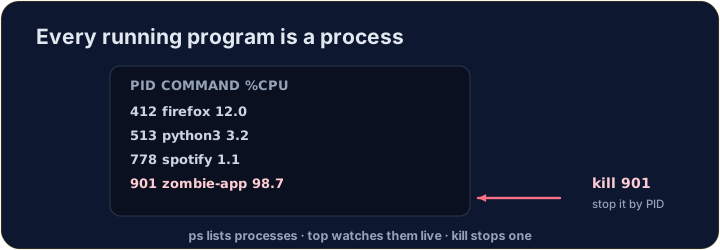
- A process is a running program. Your browser, your editor, and the shell itself are all processes.
- Each has a number — a PID (process ID) — that the system uses to keep track of it.
- (These commands talk to the real operating system, so they aren't part of our simulator — but here is what you'll use on a real machine.)
العربية
ما هو العملية؟
- العملية هي برنامج قيد التشغيل. متصفحك، محرر النصوص الخاص بك، وواجهة الأوامر نفسها جميعها عمليات.
- لكل منها رقم — PID (معرف العملية) — يستخدمه النظام لتتبعها.
- (تتحدث هذه الأوامر إلى نظام التشغيل الفعلي، لذا فهي ليست جزءاً من المحاكاة لدينا — ولكن إليك ما ستستخدمه على جهاز حقيقي.)
English
Seeing what is running
pslists your processes;ps auxlists all of them.top(or the nicerhtop) shows a live view that updates every second — handy to spot a program using too much CPU or memory:
- Press
qto quittop.
العربية
رؤية ما يعمل
psيعدد عملياتك؛ps auxيعدد جميعها.top(أو الأفضلhtop) يعرض عرضاً مباشراً يتجدد كل ثانية — مفيد لتحديد برنامج يستهلك الكثير من المعالج أو الذاكرة:
top
- اضغط
qللخروج منtop.
English
Stopping a process
- If a program is frozen, you can stop it. In the terminal, Ctrl-C stops the program running right now.
- For another process, find its PID with
psand thenkillit:
killpolitely asks the process to stop;kill -9forces it. Use force only as a last resort.
العربية
إيقاف عملية
- إذا تجمد برنامج، يمكنك إيقافه. في الطرفية، Ctrl-C يوقف البرنامج الذي يعمل الآن.
- لعملية أخرى، ابحث عن PID الخاص بها باستخدام
psثمkillلها:
kill 1234
killيطلب من العملية أن تتوقف بأدب؛kill -9تجبرها على ذلك. استخدم الإجبار كحل أخير فقط.
English
Now you try
ps,topandkilltalk to the real OS, so they are not in our simulator.- Instead, a snapshot of
psoutput is saved inprocesses.txt. Use the file tools you already know —grepandwc— to find the CPU-hog and count the processes.
العربية
الآن جرب بنفسك
psوtopوkillتتواصل مع نظام التشغيل الحقيقي، لذا فهي غير موجودة في المحاكاة لدينا.- بدلاً من ذلك، يتم حفظ لقطة من مخرجات
psفيprocesses.txt. استخدم أدوات الملفات التي تعرفها بالفعل —grepوwc— للعثور على المهدر للمعالج وعد العمليات.
English
Common mistakes
pslists running processes;killstops one by its PID.- A trailing
&runs a command in the background.
العربية
أخطاء شائعة
psيعدد العمليات النشطة؛killيوقف واحدة بناءً على PID.- وضع
&في النهاية يشغل أمراً في الخلفية.
You cannot run ps in this simulator, but a teammate saved its output to processes.txt (each line is PID name cpu%). Find the frozen, CPU-hogging firefox line with grep firefox processes.txt. · لا يمكنك تشغيل ps في هذا المحاكى، لكن زميل قد حفظ مخرجاته في processes.txt (كل سطر هو PID name cpu%). ابحث عن السطر firefox المعلق الذي يستهلك المعالج باستخدام grep firefox processes.txt.
How many processes were running when the snapshot was taken? Count the lines with cat processes.txt | wc -l. · كم عدد العمليات التي كانت قيد التشغيل عند أخذ لقطة الشاشة؟ عُدّ الأسطر التي تحتوي على cat processes.txt | wc -l.