Wildcards · الرموز النمطية
This page needs a recent browser (with SharedArrayBuffer support). Please update Chrome, Edge, Firefox or Safari to the latest version. · تحتاج هذه الصفحة إلى متصفح حديث (يدعم SharedArrayBuffer). يرجى تحديث Chrome أو Edge أو Firefox أو Safari إلى أحدث إصدار.
English
One command, many files
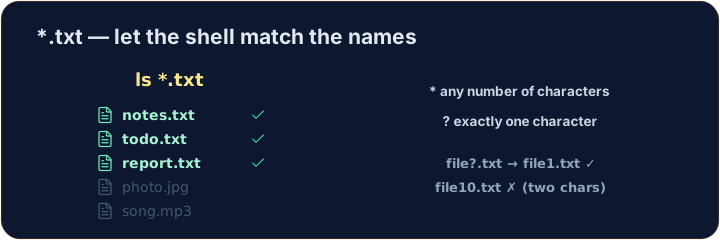
- A wildcard is a symbol that stands for "anything". The most common is
*. *.txtmeans "every name ending in.txt". The shell fills in the matches for you:
العربية
أمر واحد، ملفات متعددة
- الـ wildcard (رمز التعويض) هو رمز يمثل "أي شيء". الأكثر شيوعاً هو
*. *.txtتعني "كل اسم ينتهي بـ.txt". الطرفية تملأ المطابقات نيابة عنك:
ls *.txt
English
The two main wildcards
*matches any number of characters (even none).?matches exactly one character.
- So
file?.txtmatchesfile1.txtandfileA.txt, but notfile10.txt.
العربية
رمزي التعويض الرئيسيين
*يطابق أي عدد من الأحرف (حتى لو كان صفراً).?يطابق حرفًا واحدًا بالضبط.
ls file?.txt
- لذا
file?.txtيطابقfile1.txtوfileA.txt، لكنه لا يطابقfile10.txt.
English
Be careful with delete
- Wildcards are powerful — and that cuts both ways:
- That deletes every
.txtfile at once. Runls *.txtfirst to see exactly what will go.
العربية
كن حذراً عند الحذف
- النماذج العامة قوية — وهذا ينطبق على الحالتين:
rm *.txt
- ذلك يحذف كل ملفات
.txtفي آن واحد. شغّلls *.txtأولاً لترى بالضبط ما سيختفي.
English
Common mistakes
*matches any text and?matches one character.- Quote a name that has spaces, or the shell splits it into two.
العربية
أخطاء شائعة
*يطابق أي نص و?يطابق حرفاً واحداً.- ضع اسماً بين علامتي تنصيص إذا كان يحتوي على مسافات، وإلا سيقسمه القوقب إلى جزأين.
List only the .txt files using the * wildcard: ls *.txt. · عدّ فقط ملفات .txt باستخدام الرمز النمطي *: ls *.txt.
Delete all the .txt files at once with rm *.txt. The check lists what is left. · احذف كل ملفات .txt دفعة واحدة باستخدام rm *.txt. يعرض التحقق ما بقي.