The shell and the prompt · الصدفة والأمر الرئيسي
This page needs a recent browser (with SharedArrayBuffer support). Please update Chrome, Edge, Firefox or Safari to the latest version. · تحتاج هذه الصفحة إلى متصفح حديث (يدعم SharedArrayBuffer). يرجى تحديث Chrome أو Edge أو Firefox أو Safari إلى أحدث إصدار.
English
The prompt
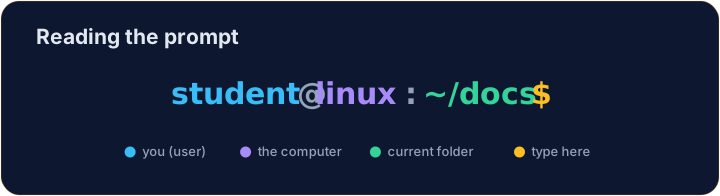
- When the terminal is ready, it shows a prompt and waits:
- That tells you who you are (
student), the computer (linux), and the folder you are in (~, your home). - You type a command after the
$, press Enter, and the computer runs it.
العربية
سطر الأوامر
- عندما تكون الطرفية جاهزة، تظهر سطر الأوامر وتنتظر:
student@linux:~$
- يخبرك هذا بـ من أنت (
student)، الـ حاسوب (linux)، والمجلد الذي تتواجد فيه (~، مجلدك الشخصي). - تكتب أمراً بعد
$، تضغط Enter، ويقوم الحاسوب بتنفيذه.
English
Where am I?
- The command
pwdprints your current folder — your "you are here" on the map:
- Press the ▶ on that example to try it. (
~is short for your home folder,/home/student.)
العربية
أين أنا؟
- أمر
pwdيطبع مجلدك الحالي — موقع "أنت هنا" على الخريطة:
pwd
- اضغط على ▶ في المثال لتجربته. (
~اختصار لمجلدك الشخصي،/home/student.)
English
Make the computer talk
echosimply prints back what you type. It is the classic first command:
- Run it, then try the two tasks below.
العربية
جعل الحاسوب يتحدث
- أمر
echoيطبع ببساطة ما تكتبه. إنه الأمر الكلاسيكي الأول:
echo Hello from the shell
- شغّله، ثم جرب المهمتين أدناه.
English
Common mistakes
- Commands are case-sensitive:
LSis notls. - The shell runs one command per line when you press Enter.
العربية
أخطاء شائعة
- الأوامر حساسة لحالة الأحرف:
LSلا يساويls. - يعمل Shell أمر واحد لكل سطر عند الضغط على Enter.
The prompt is waiting for a command. Type pwd (print working directory) to see which folder you are in, then click Run. · الأمر الرئيسي ينتظر أمراً. اكتب pwd (print working directory) لترى المجلد الذي تتواجد فيه، ثم اضغط Run.
echo prints back whatever you give it. Use it to print the word hello. · echo يطبع ما تعطيه له. استخدمه لطباعة كلمة hello.