Citations and bibliography · المراجع والمراجعية
This page needs a recent browser (with SharedArrayBuffer support). Please update Chrome, Edge, Firefox or Safari to the latest version. · تحتاج هذه الصفحة إلى متصفح حديث (يدعم SharedArrayBuffer). يرجى تحديث Chrome أو Edge أو Firefox أو Safari إلى أحدث إصدار.
English
Citing your sources
- Academic writing must say where facts came from. LaTeX makes this tidy.
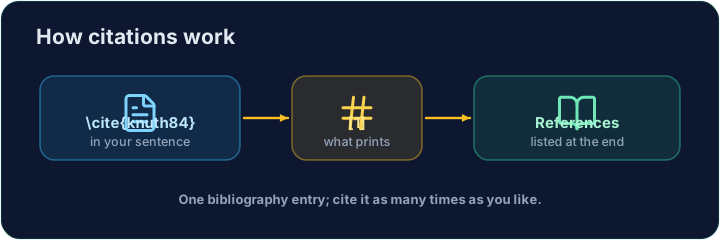
- You keep a list of sources, each with a key, and cite the key in your text.
العربية
الاستشهاد بمصادرك
- يجب أن يشير الكتابة الأكاديمية إلى مصدر الحقائق. يجعل LaTeX ذلك منظماً.
- تحتفظ بقائمة بالمصادر، لكل منها مفتاح، وتشير إلى المفتاح في نصك.
English
The bibliography
- List your sources in a
thebibliographyenvironment, each as a\bibitem:
- The
{9}just says "numbers are one digit wide".lamportis the key you choose.
العربية
قائمة المراجع
- اذكر مصادرك في بيئة
thebibliography، كل منها كـ\bibitem:
\begin{thebibliography}{9}
  \bibitem{lamport} Leslie Lamport. \emph{LaTeX}. 1986.
\end{thebibliography}
{9}يقول ببساطة "الأرقام بعرض خانة واحدة".lamportهو المفتاح الذي تختاره.
English
Citing in the text
- Anywhere in the document, write
\cite{lamport}:
- LaTeX prints
[1]and keeps the numbers in order. Add a source and everything renumbers.
العربية
الاستشهاد في النص
- في أي مكان في المستند، اكتب
\cite{lamport}:
LaTeX is powerful~\cite{lamport}.
- لطكس يطبع
[1]ويحافظ على ترتيب الأرقام. أضف مصدرًا وسيعيد ترقيم كل شيء.
English
Common mistakes
\cite{key}needs that key defined in your bibliography.- Compile twice, or the citations show as
?.
العربية
أخطاء شائعة
- يحتاج
\cite{key}إلى أن يكون هذا المفتاح مُعرّفًا في قائمة المراجع الخاصة بك. - قم بالتجميع مرتين، وإلا ستظهر الاقتباسات كـ
?.
Cite the book in the sentence with \cite{lamport}, and add a matching \bibitem{lamport} entry inside the bibliography. The same key links the two. · استشهد بالكتاب في الجملة بـ \cite{lamport}، وأضف مدخلاً مطابقاً \bibitem{lamport} داخل المراجعية. تربط نفس المفتاح بين الاثنين.
Click Run to compile and preview the PDF. · اضغط تشغيل لتركيب وعرض ملف PDF.
Add a second source. Give the second book a \bibitem{knuth} entry, then cite it in the sentence with \cite{knuth}. Watch LaTeX number them in citation order. · أضف مصدراً ثانياً. أعطِ الكتاب الثاني مدخلاً \bibitem{knuth}، ثم استشهده في الجملة بـ \cite{knuth}. راقب كيف يقوم LaTeX بترتيبه حسب ترتيب الاستشهاد.
Click Run to compile and preview the PDF. · اضغط تشغيل لتركيب وعرض ملف PDF.