Maths — your first formula · رياضيات — معادلتك الأولى
This page needs a recent browser (with SharedArrayBuffer support). Please update Chrome, Edge, Firefox or Safari to the latest version. · تحتاج هذه الصفحة إلى متصفح حديث (يدعم SharedArrayBuffer). يرجى تحديث Chrome أو Edge أو Firefox أو Safari إلى أحدث إصدار.
English
Maths mode
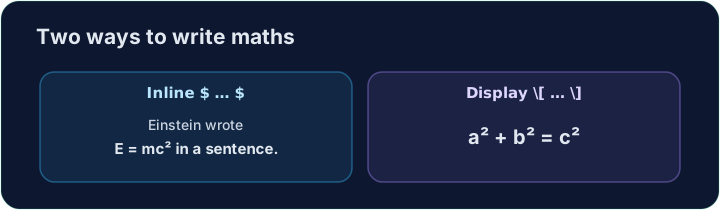
- This is what LaTeX is famous for. To write maths, switch into maths mode with dollar signs:
- Text between
$ ... $is typeset as maths, right inside your sentence. This is inline maths.
العربية
وضع الرياضيات
- هذا ما يشتهر به LaTeX. لكتابة الرياضيات، انتقل إلى وضع الرياضيات باستخدام علامات الدولار:
The equation $E = mc^2$ changed physics.
- النص الموجود بين
$ ... $يتم تنسيقه كرياضيات، مباشرة داخل جملة. هذه رياضيات مدمجة.
English
Powers and indices
^raises a superscript (a power);_lowers a subscript:
- For more than one character, group them with braces:
$x^{10}$,$a_{i+1}$.
العربية
الأسس والفهارس
^يرفع أعلىاً (أس)؛_ينزل أسفل (فهرس):
$x^2$, $a_1$, and $x^2 + y^2 = r^2$
- لأكثر من حرف واحد، قم بتجميعها بين أقواس:
$x^{10}$،$a_{i+1}$.
English
Big, centred equations
- For an important equation on its own line, use display maths
\[ ... \]:
- Now write your own inline formula in the task below.
العربية
معادلات كبيرة ومركزة
- لمعادلة مهمة في سطر مستقل، استخدم الرياضيات المعروضة
\[ ... \]:
\[ a^2 + b^2 = c^2 \]
- الآن اكتب معادلتك المدمجة الخاصة بك في المهمة أدناه.
English
Common mistakes
- Inline maths goes in
$...$; a missing closing$breaks everything after it. - Display maths uses
\[ ... \].
العربية
أخطاء شائعة
- توضع الرياضيات المدمجة في
$...$؛ وقوف إغلاق$مفقود يكسر كل ما يليه. - تستخدم الرياضيات المعروضة
\[ ... \].
Replace the words with real maths. Write the area of a circle as an inline formula: $A = \pi r^2$. The $ ... $ turns on maths mode, \pi is π, and ^2 is the power. · استبدل الكلمات برياضيات حقيقية. اكتب مساحة الدائرة كمعادلة ضمن سطرية: $A = \pi r^2$. الـ $ ... $ يُفعّل وضع الرياضيات، \pi هي π، و^2 هي القوة.
Click Run to compile and preview the PDF. · اضغط تشغيل لتركيب وعرض ملف PDF.
For an important equation, give it its own line with display maths \[ ... \]. Write Pythagoras' theorem: \[ a^2 + b^2 = c^2 \]. · بالنسبة لمعادلة مهمة، امنحها سطوراً خاصة باستخدام رياضيات عرضية \[ ... \]. اكتب نظرية فيثاغورس: \[ a^2 + b^2 = c^2 \].
Click Run to compile and preview the PDF. · اضغط تشغيل لتركيب وعرض ملف PDF.