Bold, italic and emphasis · التغميق، التمييز الخطي والتأكيد
This page needs a recent browser (with SharedArrayBuffer support). Please update Chrome, Edge, Firefox or Safari to the latest version. · تحتاج هذه الصفحة إلى متصفح حديث (يدعم SharedArrayBuffer). يرجى تحديث Chrome أو Edge أو Firefox أو Safari إلى أحدث إصدار.
English
Styling words
- To change how words look, you wrap them in a command:
\textbf= bold,\textit= italic,\texttt=code-like.
العربية
تنسيق الكلمات
- لتغيير مظهر الكلمات، تقوم بـتغليفها في أمر:
\textbf{bold} and \textit{italic} and \texttt{typewriter}
\textbf= خط عريض،\textit= مائل،\texttt=code-like.
English
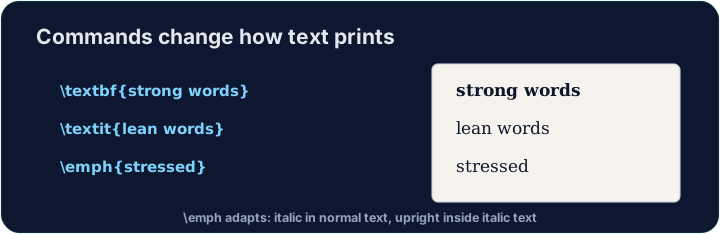
Emphasis the smart way
\emph{...}means "emphasise this" — usually italic, but it flips smartly inside italic text.- Prefer
\emphfor meaning, and\textitwhen you specifically want italic shapes.
العربية
التأكيد بطريقة ذكية
\emph{...}يعني "التأكيد على هذا" — عادة ما يكون خطًا مائلًا، لكنه يعكس نفسه بشكل ذكي داخل النص المائل.- يُفضل استخدام
\emphلـ المعنى، و\textitعندما تريد تحديدًا أشكال الخطوط المائلة.
English
A note on quotes and dashes
- Type opening quotes with two backticks and closing with two apostrophes:
- A dash in a range is
--(en-dash, like 10--20); a pause in a sentence is---(em-dash). - These little touches are what make LaTeX documents look professional.
العربية
ملاحظة حول علامات الاقتباس والشرطات
- اكتب علامات الاقتتاح بمزيج من علامتي انحداف (backticks) وإغلاقها بعلامتي اقتباس مفردة:
- الشرطة في نطاق هي
--(شرطة قصيرة en-dash، مثل 10--20)؛ والفاصل في الجملة هو---(شرطة طويلة em-dash). - هذه اللمسات الصغيرة هي ما يجعل مستندات LaTeX تبدو احترافية.
English
Common mistakes
\textbf{...}is bold,\textit{...}italic,\emph{...}emphasis.- Every opening brace
{needs a matching}.
العربية
أخطاء شائعة
\textbf{...}هو خط عريض،\textit{...}مائل،\emph{...}تأكيد.- كل قوس مفتوح
{يحتاج إلى قوس مغلق مماثل}.
Make the word important bold with \textbf{...}, and the word gently italic with \textit{...}. Then Run to see the styles. · اجعل كلمة important بخط غليظ باستخدام \textbf{...}، وكلمة gently بخط مائل باستخدام \textit{...}. ثم Run لرؤية الأنماط.
Click Run to compile and preview the PDF. · اضغط تشغيل لتركيب وعرض ملف PDF.
Use the right tool for the job. Mark really with \emph{...} (emphasis that flips smartly), and show the file name report.tex in \texttt{...} (typewriter font). · استخدم الأداة المناسبة للعمل. ضع حرف 'really' عند \emph{...} (تأكيد ذكي مقلوب)، وأظهر اسم الملف report.tex في \texttt{...} (خط الآلة الكاتبة).
Click Run to compile and preview the PDF. · اضغط تشغيل لتركيب وعرض ملف PDF.