Defending a system · الدفاع عن النظام
This page needs a recent browser (with SharedArrayBuffer support). Please update Chrome, Edge, Firefox or Safari to the latest version. · تحتاج هذه الصفحة إلى متصفح حديث (يدعم SharedArrayBuffer). يرجى تحديث Chrome أو Edge أو Firefox أو Safari إلى أحدث إصدار.
English
Walls at the edge
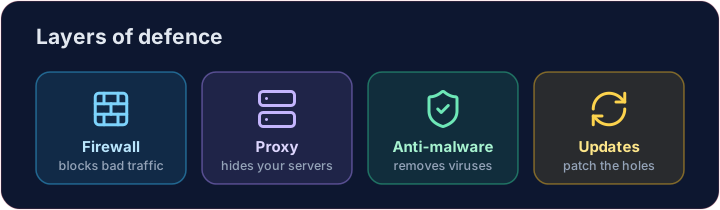
- A firewall sits between your network and the internet, blocking traffic that breaks the rules.
- A proxy server stands in front of your servers, hiding them and filtering requests.
- Together they keep unwanted visitors out before they reach anything important.
العربية
الجدران عند الحافة
- جدار الحماية يقع بين شبكتك والإنترنت، ويحظر حركة المرور التي تخالف القواعد.
- خادم الوكيل يقف أمام خوادمك، يخفيها ويصفي الطلبات.
- معاً يحفظان الزوار غير المطلوبين خارجاً قبل أن يصلوا لأي شيء مهم.
English
Software defences
- Anti-malware (anti-virus / anti-spyware) scans for and removes known malware.
- Automatic updates patch weaknesses as soon as fixes are released — most attacks use old, known holes.
العربية
دفاعات البرمجيات
- مكافحة البرمجيات الخبيثة (مضاد للفيروسات / مضاد للتجسس) يفحص ويزيل البرمجيات الخبيثة المعروفة.
- التحديثات التلقائية تُصلح الثغرات بمجرد صدور الإصلاحات — معظم الهجمات تستغل ثقوباً قديمة وم knownة.
English
Limiting the damage
- Access levels give each person only the rights they need — a student cannot change a teacher's grades.
- Privacy settings control who can see your data on a service.
- If one account is broken into, good access levels stop the attacker reaching everything.
العربية
تقليل الضرر
- مستويات الوصول تمنح كل شخص الصلاحيات اللازمة فقط — لا يستطيع طالب تعديل درجات معلم.
- إعدادات الخصوصية تتحكم في من يمكنه رؤية بياناتك على خدمة معينة.
- إذا تم اختراق حساب واحد، فإن مستويات الوصول الجيدة تمنع المهاجم من الوصول لكل شيء.
English
Smart habits
- Check the URL of a link before clicking, and the spelling and tone of messages.
- Look for HTTPS (the padlock) before entering a password — that is encryption at work, which we'll cover soon.
Covers: IGCSE 5.3 (solutions), A-Level 6.1 (security measures).
العربية
عادات ذكية
- تحقق من رابط URL للروابط قبل النقر، والإملاء والنبرة في الرسائل.
- ابحث عن HTTPS (رمز القفل) قبل إدخال كلمة المرور — هذا يعني وجود تشفير، وسنتناولها قريبًا.
يتضمن: IGCSE 5.3 (محلول)، A-Level 6.1 (إجراءات أمنية).
English
Now you try
- First act as a firewall: let the allowed ports through and collect everything else in a blocked list.
- Then match each threat to the defence that stops it.
العربية
الآن جرب بنفسك
- أولاً، كن كجدار حماية: سمح للموانئ المسموحة بالمرور واجمع كل ما هو آخر في قائمة محظورة.
- ثم طابق كل تهديد مع الدفاع الذي يوقفه.
English
Common mistakes
- Use layers: firewall, updates, anti-malware and backups.
- No single measure is enough — this is defence in depth.
العربية
أخطاء شائعة
- استخدم الطبقات: جدار الحماية، التحديثات، برنامج مكافحة البرمجيات الخبيثة والنسخ الاحتياطية.
- لا تكفي أي إجراء واحد — هذا هو الدفاع المتعدد الطبقات.
Act as a firewall. Only ports in allowed may pass. Build a list blocked of every requested port that is not allowed, and print it. · اعمل كجدار حماية. فقط المنافذ في allowed قد تمر. ابنِ قائمة blocked من كل منفذ مطلوب غير مسموح به، وطبعها.
Click Run to see the output here. · اضغط تشغيل لرؤية المخرجات هنا.
Match each problem to the defence that stops it: anti-malware, updates or access levels. · طابق كل مشكلة مع الدفاع الذي يوقفها: anti-malware، updates أو access levels.
Click Run to see the output here. · اضغط تشغيل لرؤية المخرجات هنا.