Using objects: String, Math, and wrappers · استخدام الكائنات: String، Math، والأغطية
Using objects
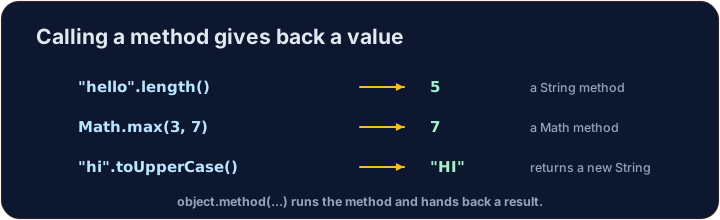
- An object is a value that knows how to do things. You call its methods with a dot
.. - A
Stringis an object.Math,Integer, andDoublegive you ready-made tools. - In this lesson you learn to make objects and use their methods.
استخدام الكائنات
- الكائن هو قيمة تعرف كيف تقوم بالأشياء. استدعي طرائقه باستخدام النقطة
.. Stringهو كائن.Math،Integer، وDoubleتقدم لك أدوات جاهزة.- في هذه الدرس تتعلم كيفية صنع الكائنات واستخدام طرائقها.
Making objects with new
- Some objects are made with the keyword
newand a constructor. - A
Stringis special: you can write it directly with quotes, like"hi". - You can also make a separate
Stringobject withnew String("..."), but quotes are the normal way.
صنع كائنات باستخدام new
- بعض الكائنات تُصنع باستخدام الكلمة المفتاحية
newوالمُبدئ. Stringخاص: يمكنك كتابته مباشرة باستخدام علامات الاقتباس، مثل"hi".- يمكنك أيضاً صنع كائن
Stringمنفرد باستخدامnew String("...")، لكن علامات الاقتباس هي الطريقة العادية.
public class Main {
    public static void main(String[] args) {
        String greeting = "Hello";
        String copy = new String("Hello");
        System.out.println(greeting);
        System.out.println(copy);
    }
}
String methods
s.length()— how many characters are ins.s.charAt(i)— the character at positioni(the first position is 0).s.substring(a, b)— the part fromaup to but not includingb.s.indexOf("x")— the first position of"x", or-1if not found.
طرق String
s.length()— كم عدد الأحرف الموجودة فيs.s.charAt(i)— الحرف عند الموقعi(الموقع الأول هو 0).s.substring(a, b)— الجزء منaإلى ولكن دون تضمينb.s.indexOf("x")— الموقع الأول لـ"x"، أو-1إذا لم يتم العثور عليه.
public class Main {
    public static void main(String[] args) {
        String word = "computer";
        System.out.println(word.length());        // 8
        System.out.println(word.charAt(0));        // c
        System.out.println(word.substring(0, 4));  // comp
        System.out.println(word.indexOf("put"));   // 3
    }
}
Comparing Strings
- Use
s.equals(other)to check if two Strings have the same letters. - Do not use
==to compare Strings — it can give the wrong answer. We learn why in lesson 3. s.compareTo(other)returns0when equal, a negative number ifscomes first in order, and a positive number if it comes later.
مقارنة النصوص
- استخدم
s.equals(other)للتحقق مما إذا كان نصان من نوع String يحتويان على نفس الأحرف. - لا تستخدم
==لمقارنة النصوص — يمكن أن تعطي إجابة خاطئة. نتعلم السبب في الدرس 3. s.compareTo(other)يعيد0عند التساوي، عدداً سالباً إذا كانsيأتي أولاً في الترتيب، وعدداً إيجابياً إذا كان يأتي لاحقاً.
public class Main {
    public static void main(String[] args) {
        String a = "cat";
        String b = "cat";
        String c = "dog";
        System.out.println(a.equals(b));   // true
        System.out.println(a.equals(c));   // false
        System.out.println(a.compareTo(c)); // negative: "cat" is before "dog"
    }
}
Math methods
Mathholds math tools. You call them onMathitself, likeMath.abs(-5).Math.abs(x)— the size ofxwith no minus sign.Math.pow(b, e)—bto the powere(returns adouble).Math.sqrt(x)— the square root ofx(returns adouble).Math.random()— a randomdoublefrom0.0up to (not including)1.0.
طرق الرياضيات
Mathيحتوي على أدوات رياضية. تستدعيها علىMathنفسها، مثلMath.abs(-5).Math.abs(x)— حجمxبدون علامة سالب.Math.pow(b, e)—bمرفوعة للأسe(تُرجع قيمة من نوعdouble).Math.sqrt(x)— الجذر التربيعي لـx(يعيدdouble).Math.random()— رقم عشوائيdoubleمن0.0حتى (ولكن دون تضمين)1.0.
public class Main {
    public static void main(String[] args) {
        System.out.println(Math.abs(-7));       // 7
        System.out.println(Math.pow(2, 3));     // 8.0
        System.out.println(Math.sqrt(9));       // 3.0
        // Math.random() changes each run, so we do not print it here.
    }
}
Wrappers and autoboxing
intanddoubleare simple types. Their object versions areIntegerandDouble.- Java can switch between them for you. This is called autoboxing.
Integer.parseInt("42")turns text into anint.Double.parseDouble("3.5")turns text into adouble.
wrappers and autoboxing
intوdoubleأنواع بسيطة. نسخ الكائن الخاصة بها هيIntegerوDouble.- يمكن لـ Java التبديل بينهما نيابة عنك. هذا يسمى التغليف التلقائي.
Integer.parseInt("42")يحول النص إلىint.Double.parseDouble("3.5")يحول النص إلىdouble.
public class Main {
    public static void main(String[] args) {
        Integer boxed = 10;        // int -> Integer (autoboxing)
        int back = boxed;          // Integer -> int (unboxing)
        int n = Integer.parseInt("42");
        double d = Double.parseDouble("3.5");
        System.out.println(back + n);   // 52
        System.out.println(d);          // 3.5
    }
}
Common mistakes
- Compare Strings (and other objects) with
.equals(), not==. Math.random()returns a value from0up to (but not including)1.
أخطاء شائعة
- قارن السلاسل (وغيرها من الكائنات) باستخدام
.equals()، وليس==. Math.random()يُرجع قيمة من0حتى (بما في ذلك)1.
Now you try
- Each task pre-fills the class skeleton — write your code inside main, or complete the method shown.
- Press Run to compile and run, then Check answer.
- Your code compiles and runs on the server, so even the first run is fast.
الآن جرب بنفسك
- كل مهمة تملأ هيكل الفئة مسبقاً — اكتب كودك داخل main، أو أكمل الدالة المعروضة.
- اضغط تشغيل للمعالجة والتشغيل، ثم تحقق من الإجابة.
- كودك يُعالج ويُشغل على الخادم، لذا حتى التشغيل الأول سريع.
The String word is "programming". Print its length on the first line, then print the first 4 letters (use substring(0, 4)) on the second line. · String word هو "programming". اطبع طوله في السطر الأول، ثم اطبع أول 4 أحرف (استخدم substring(0, 4)) في السطر الثاني.
Click Run to see the output here. · اضغط تشغيل لرؤية المخرجات هنا.
Complete hypotenuse(double a, double b) so it returns the length of the longest side of a right triangle: the square root of a*a + b*b. Use Math.sqrt and Math.pow (or a*a). · أكمل hypotenuse(double a, double b) لتُرجع طول الضلع الأطول في مثلث قائم الزاوية: الجذر التربيعي لـ a*a + b*b. استخدم Math.sqrt وMath.pow (أو a*a).
Click Run to see the output here. · اضغط تشغيل لرؤية المخرجات هنا.
Complete sameWord(String a, String b) so it returns true when the two Strings have the same letters, and false otherwise. Use .equals (not ==). · أكمل sameWord(String a, String b) لتُرجع true عندما تكون السلسلتان تحتويان على نفس الأحرف، وfalse بخلاف ذلك. استخدم .equals (ليس ==).
Click Run to see the output here. · اضغط تشغيل لرؤية المخرجات هنا.