Mini-project: a profile card · 小项目:个人名片
This page needs a recent browser (with SharedArrayBuffer support). Please update Chrome, Edge, Firefox or Safari to the latest version. · 此页面需较新浏览器(支持 SharedArrayBuffer)。请升级 Chrome、Edge、Firefox 或 Safari 至最新版本。
English
Your mini-project
- Time to put it all together and build a profile card.
- Here is what you are aiming for:
中文
你的小项目
- 是时候把学过的都用上,做一张个人名片了。
- 这就是你要做出的样子:
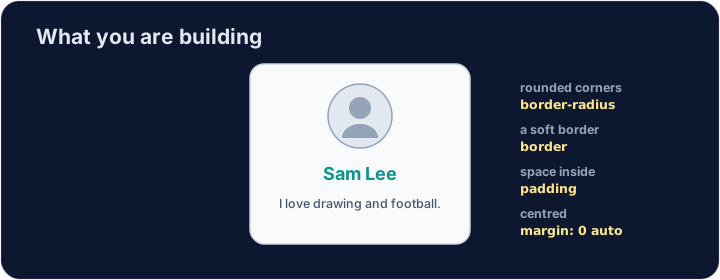
<style>
  .card { width: 280px; margin: 0 auto; padding: 20px; text-align: center;
          background-color: #f8fafc; border: 1px solid #cbd5e1; border-radius: 12px; }
  h2 { color: teal; margin: 8px 0; }
</style>
<div class="card">
  <img src="/static/code/web-basics/cat.svg" alt="My avatar" width="120">
  <h2>Sam Lee</h2>
  <p>I love drawing and football.</p>
</div>
English
What you've learned
- HTML: headings, paragraphs, lists, links, images, tables, forms, page structure.
- CSS: colours, text, the box model, spacing, sizing, and rows with Flexbox.
- That is the real foundation of every web page. You can build things now. 🎉
中文
你学到了什么
- HTML: 标题、段落、列表、链接、图片、表格、表单、页面结构。
- CSS: 颜色、文字、盒模型、间距、尺寸,以及用 Flexbox 排成一行。
- 这就是每一个网页真正的基础。你现在已经能做东西了。🎉
English
Common mistakes
- Build and check one piece at a time.
- Keep the HTML structure and the CSS styling separate.
中文
常见错误
- 一次构建并检查一部分。
- 让 HTML 结构和 CSS 样式各自分开。
English
Build your card
- The card's layout is already styled, so you can focus on filling it in.
- Each task adds one piece — content, a picture, then colour. Press ▶ often!
中文
做你的名片
- 名片的布局已经帮你写好样式了,你只要专心填内容就行。
- 每个任务加一块 —— 内容、图片,再到颜色。多按几次 ▶!
Start your card. Inside the .card, add an <h2> with a name and a <p> with one line about you. · 开始做你的名片。在 .card 里面,加一个写名字的 <h2> 和一个介绍你自己的 <p>。
Add a picture above the name. Add an <img src="/static/code/web-basics/cat.svg"> with alt text, just inside the card. · 在名字上方加一张图片。在名片里加一个带 alt 文字的 <img src="/static/code/web-basics/cat.svg">。
Finish it with a splash of colour. Give the h2 a colour you like, e.g. h2 { color: teal; }. · 用一点颜色收尾。给 h2 一个你喜欢的颜色,比如 h2 { color: teal; }(teal 是青色)。