Showing and hiding (display) · 显示与隐藏(display)
This page needs a recent browser (with SharedArrayBuffer support). Please update Chrome, Edge, Firefox or Safari to the latest version. · 此页面需较新浏览器(支持 SharedArrayBuffer)。请升级 Chrome、Edge、Firefox 或 Safari 至最新版本。
English
How boxes flow
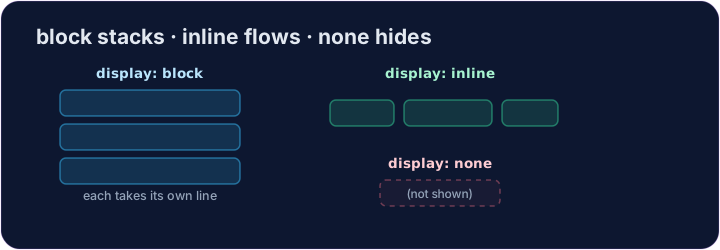
- Some elements are block: they stack on top of each other and fill the width —
<div>,<p>,<h1>. - Some are inline: they sit side by side, taking only as much room as they need —
<span>,<a>,<strong>. displaylets you change which way an element behaves.
中文
盒子是怎么排的
- 有些元素是块级(block):它们一个叠一个,并占满整行 ——
<div>、<p>、<h1>。 - 有些是行内(inline):它们并排在一行里,只占用需要的宽度 ——
<span>、<a>、<strong>。 display让你改变一个元素的排法。
English
display: none
display: none;removes an element from the page completely.- It's how menus, pop-ups, and "read more" sections stay hidden until needed.
- The element is still in your HTML — it just isn't shown.
中文
display: none
display: none;把一个元素从页面上彻底拿掉。- 菜单、弹窗、“阅读更多”这类内容,就是这样在需要前先藏着。
- 这个元素还在你的 HTML 里 —— 只是不显示出来。
<style>
  .pill { display: inline; background-color: #def; padding: 6px; }
  .gone { display: none; }
</style>
<span class="pill">Visible</span>
<span class="gone">You can't see me</span>
English
Common mistakes
display: noneremoves the element and its space;visibility: hiddenkeeps its space.blockstarts a new line;inlinedoes not.
中文
常见错误
display: none移除元素及其占位;visibility: hidden保留占位。block另起一行;inline不会。
English
Now you try
display: nonehides;display: blockmakes an element take its own line.- Hide one element, then change how another displays.
中文
现在你来试试
display: none隐藏;display: block让元素单独占一行。- 先藏起一个元素,再改变另一个的排法。
Hide the secret message. Add .secret { display: none; }. · 把这条秘密消息藏起来。加上 .secret { display: none; }。
Make each label sit on its own line. Add .label { display: block; }. · 让每个标签单独占一行。加上 .label { display: block; }。