Selectors — class and id · 选择器 —— class 和 id
This page needs a recent browser (with SharedArrayBuffer support). Please update Chrome, Edge, Firefox or Safari to the latest version. · 此页面需较新浏览器(支持 SharedArrayBuffer)。请升级 Chrome、Edge、Firefox 或 Safari 至最新版本。
English
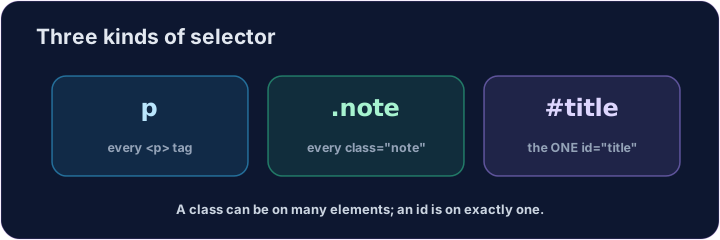
Three kinds of selector
- A selector says which elements a rule changes.
- By tag:
p { ... }changes every<p>. - That is the kind you used last lesson.
中文
三种选择器
- 选择器决定一条规则改变哪些元素。
- 按标签:
p { ... }改变每一个<p>。 - 这就是你上一课用的那种。
English
By class and by id
- By class:
.note { ... }changes every element withclass="note". A dot.means class. - By id:
#title { ... }changes the one element withid="title". A hash#means id. - A class can be on many elements; an id should be on one.
中文
按 class 和按 id
- 按 class:
.note { ... }改变每一个带class="note"的元素。点号.表示类。 - 按 id:
#title { ... }改变那一个带id="title"的元素。井号#表示 id。 - 一个 class 可以放在很多元素上;一个 id 应该只放在一个上。
<style>
  .note { color: green; }
  #title { color: purple; }
</style>
<h1 id="title">My page</h1>
<p class="note">This is a note.</p>
<p>This is normal.</p>
English
Common mistakes
- A class selector starts with
., an id selector with#. - Reuse a class on many elements; an id appears once per page.
中文
常见错误
- 类选择器以
.开头,id 选择器以#开头。 - 类可用在许多元素上;id 每页只出现一次。
English
Now you try
- Match the dot
.to a class, and the hash#to an id. - Style a class, then style an id.
中文
现在你来试试
- 把点号
.对应到 class,把井号#对应到 id。 - 先给一个 class 上色,再给一个 id 上色。
Style the note. Add a rule for the note class: .note { color: green; } (a dot means class). · 给这条提示上色。为 note 类加一条规则:.note { color: green; }(点号表示类)。
Style the title. Add a rule for the title id: #title { color: purple; } (a hash means id). · 给标题上色。为 title 这个 id 加一条规则:#title { color: purple; }(井号表示 id)。