Add some style · 加点样式
This page needs a recent browser (with SharedArrayBuffer support). Please update Chrome, Edge, Firefox or Safari to the latest version. · 此页面需较新浏览器(支持 SharedArrayBuffer)。请升级 Chrome、Edge、Firefox 或 Safari 至最新版本。
English
Adding style
- HTML gives your page its content. CSS makes it look good.
- The easiest way to add CSS is a
<style>block near the top of your page. - Inside it, you write rules that change how things look.
中文
加点样式
- HTML 给页面内容。CSS 让它变好看。
- 加 CSS 最简单的办法,是在页面靠上的地方放一个
<style>块。 - 在它里面,你写一条条规则,改变东西的样子。
English
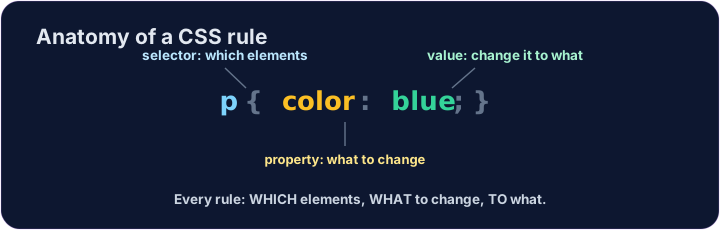
A CSS rule
- A rule has three parts:
p { color: blue; } pis the selector — which tags to change (here, every paragraph).coloris the property — what to change.blueis the value — what to change it to. (Together,color: blue;is one declaration.)
中文
一条 CSS 规则
- 一条规则有三个部分:
p { color: blue; } p是选择器 —— 要改哪些标签(这里是每个段落)。color是属性 —— 改什么。blue是值 —— 改成什么。(合起来,color: blue;是一条声明。)
<style>
  p { color: blue; }
</style>
<p>Now I am blue.</p>
<p>So am I!</p>
English
Common mistakes
- Link the CSS file, or put rules inside a
<style>block. - Each CSS rule ends with a semicolon
;.
中文
常见错误
- 链接 CSS 文件,或把规则放进
<style>块。 - 每条 CSS 规则以分号
;结尾。
English
Now you try
- Write your rules inside the
<style>block. - Colour your paragraphs, then your heading.
中文
现在你来试试
- 把你的规则写在
<style>块里面。 - 先给段落上色,再给标题上色。
Make every paragraph blue · 蓝色. Inside the <style> block, add the rule p { color: blue; }. · 把每个段落都变成蓝色。在 <style> 块里加一条规则:p { color: blue; }。
Now colour the heading too. Add a rule h1 { color: red; }. · 现在也给标题上色。加一条规则 h1 { color: red; }。