Tables · 表格
This page needs a recent browser (with SharedArrayBuffer support). Please update Chrome, Edge, Firefox or Safari to the latest version. · 此页面需较新浏览器(支持 SharedArrayBuffer)。请升级 Chrome、Edge、Firefox 或 Safari 至最新版本。
English
Tables
- A table shows information in rows and columns.
- Start with
<table>. - Each row is a
<tr>(table row).
中文
表格
- 表格用行和列来展示信息。
- 用
<table>开始。 - 每一行是一个
<tr>(table row,表格行)。
English
Cells
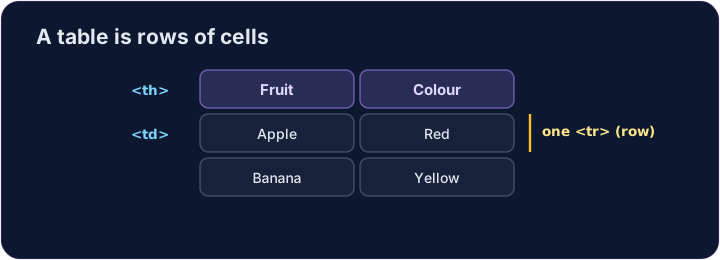
- Inside each row, each cell is a
<td>(table data). - For a heading cell, like a column title, use
<th>— it shows in bold. - Give every row the same number of cells.
中文
单元格
- 在每一行里,每个单元格是一个
<td>(table data,表格数据)。 - 作为表头的单元格(比如列标题)用
<th>—— 它会显示成粗体。 - 让每一行的单元格数量保持一样。
<table>
  <tr><th>Fruit</th><th>Colour</th></tr>
  <tr><td>Apple</td><td>Red</td></tr>
  <tr><td>Banana</td><td>Yellow</td></tr>
</table>
English
Common mistakes
- Cells (
<td>) go inside rows (<tr>). - Use
<th>for header cells.
中文
常见错误
- 单元格(
<td>)放在行(<tr>)里面。 - 表头单元格用
<th>。
English
Now you try
- A table is rows (
<tr>) holding cells (<td>or<th>). - Build a small table, then add a header cell.
中文
现在你来试试
- 表格就是一些行(
<tr>),行里装着单元格(<td>或<th>)。 - 做一个小表格,再加一个表头单元格。
Make a table with two rows. Each row is a <tr>, and put a <td> cell inside each row. · 做一个有两行的表格。每一行是一个 <tr>,每行里放一个 <td> 单元格。
Add a header cell so the column has a title. Use <th> instead of <td> for it. · 加一个表头单元格,让这一列有标题。它用 <th>,而不是 <td>。