Links · 链接
This page needs a recent browser (with SharedArrayBuffer support). Please update Chrome, Edge, Firefox or Safari to the latest version. · 此页面需较新浏览器(支持 SharedArrayBuffer)。请升级 Chrome、Edge、Firefox 或 Safari 至最新版本。
English
Links
- A link takes you to another page when you click it.
- Use the
<a>tag (astands for anchor). - The web address goes in
href:<a href="...">.
中文
链接
- 点击链接,就会带你去另一个页面。
- 用
<a>标签(a是 anchor,锚点的意思)。 - 网址写在
href里:<a href="...">。
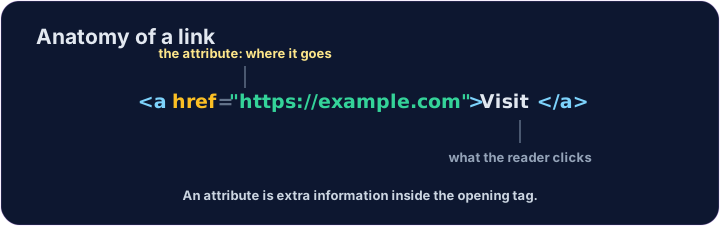
<a href="https://example.com">Visit Example</a>
English
href is an attribute
href="..."is an attribute — extra information inside the opening tag.- The text between
<a>and</a>is what the reader sees and clicks. - Use the full address, starting with
https://.
中文
href 是一个属性
href="..."是一个属性 —— 写在开始标签里的额外信息。<a>和</a>之间的文字,才是读者看到、点击的内容。- 用完整的网址,以
https://开头。
<p>Need facts? <a href="https://wikipedia.org">Look it up</a> now.</p>
English
Common mistakes
- A link needs an
href. - Open a link in a new tab with
target="_blank".
中文
常见错误
- 链接需要
href。 - 用
target="_blank"在新标签页打开链接。
English
Now you try
- A link can stand alone, or sit inside a sentence.
- Build one of each below.
中文
现在你来试试
- 链接可以单独放,也可以放在句子里面。
- 下面各做一个。
Add a link to https://example.com with the words Visit Example. · 加一个指向 https://example.com 的链接,文字是 Visit Example。
Turn the words look it up into a link to https://wikipedia.org, without breaking the sentence. · 把 look it up 这几个词变成指向 https://wikipedia.org 的链接,而且不要把句子拆开。