Headings and paragraphs · 标题和段落
This page needs a recent browser (with SharedArrayBuffer support). Please update Chrome, Edge, Firefox or Safari to the latest version. · 此页面需较新浏览器(支持 SharedArrayBuffer)。请升级 Chrome、Edge、Firefox 或 Safari 至最新版本。
English
Headings
- A heading is a title on your page.
- Use
<h1>for the biggest, most important heading. - Like all HTML, it comes in a pair:
<h1>...</h1>.
中文
标题
- 标题是页面上的题目。
- 用
<h1>表示最大、最重要的标题。 - 和所有 HTML 一样,它是一对:
<h1>...</h1>。
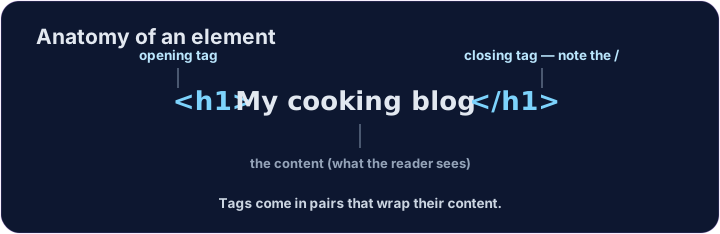
<h1>My cooking blog</h1>
<p>Welcome! Here are my favourite recipes.</p>
English
Six sizes
- There are six headings, from
<h1>down to<h6>. <h1>is the largest;<h6>is the smallest.- Use one
<h1>for the page's main title, then smaller ones for sections.
中文
六种大小
- 标题一共有六种,从
<h1>到<h6>。 <h1>最大,<h6>最小。- 页面的主标题只用一个
<h1>,各个小节再用更小的标题。
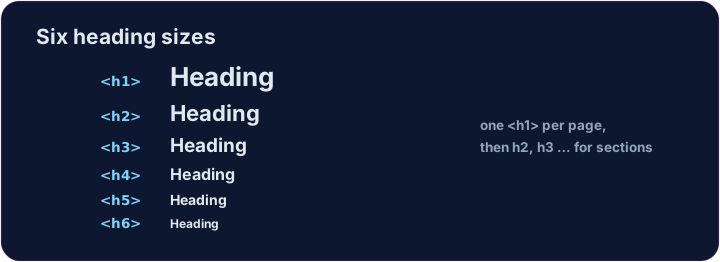
<h1>Biggest</h1>
<h2>Smaller</h2>
<h3>Smaller still</h3>
English
Common mistakes
- Headings run
<h1>(biggest) to<h6>— do not pick one just for its size. - A paragraph is
<p>...</p>.
中文
常见错误
- 标题从
<h1>(最大)到<h6>——不要只为字号选级别。 - 段落是
<p>...</p>。
English
Now you try
- A page is just headings and paragraphs stacked together.
- Build the two little tasks below.
中文
现在你来试试
- 一个页面,其实就是把标题和段落叠在一起。
- 完成下面两个小任务。
Add a big heading that says My Blog. Use an <h1> … </h1> pair. · 加一个大标题,内容是 My Blog。用一对 <h1> … </h1>。
Make a heading About me, and under it a paragraph that says I love coding. · 做一个标题 About me,在它下面放一个段落,内容是 **I love coding.**