Normalisation · 规范化
Why normalise?
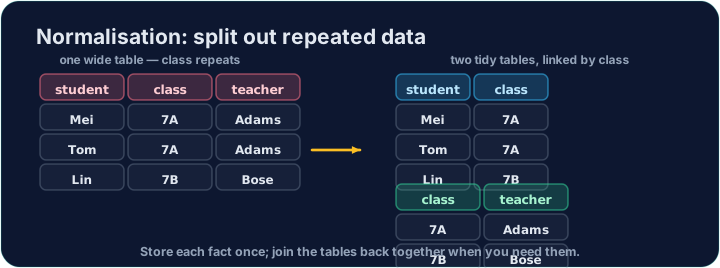
Imagine storing every club booking in one table, with the coach repeated on every row: each booking of the Chess club would carry "Mr Ng" again and again.
That repetition causes problems. If Mr Ng leaves, you must update many rows; miss one and the data becomes inconsistent. Normalisation organises tables to remove this kind of redundancy.
为什么要规范化?
设想把每一条社团预约都存在一张表里,教练在每一行都重复一遍:象棋社的每条预约都会一次次地带着“Mr Ng”。
这种重复会带来麻烦。如果 Mr Ng 离开了,你得更新许多行;漏掉一行,数据就不一致了。规范化通过整理表来消除这种冗余。
The normal forms
You normalise in steps:
- 1NF — every cell holds a single value (no lists or repeating groups), and the table has a primary key.
- 2NF — already 1NF, and no non-key column depends on only part of a composite key.
- 3NF — already 2NF, and no non-key column depends on another non-key column (no transitive dependency).
In the one-table version, coach depends on the club, not on the booking — a transitive dependency, so it is not in 3NF.
范式
规范化是一步步进行的:
- 1NF —— 每个单元格只存一个值(没有列表或重复组),并且表有主键。
- 2NF —— 已经是 1NF,且没有非键列只依赖于复合主键的一部分。
- 3NF —— 已经是 2NF,且没有非键列依赖于另一个非键列(没有传递依赖)。
在单表版本里,coach 依赖于 club,而不是依赖于这条预约 —— 这是传递依赖,所以它不符合 3NF。
The normalised design
We split the data into two tables (the ones loaded here):
club(club_id, name, coach)— each club and its coach, stored once.booking(booking_id, student, club_id)— each booking, linked by the foreign keyclub_id.
Now a coach is stored once. A JOIN puts the information back together whenever you need it — write that join below.
规范化后的设计
我们把数据拆成两张表(这里已经加载好):
club(club_id, name, coach)—— 每个社团及其教练,只存一次。booking(booking_id, student, club_id)—— 每条预约,用外键club_id连接。
现在每位教练只存一次。需要时,用一个 JOIN 就能把信息重新拼到一起 —— 在下面写出这个连接。
Common mistakes
- Split repeating groups into their own table instead of many similar columns.
- Each table should describe one kind of thing.
常见错误
- 把重复的组拆到单独的表里,而不是用许多相似的列。
- 每张表只描述一种事物。
Reassemble the data: list each booking's student next to their club's coach, by joining booking to · 到 club on club_id, ordered by booking.booking_id. · 把数据重新拼起来:通过在 club_id 上把 booking 连接到 club,列出每条预约的 student 和其社团的 coach,按 booking.booking_id 排序。
Click Run to see the output here. · 点击“运行”查看此处输出。
The split tables still answer questions together. Count how many bookings each club has: join booking to · 到 club, show club.name and COUNT(*) AS bookings, group by the club, and order by club.name. · 拆分后的表联合起来仍能回答问题。数一数每个社团有多少条预约:把 booking 连接到 club,显示 club.name 和 COUNT(*) AS bookings,按社团分组,并按 club.name 排序。
Click Run to see the output here. · 点击“运行”查看此处输出。