Updating rows · 更新行
Changing rows with UPDATE
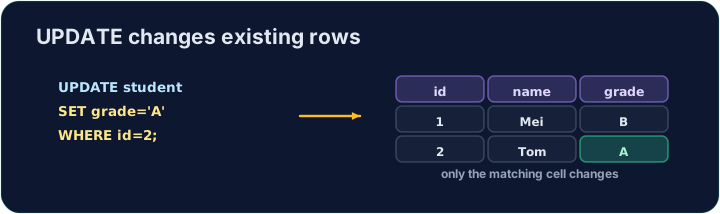
UPDATE changes values in the rows that match a WHERE condition:
SET lists the columns to change. You can change several at once, separated by commas: SET price = 0.95, in_stock = 150.
用 UPDATE 修改行
UPDATE 修改满足 WHERE 条件的那些行里的值:
UPDATE product SET price = 0.95 WHERE code = 'P02';
SET 列出要修改的列。你可以一次改多列,用逗号隔开:SET price = 0.95, in_stock = 150。
Always use WHERE
The WHERE decides which rows change. Leave it out and every row is updated:
So nearly every UPDATE should have a WHERE. The checker runs your UPDATE, then reads the table back to confirm only the right row changed.
一定要用 WHERE
WHERE 决定哪些行被修改。如果不写它,每一行都会被更新:
UPDATE product SET price = 0; -- 会改掉所有产品!
所以几乎每条 UPDATE 都应该带 WHERE。检查器会执行你的 UPDATE,再读回表,确认只有该改的那一行变了。
Common mistakes
UPDATEwithout aWHEREchanges every row — always add theWHERE.- Set several columns at once with commas.
常见错误
- 没有
WHERE的UPDATE会改动每一行——一定要加WHERE。 - 用逗号一次设置多列。
Change the price of the product with code 'P02' to · 到 0.95. Be sure to use a WHERE so only that product changes. · 把 code 为 'P02' 的产品的 price 改为 0.95。一定要用 WHERE,这样只改这一个产品。
Click Run to see the output here. · 点击“运行”查看此处输出。
A delivery arrived, so every product gains 10 in stock. Update with an expression — SET in_stock = in_stock + 10 — and no · 否 WHERE, so it applies to all rows. · 一批货到了,所以每个产品的库存都增加 10。用表达式更新 —— SET in_stock = in_stock + 10 —— 并且不写 WHERE,让它作用于所有行。
Click Run to see the output here. · 点击“运行”查看此处输出。