Inserting rows · 插入行
Adding rows with INSERT
INSERT adds a new row to a table. List the columns, then a matching set of VALUES:
Text goes in single quotes; numbers do not. The values must line up with the columns, in the same order.
用 INSERT 添加行
INSERT 给表添加一个新行。先列出列,再给出一组对应的 VALUES:
INSERT INTO product (code, title, price, in_stock)
VALUES ('P04', 'Ruler', 1.20, 75);
文本放在单引号里,数字不用。值必须和列一一对应,顺序也要一致。
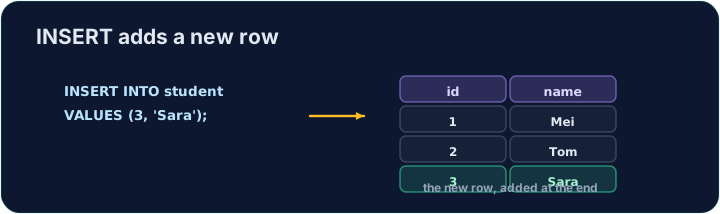
Seeing the effect
INSERT changes the data but returns no rows itself, so Run just reports how many rows changed. To see the new row, run a SELECT afterwards.
The checker does this for you: it runs your INSERT, then reads the table back to confirm your row is there.
查看效果
INSERT 改变数据,但本身不返回任何行,所以运行只会报告改了多少行。要看到新行,之后运行一条 SELECT。
检查器会替你这么做:它先执行你的 INSERT,再读回这张表,确认你的行确实在里面。
Common mistakes
- The values must line up with the columns in order and type.
- Quote text values with single quotes.
常见错误
- 值要与列在顺序和类型上一一对应。
- 文本值用单引号括起来。
Add a new product to the product table: code 'P04', title 'Ruler', price 1.20, in_stock 75. · 给 product 表添加一个新产品:code 为 'P04'、title 为 'Ruler'、price 为 1.20、in_stock 为 75。
Click Run to see the output here. · 点击“运行”查看此处输出。
Add a new customer to the customer table: id 5, name 'Eve', city 'York'. List the columns you are filling, then give the matching VALUES. · 给 customer 表添加一位新顾客:id 为 5、name 为 'Eve'、city 为 'York'。先列出你要填的列,再给出对应的 VALUES。
Click Run to see the output here. · 点击“运行”查看此处输出。