Grouping with GROUP BY · 用 GROUP BY 分组
Grouping rows with GROUP BY
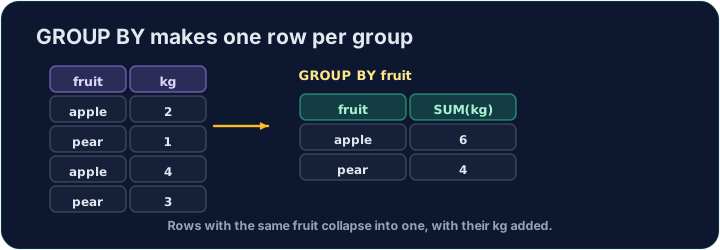
An aggregate like AVG normally summarises the whole table into one number. GROUP BY splits the rows into groups that share a value, and gives one summary row per group:
This gives one row for each form, with that form's count and average.
用 GROUP BY 分组
像 AVG 这样的聚合函数,通常把整张表汇总成一个数。GROUP BY 会把行分成共享同一个值的组,并为每个组给出一行汇总:
SELECT form, COUNT(*) AS n, ROUND(AVG(score), 2) AS avg_score
FROM student
GROUP BY form;
这样每个 form 得到一行,显示该 form 的人数和平均分。
Filtering groups with HAVING
WHERE filters rows before grouping. To filter the groups themselves — using an aggregate — use HAVING:
This keeps only forms with 3 or more students. (WHERE cannot test COUNT(*); HAVING can.)
用 HAVING 筛选组
WHERE 在分组之前筛选行。要筛选组本身 —— 用聚合函数 —— 就用 HAVING:
SELECT form, COUNT(*) AS n
FROM student
GROUP BY form
HAVING COUNT(*) >= 3;
这样只保留有 3 名或更多学生的 form。(WHERE 不能测试 COUNT(*),而 HAVING 可以。)
Common mistakes
- Filter groups with
HAVING, rows withWHERE. - A plain column beside an aggregate must be in
GROUP BY.
常见错误
- 用
HAVING筛选组,用WHERE筛选行。 - 与聚合并列的普通列必须出现在
GROUP BY中。
For · 支持 each form, show the form, the number of students as n, and the average score (2 d.p.) as avg_score. Group by form. · 对每个 form,显示该 form、学生人数(命名为 n)和平均分(两位小数,命名为 avg_score)。按 form 分组。
Click Run to see the output here. · 点击“运行”查看此处输出。
Show each form and its student count n, but only for forms with 3 or more students. Use HAVING. · 显示每个 form 及其学生人数 n,但只保留人数在 3 或以上的 form。用 HAVING。
Click Run to see the output here. · 点击“运行”查看此处输出。