File permissions · 文件权限
This page needs a recent browser (with SharedArrayBuffer support). Please update Chrome, Edge, Firefox or Safari to the latest version. · 此页面需较新浏览器(支持 SharedArrayBuffer)。请升级 Chrome、Edge、Firefox 或 Safari 至最新版本。
English
Who can do what
- Every file has permissions that say who may read, write, or execute it.
ls -lshows them on the left of each line:
- You see something like
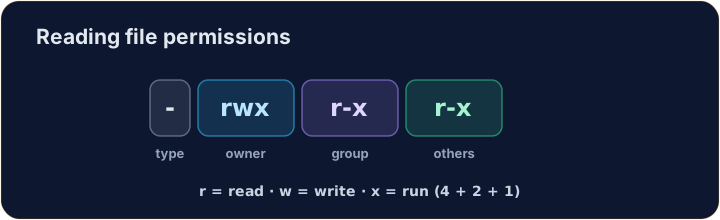
-rwxr-xr-x. Read it in groups of three.
中文
谁能做什么
- 每个文件都有权限,规定谁可以读(r)、**写(w)或执行(x)**它。
ls -l会在每行左侧显示这些权限:
ls -l script.sh
- 你会看到类似
-rwxr-xr-x的内容。把它每三个一组来读。
English
Reading the flags
- The ten characters are: type, then owner, group, others:
r= read,w= write,x= execute,-= not allowed. So the owner here can do everything; others can read and run.
中文
读懂这些标志
- 这十个字符依次是:类型,然后是所有者、用户组、其他人:
-  rwx  r-x  r-x
类型 所有者 组 其他人
r= 读,w= 写,x= 执行,-= 不允许。所以这里所有者什么都能做;其他人可以读取和运行。
English
Changing permissions
chmodchanges the mode. Numbers are a quick way:r=4, w=2, x=1, added per group:
7= 4+2+1 (rwx) for the owner;5= 4+1 (r-x) for group and others.755is the classic "runnable program".
中文
修改权限
chmod用来change mode(修改模式)。用数字最快:r=4, w=2, x=1,每组相加:
chmod 755 script.sh
7= 4+2+1(rwx)给所有者;5= 4+1(r-x)给组和其他人。755就是经典的“可运行程序”权限。
English
Common mistakes
chmodsets read, write and execute for user, group and others.- You need execute permission to run a script.
中文
常见错误
chmod为用户、组和其他人设置读、写、执行权限。- 运行脚本需要执行权限。
Explore · 探索
File permissions (chmod) · 文件权限(chmod)
Owner / group / others each get rwx — the octal is just those bits. · 所有者 / 组 / 其他人各有 rwx——八进制就是这些位。
Make script.sh runnable by giving it permissions 755 with chmod 755 script.sh. The check shows ls -l so you can see the new rwx flags. · 用 chmod 755 script.sh 把权限设为 755,让 script.sh 可以运行。检查时会显示 ls -l,这样你能看到新的 rwx 标志。
secret.key holds a private key, so no one but you should read it. Give it permission 600 with chmod 600 secret.key — owner read+write, group and others nothing. · secret.key 保存着一把私钥,所以除你之外谁都不该读它。用 chmod 600 secret.key 把权限设为 600 —— 所有者读写,组和其他人什么都没有。