Pipes — joining commands · 管道 —— 把命令连起来
This page needs a recent browser (with SharedArrayBuffer support). Please update Chrome, Edge, Firefox or Safari to the latest version. · 此页面需较新浏览器(支持 SharedArrayBuffer)。请升级 Chrome、Edge、Firefox 或 Safari 至最新版本。
English
The big idea: pipes
- This is what makes the shell powerful. A pipe
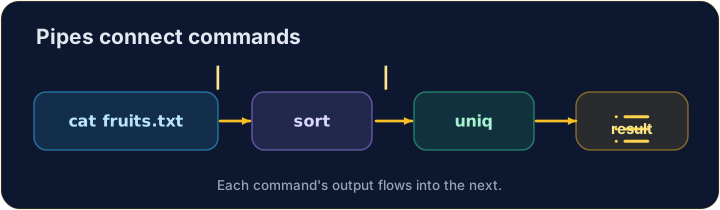
|sends one command's output straight into the next command:
catproduces the lines;sortreceives them and puts them in order. No file in between.
中文
核心思想:管道
- 这正是 shell 强大的原因。管道
|把一个命令的输出,直接送进下一个命令:
cat fruits.txt | sort
cat产生这些行;sort接收它们并排好序。中间不需要任何文件。
English
Build a chain
- You can join as many as you like, like an assembly line:
sortorders the lines, thenuniqremoves neighbouring duplicates — so you get each fruit once.
中文
搭一条流水线
- 你可以像装配线一样,串联任意多个命令:
cat fruits.txt | sort | uniq
sort把各行排序,然后uniq去掉相邻的重复行 —— 于是每种水果只剩一次。
English
Small tools, big results
- Each command does one job well. Pipes let you combine them to answer real questions:
- "How many different fruits are there?" — sort, dedupe, then count. That is the Unix way.
中文
小工具,大成果
- 每个命令把一件事做好。管道让你把它们组合起来,回答真实的问题:
cat fruits.txt | sort | uniq | wc -l
- “一共有多少种不同的水果?” —— 排序、去重,再计数。这就是 Unix 之道。
English
Common mistakes
|sends one command's output into the next.- Order matters:
sort | uniq, not the other way round.
中文
常见错误
|把一个命令的输出送入下一个。- 顺序很重要:
sort | uniq,不能反过来。
Explore · 探索
Pipes join commands · 管道把命令连起来
A pipe feeds one command's output · 输出 into the next's input · 输入. · 管道把一个命令的输出送进下一个命令的输入。
Send the output of cat fruits.txt into · 生成 wc -l with a pipe |, to count the lines. · 用管道 | 把 cat fruits.txt 的输出送进 wc -l,来数出行数。
List each fruit once, in order. Pipe sort into · 生成 uniq: cat fruits.txt | sort | uniq. · 把每种水果按顺序各列一次。把 sort 接到 uniq:cat fruits.txt | sort | uniq。