Moving around · 在文件系统中移动
This page needs a recent browser (with SharedArrayBuffer support). Please update Chrome, Edge, Firefox or Safari to the latest version. · 此页面需较新浏览器(支持 SharedArrayBuffer)。请升级 Chrome、Edge、Firefox 或 Safari 至最新版本。
English
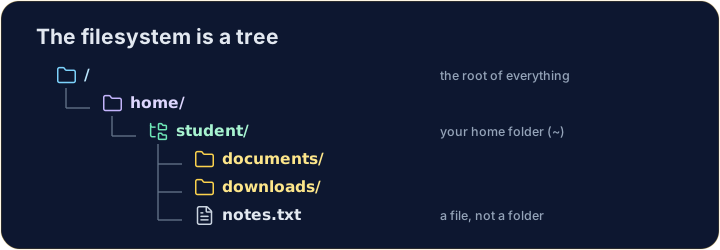
The filesystem is a tree
- Folders (called directories) hold files and other folders, like branches on a tree.
- The very top is
/, the root. Your personal folder is your home, written~.
中文
文件系统是一棵树
- 文件夹(称为目录)里装着文件和其他文件夹,就像树上的枝条。
- 最顶端是
/,即根目录。你的个人文件夹是你的主目录,写作~。
English
Looking and moving
lslists what is in the current folder.cdchanges directory — it moves you into a folder:
- After
cd documents, you are inside documents. Runpwdany time to check where you are.
中文
查看与移动
ls列出当前文件夹里的内容。cd切换目录 —— 它让你进入某个文件夹:
ls
cd documents
- 执行
cd documents后,你就在 documents 里面了。随时运行pwd都能确认你在哪。
English
Handy shortcuts
cd ..goes up one level (to the parent folder).cdwith nothing, orcd ~, jumps straight back to your home.- A path can be relative (
documents/work) or absolute (starts with/, like/home/student).
中文
实用的快捷方式
cd ..向上走一级(到父文件夹)。- 不带参数的
cd,或cd ~,会直接跳回你的主目录。 - 路径可以是相对的(
documents/work),也可以是绝对的(以/开头,如/home/student)。
English
Common mistakes
cdwith no argument goes to your home folder;cd ..goes up one level.pwdshows the folder you are in.
中文
常见错误
- 不带参数的
cd回到主目录;cd ..上一级。 pwd显示你所在的目录。
Explore · 探索
Moving around the tree · 在目录树中移动
The filesystem is one tree; an absolute path is the trail from /. · 文件系统是一棵树;绝对路径就是从 / 出发的路线。
Use ls (list) to see what is in your home folder. · 用 ls(list,列出)看看你的主目录里有什么。
Move into · 生成 the documents folder with cd documents, then run pwd to prove you are there. · 用 cd documents 进入 documents 文件夹,然后运行 pwd 来证明你确实到了那里。