Citations and bibliography · 引用与参考文献
This page needs a recent browser (with SharedArrayBuffer support). Please update Chrome, Edge, Firefox or Safari to the latest version. · 此页面需较新浏览器(支持 SharedArrayBuffer)。请升级 Chrome、Edge、Firefox 或 Safari 至最新版本。
English
Citing your sources
- Academic writing must say where facts came from. LaTeX makes this tidy.
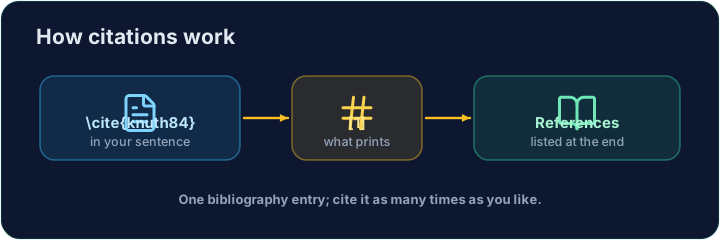
- You keep a list of sources, each with a key, and cite the key in your text.
中文
标注你的来源
- 学术写作必须说明事实的出处。LaTeX 把这件事做得很整洁。
- 你维护一份来源列表,每条都有一个关键字,然后在正文里引用这个关键字。
English
The bibliography
- List your sources in a
thebibliographyenvironment, each as a\bibitem:
- The
{9}just says "numbers are one digit wide".lamportis the key you choose.
中文
参考文献
- 在
thebibliography环境里列出来源,每一条都是一个\bibitem:
\begin{thebibliography}{9}
  \bibitem{lamport} Leslie Lamport. \emph{LaTeX}. 1986.
\end{thebibliography}
- 那个
{9}只是表示“编号宽度为一位”。lamport是你自己取的关键字。
English
Citing in the text
- Anywhere in the document, write
\cite{lamport}:
- LaTeX prints
[1]and keeps the numbers in order. Add a source and everything renumbers.
中文
在正文中引用
- 在文档的任何地方写
\cite{lamport}:
LaTeX is powerful~\cite{lamport}.
- LaTeX 会打印出
[1],并保持编号有序。新增一条来源,所有编号都会自动重排。
English
Common mistakes
\cite{key}needs that key defined in your bibliography.- Compile twice, or the citations show as
?.
中文
常见错误
\cite{key}需要该 key 在参考文献中已定义。- 编译两次,否则引用会显示为
?。
Cite the book in the sentence with \cite{lamport}, and add a matching \bibitem{lamport} entry inside the bibliography. The same key links the two. · 在句子里用 \cite{lamport} 引用这本书,并在参考文献里加上对应的 \bibitem{lamport} 条目。同一个关键字把两者连接起来。
Click Run to compile and preview the PDF. · 点击“运行”编译并预览 PDF。
Add a second source. Give the second book a \bibitem{knuth} entry, then cite it in the sentence with \cite{knuth}. Watch LaTeX number them in citation order. · 再加一个第二来源。为第二本书添加一个 \bibitem{knuth} 条目,再在句子里用 \cite{knuth} 引用它。看 LaTeX 如何按引用顺序编号。
Click Run to compile and preview the PDF. · 点击“运行”编译并预览 PDF。