Drawing with TikZ · 用 TikZ 绘图
This page needs a recent browser (with SharedArrayBuffer support). Please update Chrome, Edge, Firefox or Safari to the latest version. · 此页面需较新浏览器(支持 SharedArrayBuffer)。请升级 Chrome、Edge、Firefox 或 Safari 至最新版本。
English
Drawing inside LaTeX
- You can draw diagrams with code using the TikZ package — no image files needed.
- Load it once, then draw inside a
tikzpicture:
\draw (0,0) -- (2,1);draws a line from one point to another. Every command ends with;.
中文
在 LaTeX 里画图
- 你可以用代码画图,工具是 TikZ 宏包 —— 不需要任何图片文件。
- 加载一次,然后在
tikzpicture里绘制:
\usepackage{tikz}
...
\begin{tikzpicture}
  \draw (0,0) -- (2,1);
\end{tikzpicture}
\draw (0,0) -- (2,1);从一个点画一条线到另一个点。每条命令都以;结尾。
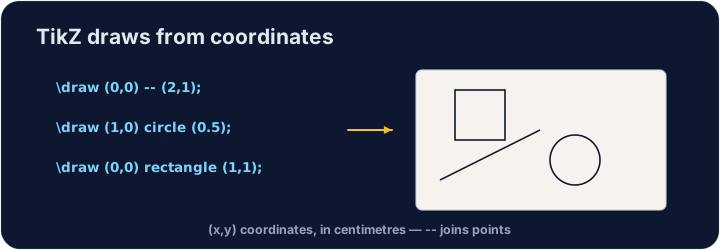
English
Shapes and paths
- Chain points with
--to make any shape;cyclereturns to the start:
中文
形状与路径
- 用
--把点连起来就能画任意形状;cycle表示回到起点:
\draw (0,0) -- (2,0) -- (1,1.5) -- cycle;   % a triangle
\draw (0,0) circle (1);                      % a circle, radius 1
\draw (0,0) rectangle (3,2);                 % a box
English
Why code a drawing?
- It stays sharp at any size (it is vector graphics, not a photo).
- It is exact — perfect for geometry, graphs, and circuit diagrams.
- Now draw your own triangle in the task.
中文
为什么要用代码画图?
- 它在任何尺寸下都清晰(这是矢量图形,不是照片)。
- 它很精确 —— 非常适合几何、图表和电路图。
- 现在在任务里画出你自己的三角形吧。
English
Common mistakes
- Every
\drawcommand ends with a semicolon;. - Wrap the drawing in a
tikzpictureenvironment.
中文
常见错误
- 每条
\draw命令以分号;结束。 - 把绘图包在
tikzpicture环境里。
Inside the tikzpicture, \draw a triangle: connect the points (0,0), (3,0) and (1.5,2) and close it with cycle. The tikz package is loaded for you. · 在 tikzpicture 里,用 \draw 画一个三角形:把 (0,0)、(3,0) 和 (1.5,2) 三个点连起来,并用 cycle 闭合。tikz 宏包已为你加载。
Click Run to compile and preview the PDF. · 点击“运行”编译并预览 PDF。
Draw two shapes this time. Add a circle · 圆 of radius 1 with \draw (0,0) circle (1); and a rectangle with \draw (2,-1) rectangle (4,1);. · 这次画两个图形。用 \draw (0,0) circle (1); 画一个半径为 1 的圆,再用 \draw (2,-1) rectangle (4,1); 画一个矩形。
Click Run to compile and preview the PDF. · 点击“运行”编译并预览 PDF。