Aligning equations · 对齐多个公式
This page needs a recent browser (with SharedArrayBuffer support). Please update Chrome, Edge, Firefox or Safari to the latest version. · 此页面需较新浏览器(支持 SharedArrayBuffer)。请升级 Chrome、Edge、Firefox 或 Safari 至最新版本。
English
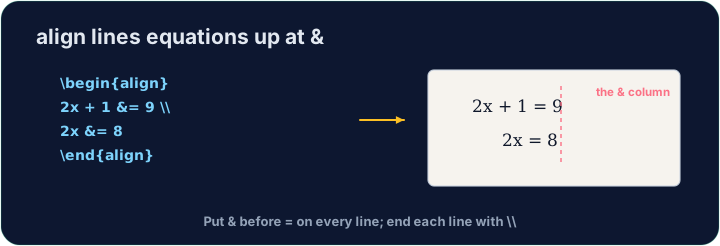
Lining equations up
- When you show working, readers like the
=signs to line up. Thealign*environment does this:
- The
&marks where to align (just before each=), and\\ends each line.
中文
让公式对齐
- 展示运算过程时,读者喜欢
=号对齐。align*环境正好能做到:
\begin{align*}
  y &= 2(x + 3) \\
  y &= 2x + 6
\end{align*}
&标记对齐的位置(就在每个=之前),\\用来结束每一行。
English
Numbered or not
align*(with the star) gives no equation numbers.- Drop the star —
align— and LaTeX numbers each line(1),(2), … for you to refer to.
中文
要不要编号
align*(带星号)不会给公式编号。- 去掉星号 ——
align—— LaTeX 就会给每一行编号(1)、(2)……方便你引用。
English
Matrices
amsmathalso gives matrices.bmatrixdraws square brackets:
- Again
&separates columns and\\separates rows — the same idea as alignment.
中文
矩阵
amsmath也提供矩阵。bmatrix会画出方括号:
\[
  \begin{bmatrix} 1 & 2 \\ 3 & 4 \end{bmatrix}
\]
- 同样地,
&分隔列,\\分隔行 —— 和对齐是一个道理。
English
Common mistakes
- In
align, line up on&and end each line with\\. - Use
align*when you do not want equation numbers.
中文
常见错误
- 在
align中,用&对齐,每行以\\结束。 - 不想要公式编号时用
align*。
Show the two steps lined up at the = sign. Put them in an align* environment, with & just before each = and \\ between the lines. · 把这两步在 = 号处对齐显示。把它们放进 align* 环境,在每个 = 前加 &,在两行之间加 \\。
Click Run to compile and preview the PDF. · 点击“运行”编译并预览 PDF。
Draw a 2×2 matrix with bmatrix (square brackets). Separate columns with & and rows with \\, e.g. \begin{bmatrix} 1 & 2 \\ 3 & 4 \end{bmatrix}. · 用 bmatrix(方括号)画一个 2×2 矩阵。列用 & 分隔,行用 \\ 分隔,例如 \begin{bmatrix} 1 & 2 \\ 3 & 4 \end{bmatrix}。
Click Run to compile and preview the PDF. · 点击“运行”编译并预览 PDF。