Fractions, roots and sums · 分数、根号与求和
This page needs a recent browser (with SharedArrayBuffer support). Please update Chrome, Edge, Firefox or Safari to the latest version. · 此页面需较新浏览器(支持 SharedArrayBuffer)。请升级 Chrome、Edge、Firefox 或 Safari 至最新版本。
English
A maths toolkit: amsmath
- For serious maths, load the
amsmathpackage once in the preamble:
- It adds better fractions, alignment, and dozens of symbols. Almost every maths document uses it.
中文
数学工具箱:amsmath
- 要写正经的数学,在导言区加载一次
amsmath宏包:
\usepackage{amsmath}
- 它提供更好的分数、对齐方式和几十种符号。几乎每一份数学文档都会用到它。
English
Fractions and roots
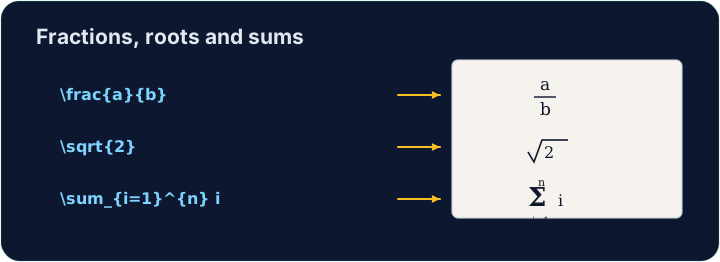
- A fraction is
\frac{top}{bottom}; a square root is\sqrt{...}:
- They nest happily:
\sqrt{\frac{1}{n}}is the square root of one-over-n.
中文
分数与根号
- 分数是
\frac{分子}{分母};平方根是\sqrt{...}:
\[ \frac{a + b}{2} \qquad \sqrt{x^2 + y^2} \]
- 它们可以愉快地嵌套:
\sqrt{\frac{1}{n}}就是“n 分之一”的平方根。
English
Sums and integrals
- These grow to the right size automatically:
- The
_sets the lower limit and^the upper limit — the same keys as powers.
中文
求和与积分
- 它们的大小会自动变得合适:
\[ \sum_{i=1}^{n} i \qquad \int_0^1 x^2 \, dx \]
_设置下限,^设置上限 —— 和写幂用的是同样的按键。
English
Common mistakes
\frac{a}{b},\sqrt{x}and\sumonly work in math mode.- Put them inside
$...$or\[ ... \].
中文
常见错误
\frac{a}{b}、\sqrt{x}和\sum只在数学模式下有效。- 把它们放进
$...$或\[ ... \]。
Write a fraction in the display equation. Replace the comment with \frac{1}{2} so the equation reads one-half. The amsmath package is already loaded for you. · 在行间公式里写一个分数。把注释替换成 \frac{1}{2},让公式表示二分之一。amsmath 宏包已经为你加载好了。
Click Run to compile and preview the PDF. · 点击“运行”编译并预览 PDF。
Now use two more maths tools. In the display equation write a square root \sqrt{...} and a sum \sum, for example \[ \sqrt{2} + \sum_{i=1}^{n} i \]. · 再用两个数学工具。在行间公式里写一个平方根 \sqrt{...} 和一个求和 \sum,例如 \[ \sqrt{2} + \sum_{i=1}^{n} i \]。
Click Run to compile and preview the PDF. · 点击“运行”编译并预览 PDF。