Maths — your first formula · 数学 —— 你的第一个公式
This page needs a recent browser (with SharedArrayBuffer support). Please update Chrome, Edge, Firefox or Safari to the latest version. · 此页面需较新浏览器(支持 SharedArrayBuffer)。请升级 Chrome、Edge、Firefox 或 Safari 至最新版本。
English
Maths mode
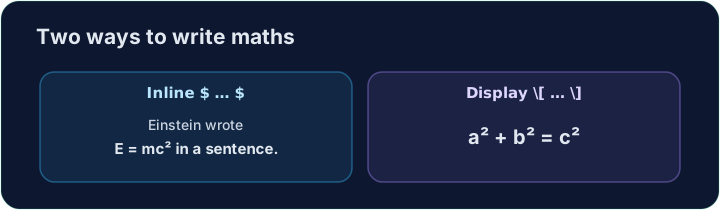
- This is what LaTeX is famous for. To write maths, switch into maths mode with dollar signs:
- Text between
$ ... $is typeset as maths, right inside your sentence. This is inline maths.
中文
数学模式
- 这正是 LaTeX 出名的本领。要写数学,就用美元符号切换进数学模式:
The equation $E = mc^2$ changed physics.
$ ... $之间的内容会被排成数学公式,直接嵌在句子里。这就是行内数学。
English
Powers and indices
^raises a superscript (a power);_lowers a subscript:
- For more than one character, group them with braces:
$x^{10}$,$a_{i+1}$.
中文
幂与下标
^表示上标(幂);_表示下标:
$x^2$, $a_1$, and $x^2 + y^2 = r^2$
- 如果上下标多于一个字符,用花括号把它们括起来:
$x^{10}$、$a_{i+1}$。
English
Big, centred equations
- For an important equation on its own line, use display maths
\[ ... \]:
- Now write your own inline formula in the task below.
中文
单独居中的大公式
- 想让一个重要公式单独占一行,就用**行间(display)**数学
\[ ... \]:
\[ a^2 + b^2 = c^2 \]
- 现在,在下面的任务里写出你自己的行内公式吧。
English
Common mistakes
- Inline maths goes in
$...$; a missing closing$breaks everything after it. - Display maths uses
\[ ... \].
中文
常见错误
- 行内数学放在
$...$中;少了结尾的$会破坏它之后的所有内容。 - 独立公式用
\[ ... \]。
Replace the words with real maths. Write the area of a circle as an inline formula: $A = \pi r^2$. The $ ... $ turns on maths mode, \pi is π, and ^2 is the power. · 把这句话换成真正的数学。用行内公式写出圆的面积:$A = \pi r^2$。$ ... $ 开启数学模式,\pi 是 π,^2 是平方。
Click Run to compile and preview the PDF. · 点击“运行”编译并预览 PDF。
For an important equation, give it its own line with display maths \[ ... \]. Write Pythagoras' theorem: \[ a^2 + b^2 = c^2 \]. · 对重要的公式,用行间公式 \[ ... \] 让它独占一行。写出勾股定理:\[ a^2 + b^2 = c^2 \]。
Click Run to compile and preview the PDF. · 点击“运行”编译并预览 PDF。