Bulleted and numbered lists · 项目符号与编号列表
This page needs a recent browser (with SharedArrayBuffer support). Please update Chrome, Edge, Firefox or Safari to the latest version. · 此页面需较新浏览器(支持 SharedArrayBuffer)。请升级 Chrome、Edge、Firefox 或 Safari 至最新版本。
English
Bulleted lists
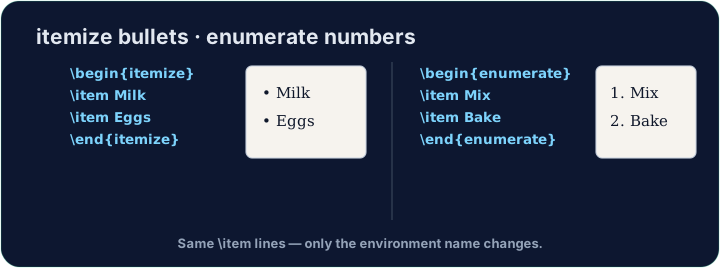
- A bulleted list is an environment — it opens with
\beginand closes with\end:
- Every entry starts with
\item. The bullets and spacing are handled for you.
中文
项目符号列表
- 项目符号列表是一种环境 —— 用
\begin打开,用\end关闭:
\begin{itemize}
  \item First thing
  \item Second thing
\end{itemize}
- 每一项都以
\item开头。项目符号和间距都会自动处理好。
English
Numbered lists
- Want 1, 2, 3 instead of bullets? Use
enumerate— everything else is the same:
- The numbers are automatic, so you can reorder items freely.
中文
编号列表
- 想要 1、2、3 而不是项目符号?用
enumerate—— 其余写法完全一样:
\begin{enumerate}
  \item Wake up
  \item Have breakfast
\end{enumerate}
- 编号是自动的,所以你可以随意调整条目顺序。
English
Lists inside lists
- Put a list inside an
\itemto make sub-points. LaTeX indents them and changes the bullet style. - Now try turning a few lines into a tidy bulleted list.
中文
列表套列表
- 在某个
\item里再放一个列表,就能做出子条目。LaTeX 会自动缩进并改变符号样式。 - 现在试着把几行文字整理成一个整洁的项目符号列表吧。
English
Common mistakes
- Use
itemizefor bullets andenumeratefor numbers; each entry starts with\item. - Close the list with
\end{itemize}(orenumerate).
中文
常见错误
- 项目符号用
itemize,编号用enumerate;每条以\item开头。 - 用
\end{itemize}(或enumerate)结束列表。
Turn the three foods into a bulleted list. Wrap them in \begin{itemize} … \end{itemize} and put \item before each one. · 把这三种食物变成一个项目符号列表。用 \begin{itemize} … \end{itemize} 包裹它们,并在每一项前加上 \item。
Click Run to compile and preview the PDF. · 点击“运行”编译并预览 PDF。
Order matters here, so use a numbered list. Wrap the three steps in \begin{enumerate} … \end{enumerate} with an \item before each. LaTeX numbers them 1, 2, 3 for you. · 这里顺序很重要,所以用编号列表。把三个步骤用 \begin{enumerate} … \end{enumerate} 包起来,每步前加 \item。LaTeX 会自动编成 1、2、3。
Click Run to compile and preview the PDF. · 点击“运行”编译并预览 PDF。