Bold, italic and emphasis · 加粗、斜体与强调
This page needs a recent browser (with SharedArrayBuffer support). Please update Chrome, Edge, Firefox or Safari to the latest version. · 此页面需较新浏览器(支持 SharedArrayBuffer)。请升级 Chrome、Edge、Firefox 或 Safari 至最新版本。
English
Styling words
- To change how words look, you wrap them in a command:
\textbf= bold,\textit= italic,\texttt=code-like.
中文
给文字加样式
- 要改变文字的外观,你需要把它包裹在一个命令里:
\textbf{bold} and \textit{italic} and \texttt{typewriter}
\textbf= 加粗,\textit= 斜体,\texttt=类似代码。
English
Emphasis the smart way
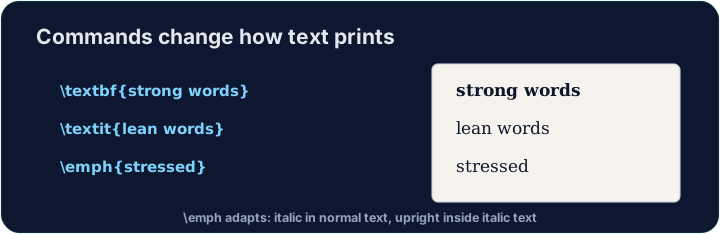
\emph{...}means "emphasise this" — usually italic, but it flips smartly inside italic text.- Prefer
\emphfor meaning, and\textitwhen you specifically want italic shapes.
中文
更聪明的强调方式
\emph{...}表示“强调这里” —— 通常是斜体,但在斜体文字里它会聪明地反转回正体。- 表达含义时优先用
\emph;当你明确想要斜体字形时再用\textit。
English
A note on quotes and dashes
- Type opening quotes with two backticks and closing with two apostrophes:
- A dash in a range is
--(en-dash, like 10--20); a pause in a sentence is---(em-dash). - These little touches are what make LaTeX documents look professional.
中文
关于引号和破折号
- 开引号用两个反引号,闭引号用两个单引号:
- 表示范围的连字号是
--(en-dash,如 10--20);句中的停顿用---(em-dash)。 - 正是这些小细节,让 LaTeX 文档看起来很专业。
English
Common mistakes
\textbf{...}is bold,\textit{...}italic,\emph{...}emphasis.- Every opening brace
{needs a matching}.
中文
常见错误
\textbf{...}是粗体,\textit{...}斜体,\emph{...}强调。- 每个左花括号
{都要有配对的}。
Make the word important bold with \textbf{...}, and the word gently italic with \textit{...}. Then Run to see the styles. · 用 \textbf{...} 把 important 这个词加粗,用 \textit{...} 把 gently 这个词变成斜体。然后运行查看效果。
Click Run to compile and preview the PDF. · 点击“运行”编译并预览 PDF。
Use the right tool for the job. Mark really with \emph{...} (emphasis that flips smartly), and show the file name report.tex in · 入 \texttt{...} (typewriter font). · 为每个任务选对工具。用 \emph{...} 强调 really(会智能切换的强调),并用 \texttt{...}(等宽字体)显示文件名 report.tex。
Click Run to compile and preview the PDF. · 点击“运行”编译并预览 PDF。