Sections and titles · 章节与标题
This page needs a recent browser (with SharedArrayBuffer support). Please update Chrome, Edge, Firefox or Safari to the latest version. · 此页面需较新浏览器(支持 SharedArrayBuffer)。请升级 Chrome、Edge、Firefox 或 Safari 至最新版本。
English
Organising with sections
- Real documents are split into sections so readers can follow them.
- The command is simple:
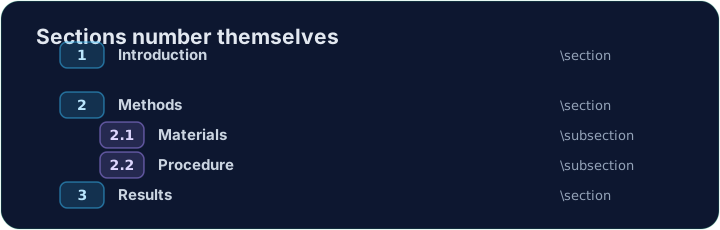
- LaTeX numbers it automatically (1, 2, 3 …) — you never count by hand.
中文
用章节来组织
- 真实的文档会分成一个个章节,方便读者跟随。
- 命令很简单:
\section{Introduction}
- LaTeX 会自动编号(1、2、3……)—— 你永远不用自己去数。
English
Smaller pieces
- Inside a section you can add subsections:
- These become 2.1, 2.2, and so on. Add or remove one and everything renumbers itself.
中文
更小的部分
- 在一个章节里,你还可以添加小节(subsection):
\section{Methods}
\subsection{Materials}
\subsection{Procedure}
- 它们会变成 2.1、2.2 等等。增删任意一个,其余的都会自动重新编号。
English
A title block
- A report usually starts with a title, an author, and a date.
- You declare them in the preamble, then print them with
\maketitle:
\maketitlemust go inside the body, as its first line.
中文
标题块
- 一篇报告通常以标题、作者和日期开头。
- 你在导言区声明它们,再用
\maketitle把它们打印出来:
\documentclass{article}
\title{My First Report}
\author{Pat Lee}
\begin{document}
\maketitle
...
\end{document}
\maketitle必须放在正文里面,作为它的第一行。
English
Common mistakes
\section{...}numbers automatically; use\section*{...}for no number.\maketitleneeds\title{...}and\author{...}set first.
中文
常见错误
\section{...}会自动编号;不要编号用\section*{...}。\maketitle之前要先设好\title{...}和\author{...}。
Organise this report by adding a section heading. Put \section{Introduction} at the start of the body, then Run. Notice LaTeX numbers it for you. · 通过添加一个章节标题来组织这篇报告。在正文开头放上 \section{Introduction},然后运行。注意 LaTeX 会自动给它编号。
Click Run to compile and preview the PDF. · 点击“运行”编译并预览 PDF。
Give the document a title block. Add \title{...} and \author{...} in the preamble, then \maketitle as the first line of the body. · 为文档添加一个标题块。在导言区加上 \title{...} 和 \author{...},再把 \maketitle 作为正文的第一行。
Click Run to compile and preview the PDF. · 点击“运行”编译并预览 PDF。