Your first document · 你的第一个文档
This page needs a recent browser (with SharedArrayBuffer support). Please update Chrome, Edge, Firefox or Safari to the latest version. · 此页面需较新浏览器(支持 SharedArrayBuffer)。请升级 Chrome、Edge、Firefox 或 Safari 至最新版本。
English
Your first LaTeX document
- LaTeX lets you make beautiful documents — reports, books, and especially maths.
- You write plain text with commands, and the computer turns it into a polished PDF.
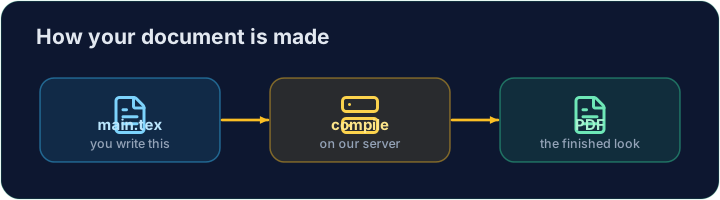
- Your LaTeX is compiled on our server — press Run and the PDF appears next to your code.
中文
你的第一个 LaTeX 文档
- LaTeX 能帮你制作精美的文档 —— 报告、书籍,尤其是数学公式。
- 你用命令编写纯文本,计算机会把它变成精美的 PDF。
- 你的 LaTeX 会在我们的服务器上编译 —— 点击运行,PDF 就会出现在代码旁边。
English
The shape of every document
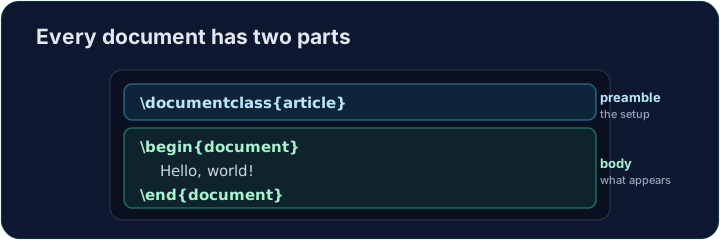
- Every document has two parts — a preamble and a body:
\documentclass{article}is the preamble: it sets the kind of document.- Everything between
\begin{document}and\end{document}is the body — the part that actually appears in the PDF.
中文
每个文档的结构
- 每个文档都有两个部分 —— 导言区 和 正文:
\documentclass{article}
\begin{document}
Hello, world!
\end{document}
\documentclass{article}是导言区:它设置文档的类型。\begin{document}和\end{document}之间的内容是正文 —— 也就是真正出现在 PDF 里的部分。
English
Now you try
- Below is a document skeleton. Add a greeting in the body.
- Press Run to compile it and see the PDF, then Check when you think it is right.
中文
现在轮到你了
- 下面是一个文档骨架。在正文里加上一句问候。
- 点击运行来编译并查看 PDF,觉得没问题时点击检查。
English
Common mistakes
- A document needs
\documentclass{...}and a\begin{document} ... \end{document}. - The text you want to see goes inside the document environment.
中文
常见错误
- 文档需要
\documentclass{...}以及\begin{document} ... \end{document}。 - 你想显示的文字要放在文档环境里面。
The skeleton below is a complete LaTeX document. Replace the comment in the body · 作品集 with a greeting (any text containing the word Hello · 握手开始), then click Run to compile it and see the PDF. · 下面的骨架是一个完整的 LaTeX 文档。把正文里的注释替换成一句问候(任何包含 Hello · 握手开始 一词的文字),然后点击运行来编译并查看 PDF。
Click Run to compile and preview the PDF. · 点击“运行”编译并预览 PDF。
Options in square brackets change the whole document. Make the text bigger by adding the [12pt] option: \documentclass[12pt]{article}. Run and see every letter grow. · 方括号里的选项会改变整篇文档。加上 [12pt] 选项把字号调大:\documentclass[12pt]{article}。运行后会看到每个字母都变大了。
Click Run to compile and preview the PDF. · 点击“运行”编译并预览 PDF。