Template literals · 模板字符串
This page needs a recent browser (with SharedArrayBuffer support). Please update Chrome, Edge, Firefox or Safari to the latest version. · 此页面需较新浏览器(支持 SharedArrayBuffer)。请升级 Chrome、Edge、Firefox 或 Safari 至最新版本。
English
A cleaner way to build strings
- Wrap a string in backticks
`and you can drop values straight in with${...}. - This is a template literal — much tidier than joining with lots of
+.
中文
构建字符串的更整洁方式
- 用反引号
`包住字符串,你就能用${...}把值直接放进去。 - 这叫模板字符串(template literal)—— 比用许多
+拼接整洁多了。
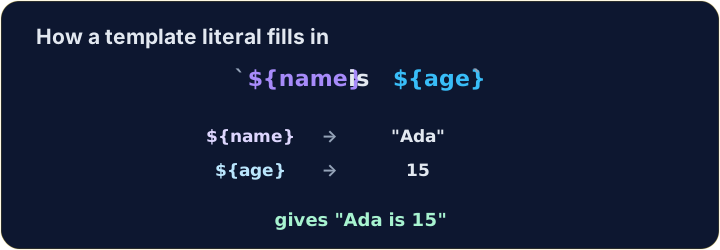
let name = "Ada";
let age = 15;
console.log(`${name} is ${age}`);   // → Ada is 15
English
Any expression fits inside ${ }
- Whatever you write inside
${...}is worked out first, then dropped into the string.
中文
${ } 里可以放任何表达式
${...}里写的任何东西都会先算出来,再放进字符串。
let a = 3;
let b = 4;
console.log(`${a} + ${b} = ${a + b}`);   // → 3 + 4 = 7
English
Same string, two ways
+and a template literal can build exactly the same text.- In backticks, spaces and punctuation stay where you type them, so a missing space is easy to see.
中文
同一个字符串,两种写法
+和模板字符串可以拼出完全一样的文字。- 在反引号里,空格和标点就在你写的位置,少了空格一眼就能看出来。
let item = "pen";
let price = 3;
console.log("A " + item + " costs " + price + " yuan.");   // → A pen costs 3 yuan.
console.log(`A ${item} costs ${price} yuan.`);             // → A pen costs 3 yuan.
English
Watch out
- Backticks
`are not the same as quotes'or".${...}only works inside backticks. - Bonus: a backtick string can span several lines — handy for longer messages.
中文
注意
- 反引号
`和引号'、"不一样。${...}只在反引号里才有效。 - 额外提示:反引号字符串可以跨好几行 —— 写较长的信息很方便。
English
Common mistakes
- Template literals use backticks and
${...}:`Hi ${name}`, not quotes. - Inside
${...}you can put any expression.
中文
常见错误
- 模板字面量用反引号和
${...}:`Hi ${name}`,不是普通引号。 ${...}里可以放任意表达式。
English
Now you try
- Use backticks and
${...}. - Press Check answer to test it.
中文
现在轮到你
- 使用反引号和
${...}。 - 按检查答案来测试它。
let name = "Sam". Use a template literal (backticks) to log Hello, Sam!. · let name = "Sam"。用模板字符串(反引号)打印 Hello, Sam!。
Click Run to see the output here. · 点击“运行”查看此处输出。
a is 3 and b is 4. Use a template literal to log 3 + 4 = 7 (put a + b inside ${ }). · a 是 3,b 是 4。用模板字符串打印 3 + 4 = 7(把 a + b 放进 ${ })。
Click Run to see the output here. · 点击“运行”查看此处输出。
Use a template literal to log Total: 10, working out the 10 as 5 * 2 inside ${ }. · 用模板字符串打印 Total: 10,把 10 在 ${ } 里用 5 * 2 算出来。
Click Run to see the output here. · 点击“运行”查看此处输出。